

sarathkumr268295
May 7, 2024
Question

Error in multidropdown field while using record in editable grid

  • May 7, 2024
  • 9 replies
  • 0 views

Hi all,
I am trying to show data in an editable grid where they can edit data and save it to back to database. While trying to display, I am getting the following error

This is how the data is present in database
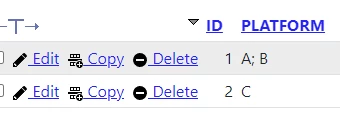
I tried using split function but it didnt resolve the issue. Can someone tell what I am missing here . I have attached the code

a!localVariables(
  local!data: /*Query*/,
  local!dropdown: { "A", "B", "C", "D"},
  a!gridLayout(
    label: "Editable Grid",
    labelPosition: "ABOVE",
    headerCells: {
      a!gridLayoutHeaderCell(label: "Platform")
    },
    columnConfigs: {},
    rows: {
      a!forEach(
        items: local!data,
        expression: a!gridRowLayout(
          contents: a!multipleDropdownField(
            label: "Platform",
            choiceLabels: local!dropdown,
            choiceValues: local!dropdown,
            value: fv!item['recordType!{a3bb3bf8-8475-4d37-8cdd-f8db72114a55}record.fields.{a4be7f3b-9f4c-4101-8518-99a99631768e}platform'],
            saveinto:fv!item['recordType!{a3bb3bf8-8475-4d37-8cdd-f8db72114a55}record.fields.{a4be7f3b-9f4c-4101-8518-99a99631768e}platform']
          )
        )
      )
    },
    selectionSaveInto: {},
    validations: {},
    shadeAlternateRows: true
  )
)

9 replies

stefanhelzle0001
Brainy
May 7, 2024

How did you use the split() function?

A small working example:

a!localVariables(
  local!value,
  a!multipleDropdownField(
    choiceLabels: {"A", "B", "C"},
    choiceValues: {"A", "B", "C"},
    value: if(
      a!isNullOrEmpty(local!value),
      null,
      split(local!value, ";")
    ),
    saveInto: a!save(
      target: local!value,
      value: joinarray(save!value, ";")
    )
  )
)

sarathkumr268295
May 7, 2024

I tried using the split function in value field like split(fv!item,";")
did the same for choicelables and choice values as well, but it didnt resolve the issue

nainak5962
May 7, 2024

Hi , 

The backend sent "A; B" as one string, so we have split it. Please refer to this code.

a!localVariables(
  local!data: rule!TA_QRY_UserAccess(),
  local!dropdown: { "A", "B", "C", "D"},
  a!gridLayout(
    label: "Editable Grid",
    labelPosition: "ABOVE",
    headerCells: {
      a!gridLayoutHeaderCell(label: "Platform")
    },
    columnConfigs: {},
    rows: {
      a!forEach(
        items: local!data,
        expression: a!gridRowLayout(
          contents: a!multipleDropdownField(
            label: "Platform",
            choiceLabels: local!dropdown,
            choiceValues: local!dropdown,
            value: split(fv!item['recordType!{a3bb3bf8-8475-4d37-8cdd-f8db72114a55}TA Users Access.fields.{a4be7f3b-9f4c-4101-8518-99a99631768e}platform'],"; ",{}),
            saveinto:fv!item['recordType!{a3bb3bf8-8475-4d37-8cdd-f8db72114a55}TA Users Access.fields.{a4be7f3b-9f4c-4101-8518-99a99631768e}platform']
          )
        )
      )
    },
    selectionSaveInto: {},
    validations: {},
    shadeAlternateRows: true
  )
)

sarathkumr268295
May 7, 2024

Thanks [mention:1913a6c1d21c4b39bf94848f5e2b18ab:e9ed411860ed4f2ba0265705b8793d05] . The error got resolved. I can see that for split() function you have used "; " as separator instead of ";". Like you have added extra space after semi colon for separation. Is it given because values are having one extra space after semi colon??

nainak5962
May 7, 2024

yes it was , but as [mention:a11f77a729fb4db2af76b09948583328:e9ed411860ed4f2ba0265705b8793d05]   suggested the best way to do this, so you need to use always best practice.