
August 18, 2021
Question

error in mutliple drop down
  • August 18, 2021
  • 4 replies
  • 0 views

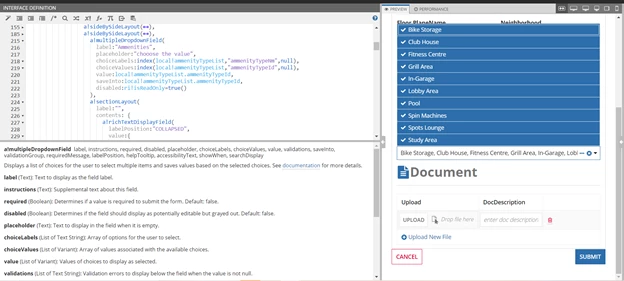
I have a ref CDT and from the ref CDT i am extracting id and name values using expression rule and using this expression rule as a local variable in the interface (i,e local!ammenityTypeList). Now for choice labels i used the name and for choice labels i used id . For storing these values i am using another CDT which consists of an integer field which is a foreign key.

here my requirement is :

1) when I select the values it's displaying the numbers when it is in read-only format . But I want it to be names! .

2) I should have the option to select my own values but instead, it is selecting all and taking all of the values. 

These are my requirements , can anyone suggest how to solve them.

    4 replies

    dastagirid756
    August 18, 2021

    [mention:cb55bee857194035a126a4b134ac0e8f:e9ed411860ed4f2ba0265705b8793d05] Please find the below code as a reference. 

    To achieve your requirements.

    Store your data retrieved from expression in local variable or directly index on choice labels and choice values,

    Use separate local variable or rule input to store the selected ids. This variable should be of type multiple

    If you want to store these selected ids into another cdt, loop the cdt by the selected ids count.

    a!localVariables(
      local!languages: {
        a!map(id: 1, name: "English"),
        a!map(id: 2, name: "Spanish"),
        a!map(id: 3, name: "French"),
        a!map(id: 4, name: "German")
      },
      local!selectedLanguageIds: {},
      a!multipleDropdownField(
        label: "Language",
        instructions: "Which language(s) are you proficient in?",
        choiceLabels: fn!index(local!languages, "name", {}),
        choiceValues: fn!index(local!languages, "id", {}),
        value: local!selectedLanguageIds,
        saveInto: local!selectedLanguageIds,
        searchDisplay: "AUTO"
      )
    )

    August 18, 2021

    Thanks for your response, I followed all your suggestions still I am unable to store the values into another CDT when I am choosing values from the dropdown. It is showing empty as shown in the below image

    peter.lewis
    Employee
    August 18, 2021

    It doesn't look like you're saving into a rule input - your save references a local variable. Can you set the saveInto to use your rule input instead? Also if you want to save to multiple variables, the saveInto can use an array of values using {}.