
February 10, 2022
Solved

Error when modifying an array in the rule input, it only happens on the site

  • February 10, 2022
  • 7 replies
  • 0 views

Hello, I have a "little" problem.

I have an array that I want to modify using a! save, inside my foreach. Everything works fine on the interface.

a!sideBySideItem(
                      item: a!buttonArrayLayout(
                        buttons: {
                          a!buttonWidget(
                            label: "",
                            icon: "trash-o",
                            size: "SMALL",
                            width: "MINIMIZE",
                            style: "DESTRUCTIVE",
                            loadingIndicator: true,
                            saveInto: {
                              a!save(
                                target: ri!moneyAccounts[fv!index].isDeleted,
                                value: true()
                              ),

                            }
                          ),
                          a!buttonWidget(
                            label: "",
                            icon: "pencil-square-o",
                            size: "SMALL",
                            width: "MINIMIZE",
                            style: "PRIMARY"
                          )
                        },
                        align: "START"
                      ),
                      width: "MINIMIZE"
                    )
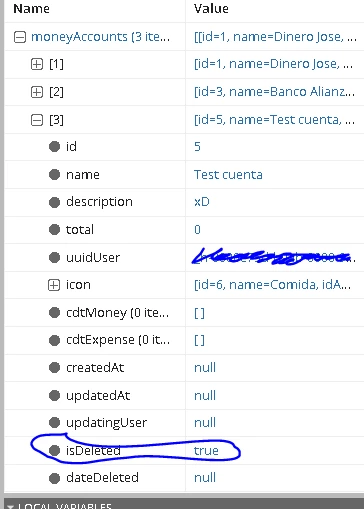
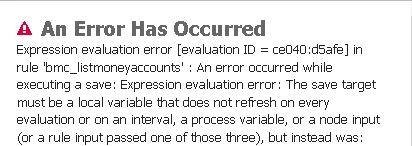
But when I want to use it on the site I get this error. Please help
Best answer by mikes0011

This explains what you see in your error message.  From this parent contxt, you're passing the direct result of a query into the rule input, but then in the sub-interface, you're trying to save a new value into it.  The issue is that the new value does not have a proper location to save "up" into (such as a local variable). 

Also I would caution you that even if you provide a local variable for it to save up into, this change will only be transient and will not affect the DB value unless you take specific steps to also save the new value into the DB.

7 replies

mikes0011
Brainy
February 10, 2022

Can you share some more detail around how you're calling this interface from the site and/or parent interface?  In particular, how the value being passed in for ri!moneyAccounts is initially being established prior to being passed into the interface in question.  As the error message indicates, you're probably using an indvalid method of doing such, though it's hard to guess at exactly what.

The Expression Guru
February 10, 2022

Of course The interface I have on my site calls another interface where I pass the moneyAccount to it.

contents: a!columnsLayout(
      columns: {
        a!columnLayout(
          contents: {
            rule!BMC_ListMoneyAccounts(
              moneyAccounts: rule!BMC_GetMoneyAccounts(
                uuidUser: user(loggedInUser(), "uuid")
              ).data
            )
          },
          width: "AUTO"
        )
      },
      stackWhen: {
        "PHONE",
        "TABLET_PORTRAIT",
        "TABLET_LANDSCAPE",
        "DESKTOP_NARROW"
      }
    ),

mikes0011
mikes0011Answer
Brainy
February 10, 2022

This explains what you see in your error message.  From this parent contxt, you're passing the direct result of a query into the rule input, but then in the sub-interface, you're trying to save a new value into it.  The issue is that the new value does not have a proper location to save "up" into (such as a local variable). 

Also I would caution you that even if you provide a local variable for it to save up into, this change will only be transient and will not affect the DB value unless you take specific steps to also save the new value into the DB.

The Expression Guru
agamb0001
February 10, 2022

HI [mention:0d720dbd70ef4fbcaf4b0fca7399b42d:e9ed411860ed4f2ba0265705b8793d05],

Can you also describe how is this interface rendered on your site

Is it through a parent interface / process model ?

I believe you are using a parent interface and inside that you have not declared this rule parameter as a local variable.

Eg. lets say your above code is in a rule say, rule!ABC which has a rule input ri!moneyAccounts

then in your parent interface, you must declare a local variable for this rule input as well

so, make sure you are calling this rule ABC in the parent interface something as

 rule!ABC(

     moneyAccounts: local!moneyAccounts

)

February 10, 2022

Yes, of course, this is my code on my site, I call this interface that I mentioned where I have the list of money accounts and I pass the moneyAccount parameter through an expression.

a!columnsLayout(
      columns: {
        a!columnLayout(
          contents: {
            rule!BMC_ListMoneyAccounts(
              moneyAccounts: rule!BMC_GetMoneyAccounts(
                uuidUser: user(loggedInUser(), "uuid")
              ).data
            )
          },
          width: "AUTO"
        )
      },
      stackWhen: {
        "PHONE",
        "TABLET_PORTRAIT",
        "TABLET_LANDSCAPE",
        "DESKTOP_NARROW"
      }
    ),

agamb0001
February 10, 2022

Thanks.

well, if you see the moneyAccounts parameter value is not set to a rule input / local variable / process variable and that's the reason it is giving you an error.


So, if you do something like the below, it will work.

a!localVariables(
  local!accounts: rule!BMC_GetMoneyAccounts(uuidUser: user(loggedInUser(), "uuid")).data,
  a!columnsLayout(
    columns: {
      a!columnLayout(
        contents: {
          rule!BMC_ListMoneyAccounts(moneyAccounts: local!accounts)
        },
        width: "AUTO"
      )
    },
    stackWhen: {
      "PHONE",
      "TABLET_PORTRAIT",
      "TABLET_LANDSCAPE",
      "DESKTOP_NARROW"
    }
  )
)
