
April 22, 2022
Question

Expression Editor

  • April 22, 2022
  • 7 replies
  • 0 views

Hi,

I have a lot of code that I am trying to write in the expression editor.

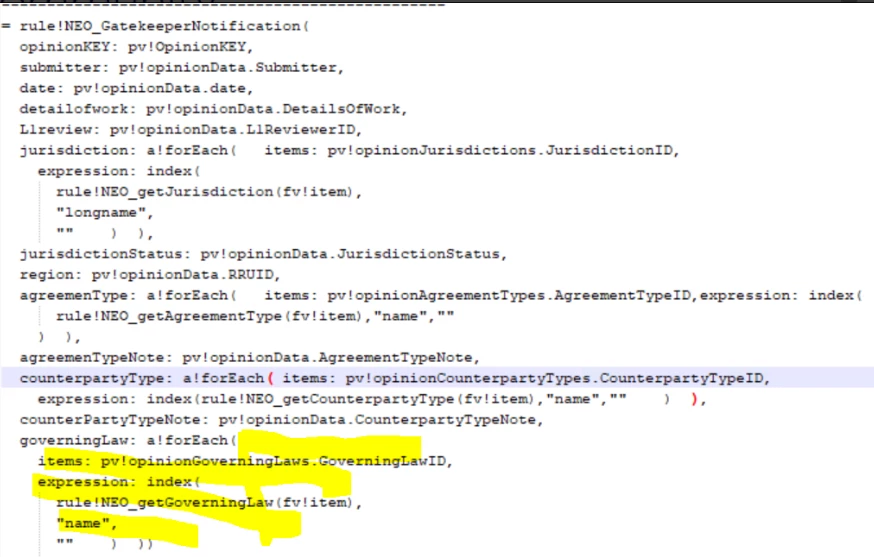
After saving code is getting trimmed.

I am not sure if there is any limit on the number of characters that are allowed inside Expression Editor.

Code is getting trimmed starting from the yellow highlighted color.

Can someone advise on this? Thanks.
    7 replies

    stefanhelzle0001
    Brainy
    April 22, 2022

    Is this in the editor inside the process modeller? It has some known issues ...

    April 22, 2022

    Yes, the code is from the script task expression editor.

    aparajitas0002
    October 11, 2022

    When something needs to be processed in a Script task it is best practice to create an expression rule for it. Both for readability and it avoid this issue. 

    Inspiring
    April 22, 2022

    Hi,

    I would suggest you to move all your foreach logic inside expression rule. Pass your CDT data into your expression and use local variable to build your all foreach logic.

    stewart.burchell
    April 25, 2022

    I would second this. You want to be able to unit test your expression rules as stand-alone objects and once you know they work, call them from the relevant object (in your case, the process model). You'll end up with a more robust solution and encounter fewer errors when testing.

    andrewh0007
    April 22, 2022

    Unless the code I'm writing is exceedingly simple I always put it in an expression rule and never directly in the expression editor in the process modeller.

    namratak0001
    October 11, 2022

    I would suggest you to move your code to Expression rule and call that rule in Script task , this way you can avoid issues and it would be easy to debug the code as well