
May 11, 2022
Question

Expression for actualize the specific interface

  • May 11, 2022
  • 15 replies
  • 0 views

Hi,

We are planning to develop an interface to actualize the functions in the attached file,
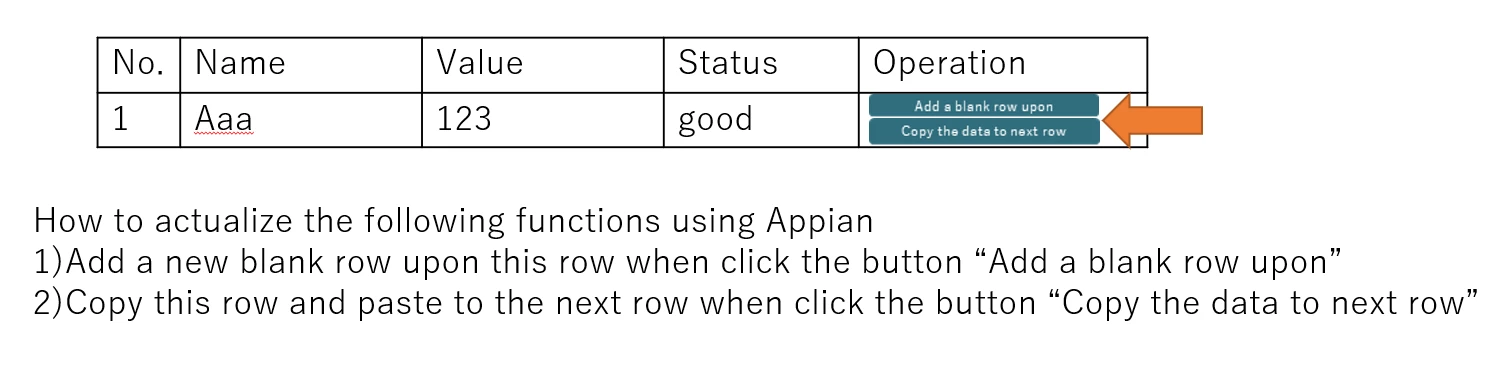
but we are not sure if Appian can actualize those functions.

If it dose , may you tell us the expressions?

Best regards

15 replies

joshf713
May 11, 2022

Are you asking if it's possible to have a link on a grid row that can add a row, and another that can copy the data?

wangz0002Author
May 11, 2022

Thank you for your replying! 

In fact we want to actualize those two functions you said with one click.

joshf713
May 11, 2022

a!localVariables(
  local!data: {
    {
      number: 1,
      name: "Aaa",
      value: 123,
      status: "good"
    }
  },
  a!gridLayout(
    headerCells: {
      a!gridLayoutHeaderCell(label: "Number"),
      a!gridLayoutHeaderCell(label: "Name"),
      a!gridLayoutHeaderCell(label: "Value"),
      a!gridLayoutHeaderCell(label: "Status"),
      a!gridLayoutHeaderCell(label: "Operation"),
      
    },
    rows: a!forEach(
      items: local!data,
      expression: a!gridRowLayout(
        id: fv!index,
        contents: {
          a!textField(readOnly: true, value: fv!item.number),
          a!textField(readOnly: true, value: fv!item.name),
          a!textField(readOnly: true, value: fv!item.value),
          a!textField(readOnly: true, value: fv!item.status),
          a!richTextDisplayField(
            value: {
              a!richTextIcon(
                icon: "plus",
                linkStyle: "STANDALONE",
                link: a!dynamicLink(
                  value: fv!item,
                  saveInto: a!save(
                    local!data,
                    append(local!data, save!value)
                  )
                )
              ),
              a!richTextItem(
                text: " Add a row",
                linkStyle: "STANDALONE",
                link: a!dynamicLink(
                  value: fv!item,
                  saveInto: a!save(
                    local!data,
                    append(local!data, save!value)
                  )
                )
              )
            }
          )
        }
      )
    )
  )
)

This should get you on the right path. 

I used an editable grid with the data based on a local dictionary of data. The magic happens in the save into on the rich text objects. I am using a dynamic link to to append the data used to populate the grid. I am sure this is not 100% what you need but it should get you familiar enough with the design concepts to build out according to your own use case. 

May 11, 2022

Hi, Did slight modifications to above answers, hope this code exactly suits for your requirement.

a!localVariables(
  local!data: {
    {
      number: 1,
      name: "Aaa",
      value: 123,
      status: "good"
    }
  },
  a!gridLayout(
    headerCells: {
      a!gridLayoutHeaderCell(label: "Number"),
      a!gridLayoutHeaderCell(label: "Name"),
      a!gridLayoutHeaderCell(label: "Value"),
      a!gridLayoutHeaderCell(label: "Status"),
      a!gridLayoutHeaderCell(label: "Operation"),
      
    },
    rows: a!forEach(
      items: local!data,
      expression: a!gridRowLayout(
        id: fv!index,
        contents: {
          a!textField(readOnly: false, value: fv!item.number),
          a!textField(readOnly: false, value: fv!item.name),
          a!textField(readOnly: false, value: fv!item.value),
          a!textField(readOnly: false, value: fv!item.status),
          a!buttonArrayLayout(
            buttons: {
              a!buttonWidget(
                label: "Add a blank row upon",
                size: "SMALL",
                saveInto: {
                  a!save(local!data, append(local!data, null))
                }
              ),
              a!buttonWidget(
                label: "Copy the data to next row",
                size: "SMALL",
                saveInto: {
                  a!save(
                    local!data,
                    insert(local!data, fv!item, fv!index + 1)
                  )
                }
              )
            }
          )
        }
      )
    )
  )
)

wangz0002Author
May 12, 2022

Thank you for your sharing ;)

davel001150
May 12, 2022

I would consider putting Icons side by side, with captions that can tell the users which does which.  I find that to be a lot more effective, because once the users learn what the symbols mean (1 minute, perhaps) it becomes super fast to scan with the eye.

[emoticon:a9953ffb34f44c1aa95d806dfb7e25ae] Is the standard for add a row, a stack of 2 sheets of paper (can't find icon) is classic symbol for copy, and red X is go to for delete this row.

wangz0002Author
May 13, 2022

Thank you for your advice!