

bisheswart9459
August 6, 2024
Question

fetch data from uploaded file.

  • August 6, 2024
  • 19 replies
  • 0 views

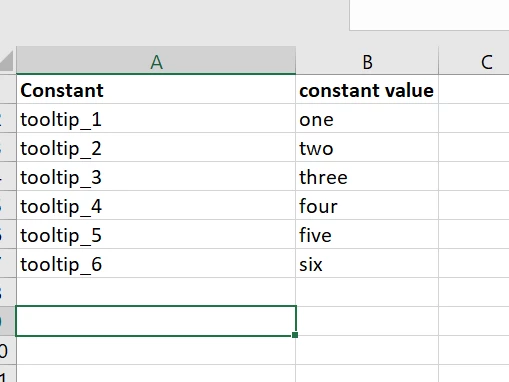
I have a excel file where there are too columns one is constant name and another is constant value .
I need to upload a the file in an interface using file upload component and after clicking a submit button in the interface i need to fetch the data in the excel and
update the constant values for respected constants . will anyone please guide me to achieve this scenario ?I have also given the snap of the excel sheet ,please find that below.
Thanks in advance !

    19 replies

    karumurua531442
    August 6, 2024

    hi [mention:466b8d91c6644a268a25841953c896cf:e9ed411860ed4f2ba0265705b8793d05]  Initially upload a file from UI, save the data of the file in a pv!variable, and pass that pv to UI from the same process model. show the data the UI in a grid format,make the edits for your data and then submit and save the data

    venkatrea696188
    August 6, 2024

    How you want the interface, you want it as a Startform ? Or standalone userinterface. If it's standalone interface  where you gonna upload a File , use SubmitUploadedFiles (You can't use this in startform or task) to save the file into Appian and use readexcelwithPaging which comes with Exceltools plugin  to read the uploaded file contents and show it on editable grid . After editing give user a option to run a  processmodel to update the constant.

    bhargavip7872
    August 6, 2024

    Hi [mention:466b8d91c6644a268a25841953c896cf:e9ed411860ed4f2ba0265705b8793d05] 

    1) Provide a interface where user can update the excel file

    2) Once user click on the submit button you can read the excel file using the plugin 

    readexcelsheet(
    excelDocument: cons!OBJECT_LIST_TEST,
    sheetNumber: 1,
    startRow: 1
    )

    it return the ExcelSheetResultSet which contains the data in the excel sheet and success response. 

    3) You can use the  ' Update Constant ' plugin to update the value of the constants. use the above result set and call this node as MNI for each value it should update the data.

    Hope its clear.

    Thanks,

    Bhargavi P.

    bisheswart9459
    August 6, 2024

    can you please explain or give me a summary of using update constant plug in ? Or any link to understand that 

    prasantap0900
    August 7, 2024

    Smart service

    mikes0011
    Brainy
    August 7, 2024

    I don't know whether this will work - the Update Constant Smart Service requires a reference to the constant, I don't think you can use a Constant Name instead.

    Edit: sorry I was wrong.  The smart service also accepts the constant's ID (as in, its integer-based environment-specific object ID, similar to a Process Model ID).

    Getting the Constant's ID isn't super easy though - you have to use "get constant or rule UUID by name", then the "get content object details by UUID" function and extract the "ID".  The quick-and-dirty expression, which could go directly in the "constant" field of the Update Constant smart service, could look like this:

    extract( getcontentdetailsbyuuid( getconstantorruleuuidbyname("MY_CONSTANT_NAME")), "Id: ", ", Parent:")

    You'd simply replace "MY_CONSTANT_NAME" with the actual constant name.  You'd need to be sure the constant name actually exists, otherwise I expect the node would error.

    (If anyone has an easier way to do this, i'd love to hear it.)

    bisheswart9459
    August 8, 2024

    Thanks a lot [mention:b45a4f6a20b14a008e4e0ec732a8bf98:e9ed411860ed4f2ba0265705b8793d05]  .It really helped me a lot and also learnt a new thing .