
February 13, 2025
Solved

: File Upload Validation Not Working for PDF Restriction

  • February 13, 2025
  • 9 replies
  • 0 views

I am facing an issue with the a!fileUploadField() component in Appian. The validation logic is supposed to restrict uploads to only PDF files, but it is not throwing an error when an XLSX file is uploaded. Below is my implementation:

a!fileUploadField(
    label: "File Upload",
    labelPosition: "ABOVE",
    target: cons!W500_KnowledgeCenter,
    maxSelections: 5,
    value: ri!File,
    saveInto: ri!File,
    validations: {
        if(fv!files.extension="PDF", "Error", "")
    }
)

    Best answer by mikes0011

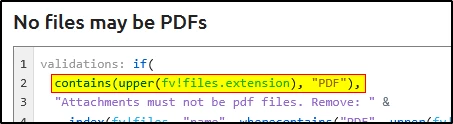
    "fv!files" is a list.  if you say "fv!files.extension = "pdf"", it will be asking Appian if the entire list of extensions is equal to the exact string "pdf", which it obviously won't be. 

    You will need to rewrite your code in such a way that you check all entries in the "fv!files" list for invalid extensions.

    Hence the example Stefan linked:

    e.g.

    a!localVariables(
      
      local!file: {},
      
      a!fileUploadField(
        value: local!file,
        saveInto: local!file,
        maxSelections: 3,
        validations: {
          if(
            contains(fv!files.extension, "pdf"),
            "no pdf allowed",
            ""
          )
        }
      )
    )

    ...which works perfectly when I try it.

    9 replies

    February 13, 2025

    Is this a good Code

     a!fileUploadField(
                label: "File Upload",
                labelPosition: "ABOVE",
                target: cons!W5000_KnowledgeCenter,
                maxSelections: 5,
                value: ri!File,
                saveInto: ri!File,
                validations: {
                  a!localVariables(
                    local!err:a!forEach(
                    items: fv!files,
                    expression: if(fv!files.extension[fv!index]="PDF","Error","")
                  ),
                  local!err
                  )
    
                }
              )
            }

    stefanhelzle0001
    February 13, 2025
    February 13, 2025

    Yeah, But that code in doc is not working for multiple files,

    case:
    First upload a invalid Extension file ----- Shows validation
    Second upload a valid extension file  --------- Validation disappears.
    Third upload a invalid extension file ------------ Validation doesn't show up.

    mikes0011
    mikes0011Answer
    Brainy
    February 13, 2025

    "fv!files" is a list.  if you say "fv!files.extension = "pdf"", it will be asking Appian if the entire list of extensions is equal to the exact string "pdf", which it obviously won't be. 

    You will need to rewrite your code in such a way that you check all entries in the "fv!files" list for invalid extensions.

    Hence the example Stefan linked:

    e.g.

    a!localVariables(
      
      local!file: {},
      
      a!fileUploadField(
        value: local!file,
        saveInto: local!file,
        maxSelections: 3,
        validations: {
          if(
            contains(fv!files.extension, "pdf"),
            "no pdf allowed",
            ""
          )
        }
      )
    )

    ...which works perfectly when I try it.