
Question
Grid values not populating correctly
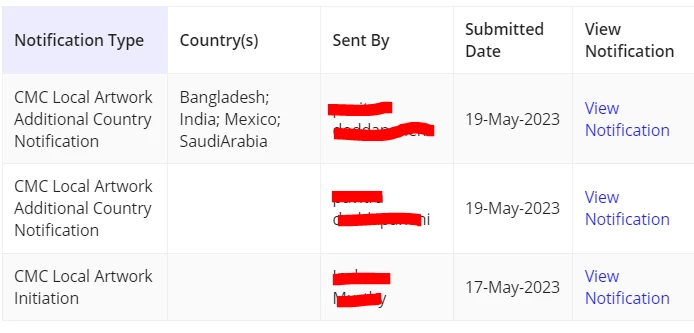
I have a grid as below. The thing is it is populating the country(s) column wrongly. India should be in third row, Mexico should be 2nd row and Saudi Arabia and Bangladesh should be in first row. The data we are passing is stored in the local variables and rule input correctly. But something is going wrong with the code to populate the grid column value. The code for grid column to populate Country(s) is below. Please help me in storing the correct values in to the grid.
a!gridTextColumn(
                label: "Country(s)",
                field: "country_txt",
                data: if(
                  rule!APN_isBlank(index(local!gridData, "data", {})),
                  {},
                  tostring(
                    sorttextarray(
                      stringArray: stripwith(
                        split(
                          index(
                            index(local!gridData, "data", {}),
                            "country_txt",
                            {}
                          ),
                          ";"
                        ),
                        " "
                      ),
                      isDescendingOrder: false()
                    )
                  )
                )
              )
Thanks in advance.