
April 10, 2024
Solved

How can we apply show when condition for particular rows in an Editable Grid?

  • April 10, 2024
  • 6 replies
  • 0 views

Hi @all,

Can anybody help me in figuring out how we can apply show when condition for particular rows in an Editable Grid.

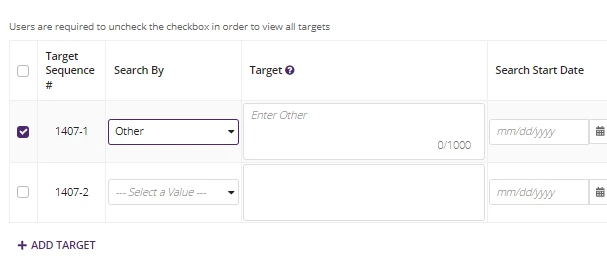
My use case is to show all the rows initially but when we select any row, rest of the rows hide out and only that row remains in the grid.

I am attaching an image of the interface of my editable grid:

Highly appreciate your efforts.
    Best answer by stefanhelzle0001

    In an editable grid, you create rows using a foreach and a!gridRowLayout(). Now, based on conditions, you can either skip the row entirely, or set showWhen of that row to false.

    6 replies

    April 10, 2024

    Hi [mention:07fecfc9ac2942fcb65d4ac2b18a0037:e9ed411860ed4f2ba0265705b8793d05] 

    When you are selecting something, make sure that you are saving the particular primary key value in a variable, later filter the data where you are querying from.

    This should solve your issue.

    Regards,
    Achuth

    April 12, 2024

    Thanks [mention:f150d8b666db4f8184c2c73197aeb201:e9ed411860ed4f2ba0265705b8793d05] , But we have no primary key, only unique indexes. And we also not querying from anywhere. We are just saving the data initially in a rule input whatever user is inputting in the grid.

    stefanhelzle0001
    Brainy
    April 10, 2024

    In an editable grid, you create rows using a foreach and a!gridRowLayout(). Now, based on conditions, you can either skip the row entirely, or set showWhen of that row to false.

    April 12, 2024

    Thanks [mention:a11f77a729fb4db2af76b09948583328:e9ed411860ed4f2ba0265705b8793d05] for your help, it worked!

    harshitb6843
    April 10, 2024

    There are several ways of doing it, but the first step would be to store an identifier for the row you want to keep visible. Now in the gridRowLayout's showWhen you can add a condition which is something like this 

    a!gridRowLayout(
      showWhen: local!selectedRowIndex=fv!index
    )

    April 12, 2024

    Thank you [mention:b8ea18cfbb2e4f6d841cf3c1d4d7420b:e9ed411860ed4f2ba0265705b8793d05] , It solved my problem.
    Appreciate your help!
