
July 14, 2025
Solved

How do i set the security for this option.
  • July 14, 2025
  • 14 replies
  • 0 views

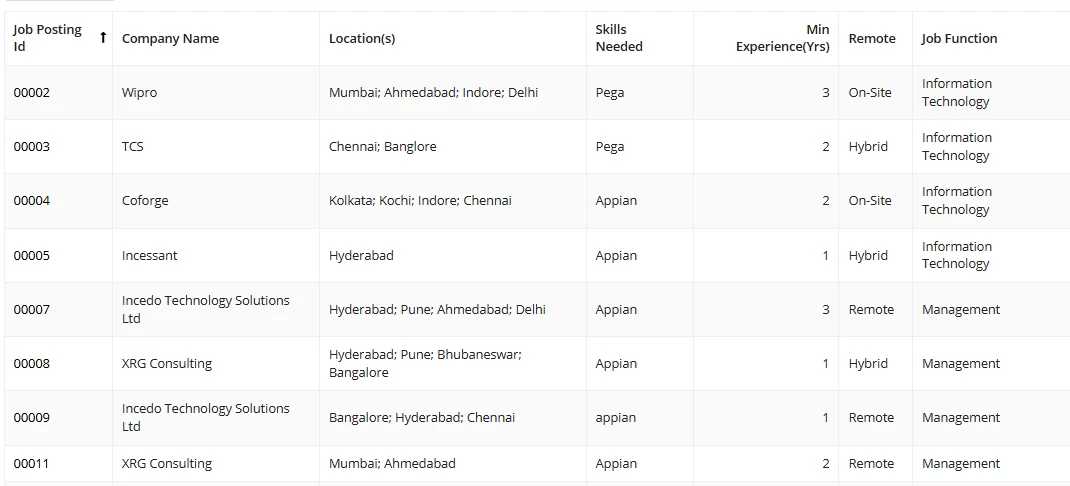
As you can see above i have a list of jobs posted.

And this view is the summary view as you might already know and i have an saperate action apply beside the job details tab which is for applying the candidate for the particular job.
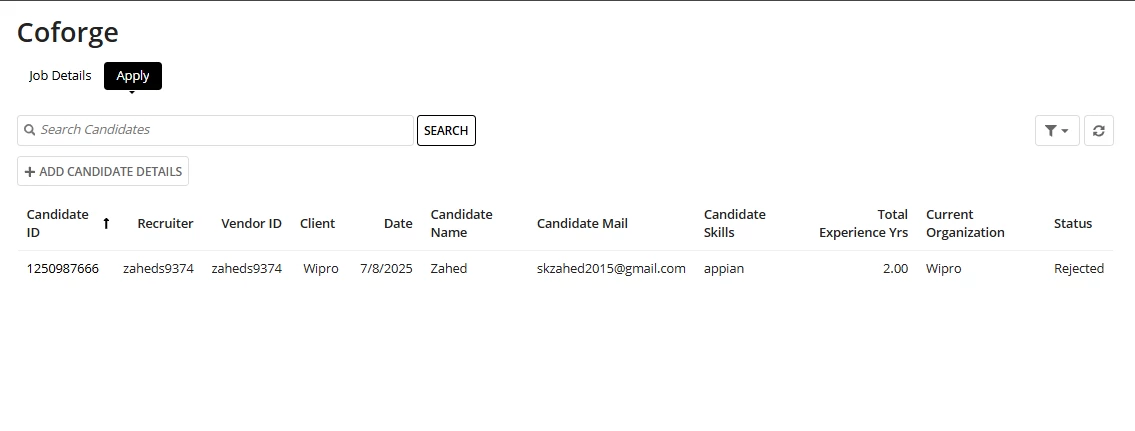
But when i click apply, the candidates that i have applied for other jobs also are visible.

I want to know how can i use the queryfilter option so that when i come to the summary view of a particular job and click on apply i can only see the candidates that have applied for that particular job.

Ex: I have a job posting called coforge with an job posting id of "00004" and when i go on its summary view i can see the whole job details and when i click on the apply tab , i should only see the candidates that have applied for the coforge job only. Is that possible using the queryfilter function. Please guide me through it.

    Best answer by shubhama926776

    You can achieve this by using queryFilter in your data query to filter candidates based on the Job Posting ID of the job you are viewing in the summary. When you open the summary of a specific job and click Apply, pass the Job Posting ID as an input or local variable to the Apply interface or section. Inside the Apply tab, use the queryFilter to filter the candidate records where the jobPostingId field matches the selected job’s ID.
    This way, the candidate list will show only those candidates who have applied for that specific job, and candidates applied to other jobs will not be visible.

    14 replies

    harshas2775
    July 14, 2025

    yes, query filter can help you in achieving the expected filtered list of candidates. In the rule for this 'Apply' view you must have a queryRecord(). Within the query code try adding a filter where recordtype!record.jobPostingId = Coforge's job id and then check. ( after testing replace the filter code with job id field from record) . 

    July 14, 2025

    a!queryFilter(
         field: recordType!Add Details.fields.jobpostingId,
          operator: "=",
          value: ""
            )
          }
        )

    Is this the right format. 

    If not can you please help me out with the code a little to get me started, I have no idea where and how to implement it in the project.

    harshas2775
    July 14, 2025

    Can you share the code you currently have for this Apply view as well as the record field configuration so that we can understand your data structure

    shubhama926776
    July 14, 2025

    You can achieve this by using queryFilter in your data query to filter candidates based on the Job Posting ID of the job you are viewing in the summary. When you open the summary of a specific job and click Apply, pass the Job Posting ID as an input or local variable to the Apply interface or section. Inside the Apply tab, use the queryFilter to filter the candidate records where the jobPostingId field matches the selected job’s ID.
    This way, the candidate list will show only those candidates who have applied for that specific job, and candidates applied to other jobs will not be visible.

    July 14, 2025

    Can you please help me out with the code a little to get me started, I have no idea where and how to implement it in the project.

    shubhama926776
    July 14, 2025

    1) Open IP Add Details record
    2) Go to Views section
    3) Open the Apply view
    4) Edit the interface used in that view
    5) Inside your gridField data parameter, add the filter:

    a!gridField(
    data: a!queryRecordType(
    recordType: recordType!candidate,
    filters: a!queryFilter(
    field: recordType!candidate.fields.jobPostingId,
    operator: "=",
    value: ri!record[recordType!ipAddDetails.fields.jobPostingId]
    )
    ),
    /* rest of your grid configuration */
    )


    Replace above queryRecordType with proper record as i don't have proper access to record.

    Filter candidates by jobPostingId (not by client, since one client can have multiple jobs if you have this logic implemented)