

lalithap7428
July 27, 2023
Question

How to access external source content when embedded using a!webContentField

  • July 27, 2023
  • 4 replies
  • 0 views

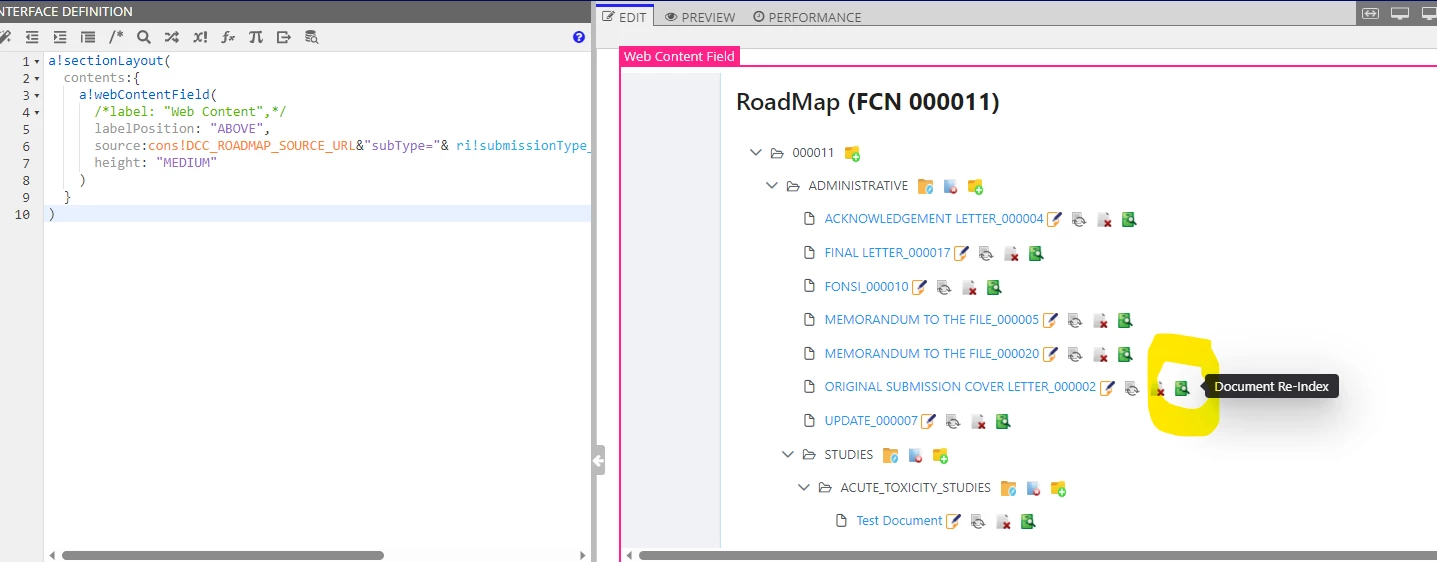
I have embedded Java content using a!webContentField on an Interface. Below are the actions I need to perform:

  • Click on a icon beside the link/document (Capture URL)
  • This should open another Appian Interface with all the related information. (Parse URL to get the query parameters like Folder & Document Id's)

Question here is how do I capture the URL ?
    4 replies

    stefanhelzle0001
    Brainy
    July 27, 2023

    I am not sure I understand what you want to achieve. Can you explain in more detail?

    There is no connection between the surrounding content and the embedded one.

    lalithap7428
    July 27, 2023

    Due to the limitations of drag & drop of documents between the folders, we had to display this java component in our interface. 

    Our requirement is to implement a split screen upon clicking the link, with all the relevant information of that document shown as below.

    According to my investigation, Appian has no control over the embedded content. Is there a different way to implement this feature?

    mathieud0001
    Brainy
    July 27, 2023

    There's no way to do this unfortunately. You would have to manage that link from within the embedded content.