August 29, 2024
Question

How to achieve the menu click on the 3 dots

  • August 29, 2024
  • 7 replies
  • 1 view

Hi,
This might be a very basic question but still can anybody guide me how to achieve the context menu by clicking on the 3 dots as shown in the picture below:
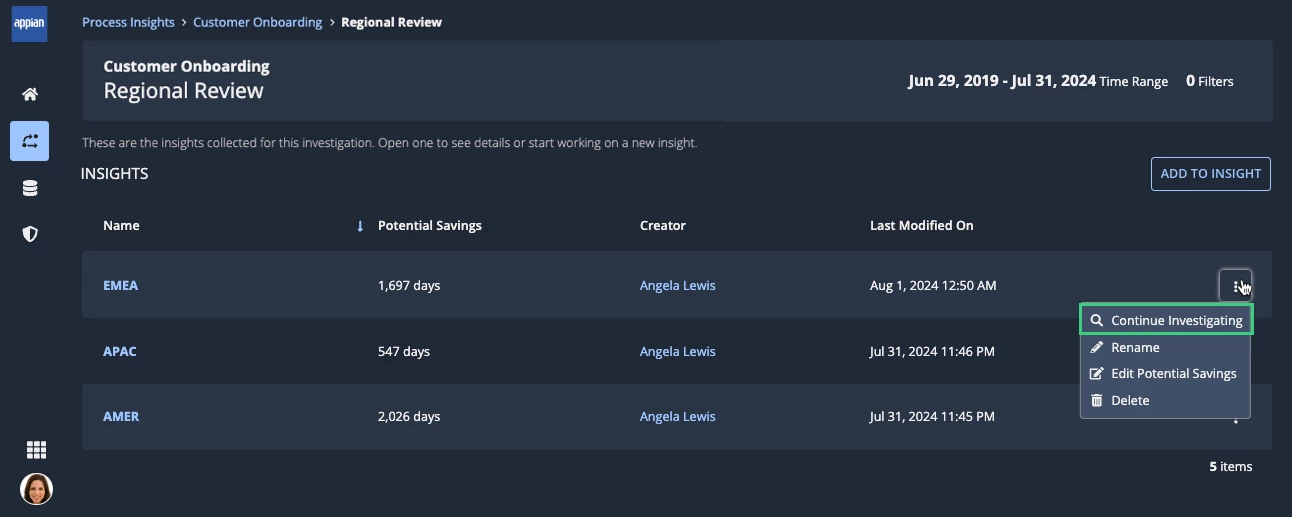
Thanks

7 replies

konduruc733182
August 29, 2024

What is that you want to show in this menu?

If its some kind of actions you can use the recordActionField(). 

Please refer the documentation. https://docs.appian.com/suite/help/24.3/Record_Action_Component.html#record-action-field-with-primary-button-styling use the style parameter to check what is suitable.

September 2, 2024

Is only available for the record type? How to do this for custom data type?

konduruc733182
September 3, 2024

You will have to create a record to create these actions and use the function. 

shubhama926776
Brainy
August 29, 2024

While showing related action simply use style as MENU or MENU_ICON.

This documentation will solve your purpose.
https://docs.appian.com/suite/help/24.3/Record_Action_Component.html
and
https://docs.appian.com/suite/help/24.3/sail/ux-record-actions.html

शुभम्
August 31, 2024

Is only available for the record type? How to do this for custom data type?

September 3, 2024

Related actions are available only for record types. You can create a record type(unsynced) using CDT and then add related actions to it.  

somasundaram.d
September 5, 2024

[mention:badc3eb7553340be80ed947b482eb441:e9ed411860ed4f2ba0265705b8793d05] 

Appian introduced multiple ways to invoke record actions. The three dot menu style is one of them.

This is not an independent component and cannot be used anywhere other than in the context of a record.