May 7, 2025
Question

how to add multiple documents at the same time in editable grid

  • May 7, 2025
  • 5 replies
  • 0 views

hi team,

how to add the multiple documents at the same time to record 
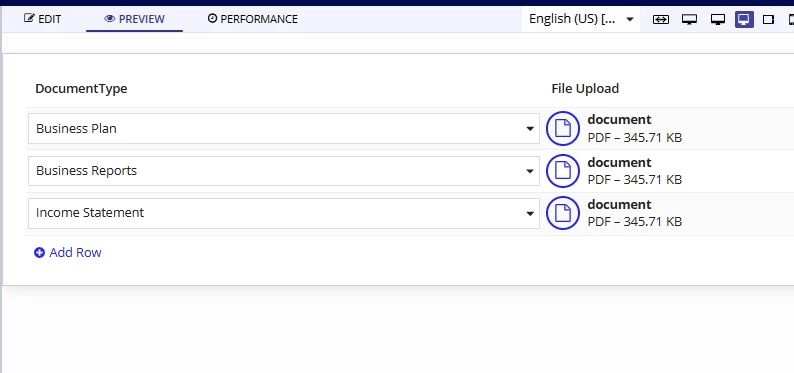
could you please suggest me.

thanks

    5 replies

    mikes0011
    Brainy
    May 7, 2025

    Can you clarify what you mean by "at the same time"?  Your screenshot shows you have a document uploaded to each row already, which is the typical use case.

    May 7, 2025

    HI [mention:b45a4f6a20b14a008e4e0ec732a8bf98:e9ed411860ed4f2ba0265705b8793d05] ,

    Thanks for response,

    while we are doing to save into service document id in rule inputs returning [Document:133708]   is there any way to get only ID to store in record,

    thanks

    mikes0011
    Brainy
    May 7, 2025
    is there any way to get only ID to store in record,

    What is the date type of the "serviceDocumentId" field in your record type?

    davidj137213
    May 7, 2025

    Could you explain a little bit your problem please? 

    May 8, 2025

    Hi [mention:cb656964172a4c65ba07f4d4ada5a0c6:e9ed411860ed4f2ba0265705b8793d05] ,

    You can try the code below and let me know whether it works.

    {
      a!gridLayout(
        label: "Editable Grid",
        labelPosition: "ABOVE",
        headerCells: {
          a!gridLayoutHeaderCell(label: "Document")
        },
        columnConfigs: {},
        rows: {
          a!forEach(
            items: ri!documentIds,
            expression: a!gridRowLayout(
              contents: {
                a!fileUploadField(
                  placeholder: "upload files",
                  target: cons!FOLDER,
                  value: reject(
                    fn!isnull,
                    tointeger(split(ri!documentIds[fv!index], ";"))
                  ),
                  maxSelections: cons!MAX_SELECTIONS,
                  saveInto: {
                    a!save(
                      ri!documentIds[fv!index],
                      tointeger(save!value)
                    )
                  },
                  buttonDisplay: "LABEL"
                )
              }
            )
          )
        },
        selectionSaveInto: {},
        validations: {},
        shadeAlternateRows: true,
        addRowLink: a!dynamicLink(
          label: "Add",
          saveInto: {
            a!save(
              ri!documentIds,
              append(ri!documentIds, null())
            )
          }
        )
      )
    }

    documentIds is a list of text string. In the process model, you can split the each index and iterate through each value individually