
February 6, 2024
Solved

How to add two layout inside a sideBySideItem

  • February 6, 2024
  • 6 replies
  • 1 view

I started with a CardLayout and have a sideBysideLayout inside it. Inside this SideBySideLayout I have two SideBySideItem. The problem I'm facing is Inside one of this SideBySideItem I want to have two components. SideBySideLayout doesn't allow any other layouts, nor does it allow array of items.

PS: For reference this is being used in a Portal. Please see attached pic for layout if the descriptions seems confusing.
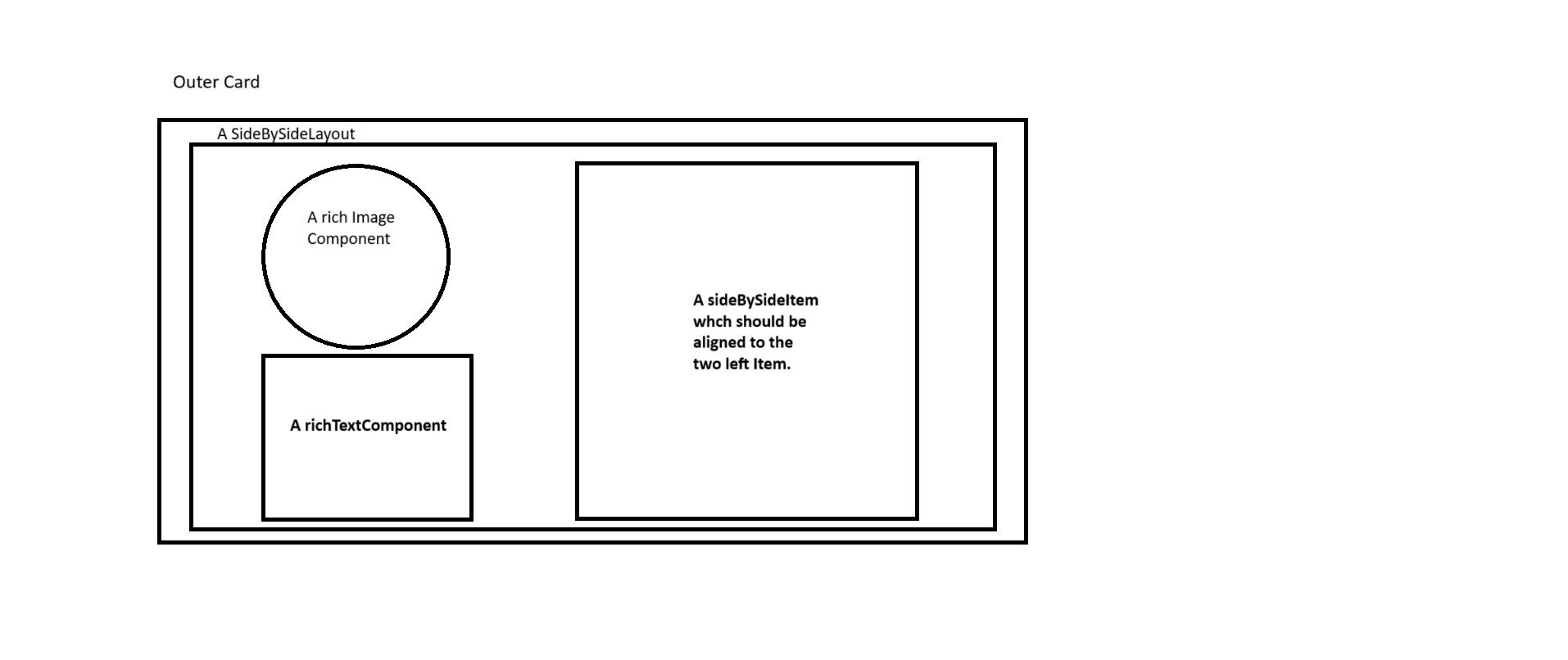

Best answer by harshitb6843

{
  a!columnsLayout(
    columns: {
      a!columnLayout(
        contents: {
          a!imageField(
            label: "Image",
            labelPosition: "COLLAPSED",
            images: {
              a!documentImage(document: a!EXAMPLE_DOCUMENT_IMAGE())
            },
            size: "MEDIUM",
            isThumbnail: false,
            style: "STANDARD"
          ),
          a!richTextDisplayField(
            align: "CENTER",
            labelPosition: "COLLAPSED",
            value: { a!richTextItem(text: { "Styled Text" }) }
          )
        },
        width: "NARROW_PLUS"
      ),
      a!columnLayout(
        contents: {
          a!paragraphField(
            label: "Paragraph",
            labelPosition: "ABOVE",
            saveInto: {},
            refreshAfter: "UNFOCUS",
            height: "MEDIUM",
            validations: {}
          )
        }
      )
    }
  )
}

6 replies

harshitb6843
February 6, 2024

You can't. You will have to switch to columnsLayout() 

And if your rich image is just a small square-shaped image you want to display, then you can add it in the same richTextDisplayField using a!richTextImage and a!richTextItem. Use char(10) between them to add a new line. 

ariba5597Author
February 6, 2024

Can you please guide me with the layout so that I can align one of the Item on the right and the other two(Img & text) being on top of each other. while keeping these two on the left.  If I use the columnsLayout I would be keeping the Image on top of the two items(rich Text component & sideBySideItem).

while the sideBySideItem on the 'right' has a lot of details which should be highlighted.

Also, this image pretty decent size, I had tried with richTextItem but it becomes too small to be visible.

harshitb6843
February 6, 2024

{
  a!columnsLayout(
    columns: {
      a!columnLayout(
        contents: {
          a!imageField(
            label: "Image",
            labelPosition: "COLLAPSED",
            images: {
              a!documentImage(document: a!EXAMPLE_DOCUMENT_IMAGE())
            },
            size: "MEDIUM",
            isThumbnail: false,
            style: "STANDARD"
          ),
          a!richTextDisplayField(
            align: "CENTER",
            labelPosition: "COLLAPSED",
            value: { a!richTextItem(text: { "Styled Text" }) }
          )
        },
        width: "NARROW_PLUS"
      ),
      a!columnLayout(
        contents: {
          a!paragraphField(
            label: "Paragraph",
            labelPosition: "ABOVE",
            saveInto: {},
            refreshAfter: "UNFOCUS",
            height: "MEDIUM",
            validations: {}
          )
        }
      )
    }
  )
}

konduruc733182
February 6, 2024

Hello [mention:0057b62a033c43829866095a9e03dfc6:e9ed411860ed4f2ba0265705b8793d05] 

It is not supported to do so in Side By side layout. You will have to use a!columnsLayout() to do so.
Look at these for more ideas on using columns layout.

Sail Design System-UX_Columns_Layout

stefanhelzle0001
Brainy
February 6, 2024

Use columns layouts for the course layout, and side by side layouts for the fine, single row adjustments.

abhayd3663
February 6, 2024

- For this particular use case, you don't need sideBySideLayout, the columnLayout will do the job.

- Have the columnLayout at top level and sideBySideLayout within it if requires.