
August 24, 2021
Question

How to avoid/stop scrolling up & Down on interface form while selecting value in dropdown list

  • August 24, 2021
  • 9 replies
  • 0 views

Hi, I am facing an issue with scrolling up & down while selecting any value in multipledropdown list on interface form. can some pls suggest to stop or restrict this functionality.

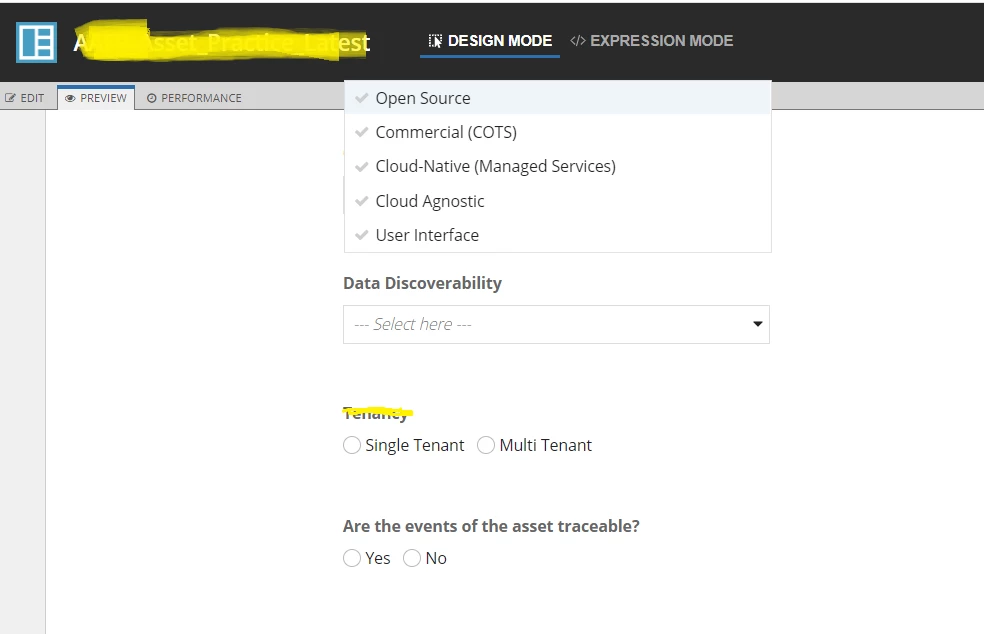
as per below screen, i am doing scrolling up my form page and it was scrolling up even dropdown field also moved up. 

this should not be like this. if i clicked on dropdown field page stop at there i can not moved up until unless i dis selected.
    9 replies

    vinayp0002
    August 25, 2021

    Hi Kishore,

    Instead of using dropdown field, use a custom picker component , so that it would show values related to your search.

    August 25, 2021

    Hi Vinay, Firstly, Thanks for sharing info.

    i am looking for a way to stop background screen scrolling up and down with dropdown field. actually scenario is when user has clicked on dropdown icon but has not selected, if the user scrolls the page/screen the choice labels are also moving up & down. 

    could you please check the screen print it shows clearly dropdown choice labels are above the actual field.

    vinayp0002
    August 25, 2021

    Could you please share your code to have a look?

    selvakumark
    Participating Frequently
    August 25, 2021

    Hi Kishore,

    I think this is Appian's default behavior. Until you click outside of the drop-down, it will show the values. For instance, You can notice the same behavior in the record's default filters as well.

    Maybe, you can raise a support ticket with Appian to check further.

    August 25, 2021

    Thank you.. could you pls share the link to raise an incident for this issue ?

    selvakumark
    Participating Frequently
    August 25, 2021