
March 15, 2023
Question

How to catch default error when invalid datetime format entered in dateTimeField?

  • March 15, 2023
  • 5 replies
  • 0 views

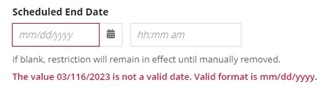
How to catch default error when invalid datetime format entered in dateTimeField?. If we catch the error it will be useful to validate for other dependencies like to enable/disable button. 

Eg: How to save the default error message in a variable which we found red colored text in the below screenshot?
5 replies

stefanhelzle0001
Brainy
March 15, 2023

We cannot customize any internal validation behaviour. What do want to achieve?

mallepup3914
March 15, 2023

Hi [mention:c72acccd241848e3bad26679aa658af8:e9ed411860ed4f2ba0265705b8793d05]

It is not possible to capture the default error message. However, by using validations and validation message you can enable/disable a button as per your requirement. 

Participating Frequently
March 15, 2023

as mentioned we can not do that, but if you just want to enable or disable fields based on just valid date and time, you can apply a null check to the fields because the value will be saved only when you enter the valid date and time.

harshitb6843
March 15, 2023

You cannot capture the message. If you want, you can create it using a combination of two textFields() that will give you access to its value if want to validate, as in the current scenario, you will not be able to access the value of it, It will only store the value when no validation is triggered. 

The order is 

  1. You enter the value. 
  2. Components checks the value and see if it follows all the applied validations. 
  3. If yes, then the value gets saved to the specified variable (local or ri)

Now you either check the value for null or if you really want the value, then replace it with a textField!

adityag9712
March 15, 2023

Build a integration that can pull the element value, using the element field id. Store them in Cache variable.