
How to Close form and open new form on click of button or linkfield
Hello,
I am implementing an excel sheet to appian forms where the excel workbook is having two sheet (sheet1 and sheet2). To replicate this, I have created form1 and form2 with individual table for each form. I am passing 2 CDT as record input from form1 to form2 and then to form1. The Main form (Form1) have link to open Form2 where the user will input data on the fields and click on the "go back to form 1", then when submit is clicked on Form1, the data in both the CDT will be stored in to DB tables. I have kind of achieve this and the data is also saving as expected but the problem is it opening new session of form and the old is still opened in the background. I am using linkfield and startProcessLink to pass CDT data and open new forms.
Please help me to close the form before calling the next form. Code and screenshots below.
Current Scenario:
Record type (Add Record Link) --> Form1 (Fill data and click Open form2) --> Form2 (Fill data and click Go back Form1) --> Form1 (submit and the form get closed but the form 2 is still opened)
Expected Behaviour:
Record Link (Add Record Link) --> Form1 (Fill data and click Open form2 should close Form1) --> Form2 (Fill data and click Go back Form1 should close Form1) --> Form1 (submit and the form get closed and return to Record Link)
Screenshots:
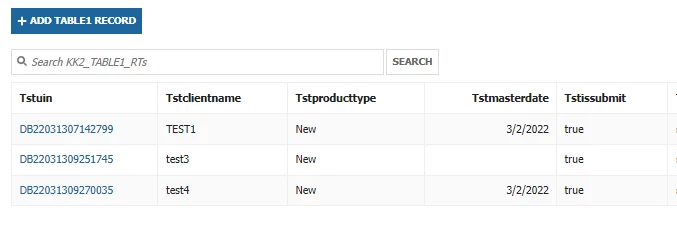
Main Record link Screen
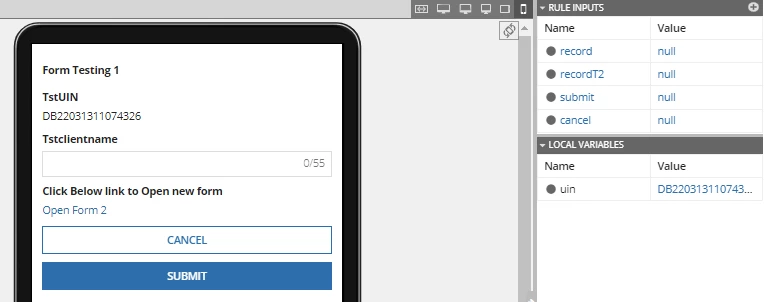
Form 1:
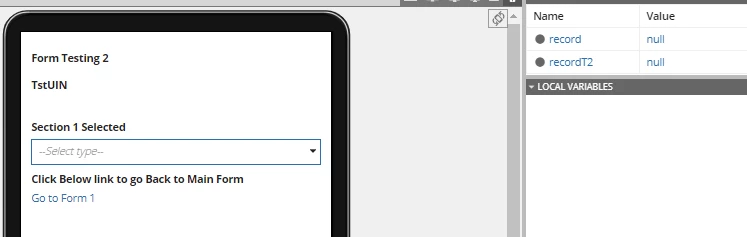
Form 2:
CODE:
Form 1:
a!localVariables(
local!uin: IF(a!isNullOrEmpty(ri!record.tstuin), concat(
{ "DB", datetext(now(), "yyMMddhhmmssSS") }
), ri!record.tstuin),
{
a!columnsLayout(
columns: {
a!columnLayout(
contents: {
a!richTextDisplayField(
label: "Form Testing 1"
),
a!textField(
label: "TstUIN",
labelPosition: "ABOVE",
value: local!uin,
saveInto: {
a!save(ri!record.tstuin, local!uin),
a!save(ri!recordT2.tst2uin, local!uin)
},
characterLimit: 17,
readonly: true()
),
a!textField(
label: "Tstclientname",
labelPosition: "ABOVE",
value: ri!record.tstclientname,
saveInto: ri!record.tstclientname,
characterLimit: 55
),
a!linkField(
label: "Click Below link to Open new form",
links: a!startProcessLink(
label:"Open Form 2",
processModel: cons!KK2_TABLE2_CONST_PM,
processParameters: {
record: ri!record,
recordT2: ri!recordT2,
}
)
)
}
)
}
),
a!buttonArrayLayout(
buttons: {
a!buttonWidget(
label: "Cancel",
value: true,
saveInto: ri!cancel,
submit: true,
style: "NORMAL",
validate: false
),
a!buttonWidget(
label: "Submit",
saveInto: {
a!save(ri!record.tstuin, local!uin),
a!save(ri!recordT2.tst2uin, local!uin)
},
submit: true,
style: "PRIMARY"
)
},
align: "START"
)
}
)
FORM 2:
a!localVariables(
{
a!columnsLayout(
columns: {
a!columnLayout(
contents: {
a!richTextDisplayField(
label: "Form Testing 2"
),
a!textField(
label: "TstUIN",
labelPosition: "ABOVE",
value: ri!record.tstuin,
saveInto: ri!record.tstuin,
characterLimit: 17,
readonly: true()
),
a!dropdownField(
label: "Section 1 Selected",
labelPosition: "ABOVE",
placeholder: "--Select type--",
choiceLabels: { "X" },
choiceValues: { "X" },
value: ri!recordT2.tst2selection1,
saveInto: ri!recordT2.tst2selection1
),
a!linkField(
label: "Click Below link to go Back to Main Form",
links: a!startProcessLink(
label:"Go to Form 1",
processModel: cons!KK2_TABLE1_CONST_PM,
processParameters: {
record: ri!record,
recordT2: ri!recordT2
}
)
)
}
)
}
)
}
)
Regards,
Khan