
August 29, 2023
Question

How to copy values of a filled editable grid into another grid in an interface

  • August 29, 2023
  • 12 replies
  • 0 views

Hi! I have an editable grid which is filled by the user (possible to add new rows), like in this example:
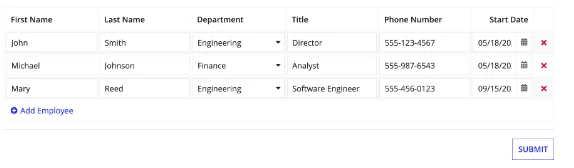
The editable grid values are saved in a Record, and they all have a common field for each grid created (for example, Employee Set 1, even though it is not shown in the example it should be another column)

Now, I would like to "copy" the created matrix into a grid in another interface, being able to create new columns but  without the possibility of adding extra-rows (I mean, without the "Add Employee" dynamic link)

To be clear, my idea is to re-use the data in another grid, and add a column to identify the data for a new purpose

Thanks a lot!

    12 replies

    stefanhelzle0001
    Brainy
    August 29, 2023

    Can you explain what exactly you mean with "copy"? Why not just query the data and feed it into the grid?

    On the UI, you would just have to hide the add-item-link and the remove column.

    August 29, 2023

    Sure, I was thinking about querying the data to make the grid. I know I can do this directly with a read-only grid (from a Record Type), but in this case I would prefer to use an editable grid (to be able to add new columns)

    So I have the following questions:

    1. ¿Do you recommend me to query the database for each column of the grid? ¿Or is there a way to query all the record list (like in the read-only grids) and being able to add new columns?

    2. After executing the query and having the editable grid with the values, ¿could it be possible for the user to change the value manually and apply validations rules over the first value? 

    f.e. I my value for first row and first column is "20". ¿Can I change it to "10" manually and put a validation rule so that I can only change with values <= 20?

    stefanhelzle0001
    Brainy
    August 29, 2023

    The documentation has some good examples on editable grids.

    https://docs.appian.com/suite/help/23.3/Editable_Grid_Component.html#editable-grid-with-two-rows-using-looping

    Once you understand how it works, adjust it to work with a static list of your record items. Then use a!queryRecordType to load dynamic data into that local variable.

    docs.appian.com/.../reference-records.html

    dhananjayk3480
    August 29, 2023

    I am not sure If I got your point or not. However, there is a way to disable add row link. Moreover, you can set columns as per business condition.