

stephenk0001
October 20, 2022
Question

How to force selection of a specific answer in a dropdown field within an editable grid

  • October 20, 2022
  • 7 replies
  • 0 views

Hi team

I'm needing some help to force an answer in a dropdown field where a given answer is selected in another dropdown field.

 Here is a screenshot of the editable grid.

I want to force "not used" in the "how important" column when "never" is selected  in the "how often" column
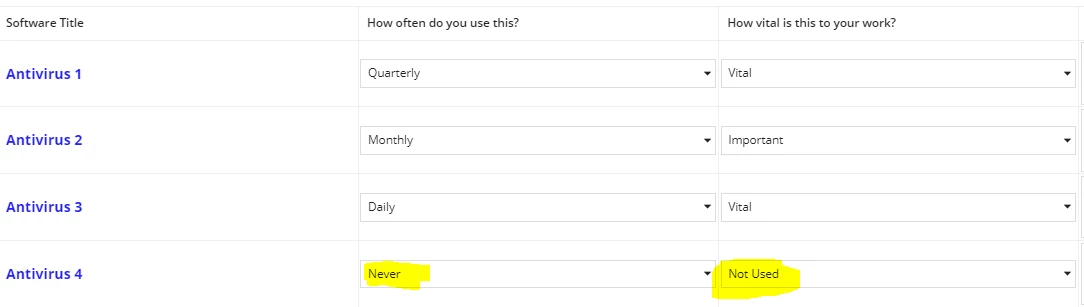
The software names are returned from an existing table.

This is how the answer table is set up:

Answer Table
id Name questionID
1 Daily 1
2 Weekly 1
3 Monthly 1
4 Quarterly 1
5 Annually 1
6 Never 1
7 Vital 2
8 Important 2
9 Useful 2
10 Not Useful 2
11 Not Used 2

The questionId corresponds to the two column headings.

Here's the expression for teh editable grid:

{
/* For the Software Title Column*/
a!richTextDisplayField(
value: a!richTextItem(
text: fv!item.softwareID.name,
color: "ACCENT",
size: "MEDIUM",
style: "STRONG"
)
),
/* For the Frequency Of Use and Vitality Columns*/
a!forEach(
items: fv!item.surveyResultUserResponse,
expression: a!dropdownField(
placeholder: "Select",
choiceLabels: fv!item.question.allowedAnswer.name,
choiceValues: fv!item.question.allowedAnswer.name,
value: fv!item.answer,
saveInto: { fv!item.answer },
required: true
)
)

I'm stumped!

I would greatly appreciate answers with sample expressions, please

Thanks

Stephen

7 replies

mikes0011
Brainy
October 20, 2022

When you say "force 'not used'", what exactly are you hoping the sequence of events the users sees will be?

It would be trivially easy, for example, to set that dropdown to "required" and add a validation such that the only valid answer is "not used" when the selection in the previous column is "never".

The Expression Guru
stefanhelzle0001
Brainy
October 20, 2022

Why not just hide the second dropdown?

csteward
October 20, 2022

I typically implement this by first having the "How Often" dropdown perform an a!save() to update the neighboring "How Vital" column, setting it to Not Used when Never is selected, then have the How Vital column become disabled in the same scenario.  You could take this further and prevent "Not Used" from being selected with validation when any other selection of How Often is selected, or have the How Often selection simply clear the How Vital selection whenever it is toggled otherwise, etc.

Essentially, you can easily reference data points across the row when you need to check other values:

a!localVariables(
  local!howOften: {"Daily","Weekly","Monthly","Quarterly","Never"},
  local!howVital: {"Vital","Important","Useful","Not Useful","Not Used"},
  local!data: {
    a!forEach(
      items: 1+enumerate(4),
      expression: a!map(id: fv!item, software: concat("Antivirus ",fv!item), howOften: null, howVital: null)
    )
  },
  a!gridLayout(
    headerCells: {
      a!forEach(
        items: {"Software","How often do you use this?","How vital is this to your work?"},
        expression: a!gridLayoutHeaderCell(label: fv!item)
      )
    },
    rows: a!forEach(
      items: local!data,
      expression: a!gridRowLayout(
        id: fv!index,
        contents: {
          a!richTextDisplayField(
            value: a!richTextItem(
              text: fv!item.software
            )
          ),
          a!dropdownField(
            placeholder: "-- Select --",
            choiceLabels: local!howOften,
            choiceValues: local!howOften,
            value: fv!item.howOften,
            saveInto: {
              local!data[fv!index].howOften,
              if(
                local!data[fv!index].howOften="Never",
                a!save(local!data[fv!index].howVital,"Not Used"),
                {}
              )
            }
          ),
          a!dropdownField(
            placeholder: "-- Select --",
            choiceLabels: local!howVital,
            choiceValues: local!howVital,
            value: fv!item.howVital,
            saveInto: local!data[fv!index].howVital,
            disabled: local!data[fv!index].howOften="Never",
          )
        }
      )
    )
  )
)

mikes0011
Brainy
October 20, 2022

I was thinking of this too, but usually I personally prefer to wait until they can actually write out the desired user experience (since there's a bad habit around here of tossing out super vague design requests and expecting us to just fill in the blanks).

(And also because i want to make sure they're actually going to participate in their thread, before going through the effort of actually banging out some example code.)

The Expression Guru
csteward
October 20, 2022

I hear ya, I just happened to have some handy for this basic scenario.  And sometimes holding your breath for:

wait until they can actually write out the desired user experience

..doesn't always end up well for your health :)