
November 3, 2022
Question

How to get CDT array fields based on specific column value

  • November 3, 2022
  • 4 replies
  • 0 views

Hello all,

I'm trying to create 2 dropdowns where the 1st dropdown will show the unique manufacturer brands from this table.
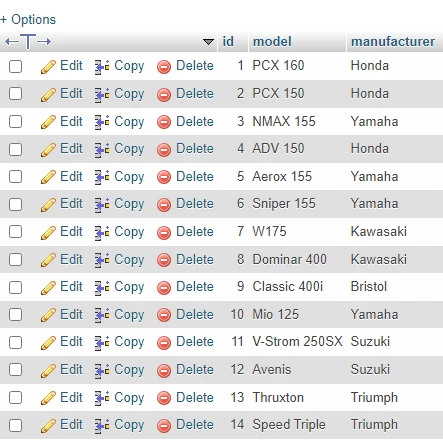
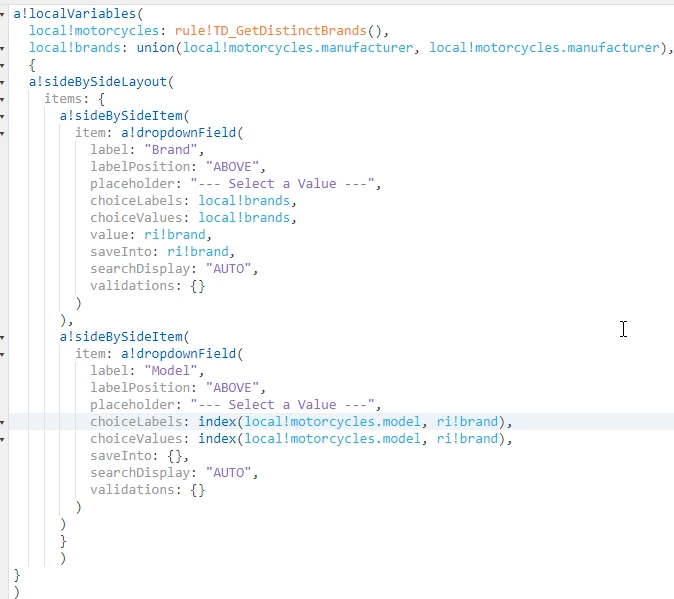
I managed to do it, but the 2nd dropdown is to get the motorcycle models based on the selected manufacturer. The catch is I need to only make a single query. What I did is I created a query rule then saved it to a local variable. On the 1st dropdown, I used union function to get the unique manufacturers from the local variable containing the query. However, I'm having a hard time on the 2nd dropdown.

4 replies

November 3, 2022

Hi Anwille,

can you pls refer the below code.

a!localVariables(
  local!selectedDepartment,
  local!selectedTitle,
  /*
    * Hardcoded values are stored here through the choose function. Typically    
    * this data would live with the department in a lookup value. In that case
    * local!selectedDepartment would act as a filter on that query to bring
    * back titles by department.
    */
  local!availableTitles:choose(
    if(isnull(local!selectedDepartment), 1, local!selectedDepartment),
    {"CEO","CFO","COO","Executive Assistant"},
    {"Director","Quality Engineer","Manager","Software Engineer"},
    {"Accountant","Manager","Director"},
    {"Coordinator","Director","Manager"},
    {"Consultant","Principal Consultant","Senior Consultant"},
    {"Account Executive","Director","Manager"}
  ),
  a!sectionLayout(
    label: "Example: Cascading Dropdowns",
    contents: {
      a!dropdownField(
        label: "Department",
        choiceLabels: { "Corporate", "Engineering", "Finance", "Human Resources", "Professional Services", "Sales" },
        choiceValues: { 1, 2, 3, 4, 5, 6 },
        placeholder: "-- Select a Department -- ",
        value: local!selectedDepartment,
        saveInto: {
          local!selectedDepartment,
          a!save(local!selectedTitle, null)
        }
      ),     
      a!dropdownField(
        label: "Title",
        choiceLabels: local!availableTitles,
        choiceValues: local!availableTitles,
        placeholder: "--- Select a Title ---",
        value: local!selectedTitle,
        saveInto: local!selectedTitle,
        disabled: isnull(local!selectedDepartment)
      )
    }
  )
)
peter.lewis
Employee
November 4, 2022

For what it's worth, this example is from the documentation page for cascading dropdowns. There's some more information on that page on how to implement it as well here: https://docs.appian.com/suite/help/latest/recipe-configure-cascading-dropdowns.html 

amans0009
November 3, 2022

use this in second dropdown in choicesvalues and choiceslabels

index(index(local!motorcycles,wherecontains(ri!brand,local!motorcycles),{}),"model",{})

stefanhelzle0001
Brainy
November 3, 2022

The following code snippet should get you started.

a!localVariables(
  local!data: {
    a!map(model: "PCX", make: "Honda"),
    a!map(model: "GSX", make: "Honda"),
    a!map(model: "Avenis", make: "Suzuki"),
    a!map(model: "ADV", make: "Honda"),
    a!map(model: "Thruxton", make: "Suzuki"),
  },
  index(
    local!data,
    wherecontains(
      "Honda",
      local!data.make
    )
  )
)