
April 25, 2023
Question

how to give space between checkbox and choice value

  • April 25, 2023
  • 8 replies
  • 1 view

Hi Champ,

I have a requirement where I need to have some space between the checkbox and the choice label. Is it possible ?
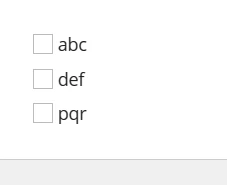
For example, I need to have some space between the checkbox and text "abc"

8 replies

April 25, 2023

No it is not possible, if you try to add spaces they will be trimmed automatically. I would suggest giving a try to "CARDS" choiceStyle.

stefanhelzle0001
Brainy
April 25, 2023

Sure. Use char(160) to add some non-breaking spaces.

April 25, 2023

Thanks Stefen.That works

harshitb6843
April 25, 2023

This always works like a charm but be aware that it is not like padding. This is actually adding characters in your choiceLabels making the length of each of them change.

tejpals0001
April 25, 2023

a!checkboxField(
label :"Hello",
choiceLabels: {char(160)&char(160)&"abc",char(160)&char(160)&"def",char(160)&char(160)&"pqr"},
choiceValues: {1,2,3}
)

April 25, 2023

Try with check box choice label as empty and add your labels in the Separate Rich text display field from that you can achieve space between check box and labels .

{
  a!sideBySideLayout(
    items: {
      a!sideBySideItem(
        item: a!checkboxField(
          label: "Checkboxes",
          labelPosition: "COLLAPSED",
          choiceLabels: {
            ""
          },
          choiceValues: {
           1
          },
          saveInto: {},
          validations: {},
          align:"RIGHT"
        ),
        width:"1X"
      ),
      a!sideBySideItem(
        item: a!richTextDisplayField(
          labelPosition: "COLLAPSED",
          value: {
            
            a!richTextItem(
              text:"ABC"
            )
          }
        )
      ),
      a!sideBySideItem(
        item: a!richTextDisplayField(
          labelPosition: "COLLAPSED",
          value: {}
        )
      ),
      a!sideBySideItem(
        item: a!richTextDisplayField(
          labelPosition: "COLLAPSED",
          value: {}
        )
      ),
      a!sideBySideItem(
        item: a!richTextDisplayField(
          labelPosition: "COLLAPSED",
          value: {}
        )
      ),
      a!sideBySideItem(
        item: a!richTextDisplayField(
          labelPosition: "COLLAPSED",
          value: {}
        )
      ),
      a!sideBySideItem(
        item: a!richTextDisplayField(
          labelPosition: "COLLAPSED",
          value: {}
        )
      ),
      a!sideBySideItem(
        item: a!richTextDisplayField(
          labelPosition: "COLLAPSED",
          value: {}
        )
      ),
      a!sideBySideItem(
        item: a!richTextDisplayField(
          labelPosition: "COLLAPSED",
          value: {}
        )
      ),
      a!sideBySideItem(
        item: a!richTextDisplayField(
          labelPosition: "COLLAPSED",
          value: {}
        )
      ),
      a!sideBySideItem(
        item: a!richTextDisplayField(
          labelPosition: "COLLAPSED",
          value: {}
        )
      ),
      a!sideBySideItem(
        item: a!richTextDisplayField(
          labelPosition: "COLLAPSED",
          value: {}
        )
      ),
      a!sideBySideItem(
        item: a!richTextDisplayField(
          labelPosition: "COLLAPSED",
          value: {}
        )
      ),
      a!sideBySideItem(
        item: a!richTextDisplayField(
          labelPosition: "COLLAPSED",
          value: {}
        )
      ),
      a!sideBySideItem(
        item: a!richTextDisplayField(
          labelPosition: "COLLAPSED",
          value: {}
        )
      ),
      a!sideBySideItem(
        item: a!richTextDisplayField(
          labelPosition: "COLLAPSED",
          value: {}
        )
      ),
      
    }
  ),
  
}