July 9, 2025
Solved

How to make link field more like a button field

  • July 9, 2025
  • 13 replies
  • 0 views

So the 5 text fields in the bottom of the page are actually link fields. This is a Landing page i was supposed to create which is still in progress. And the link fields lead to another site, but as you can see above they are very plain and unattractive to call them as a site. Is there any way that i can make these link fields more presentable and in a nice way so that this site can be called a WEBSITE.

Thanks and Regards.

Best answer by harshas2775

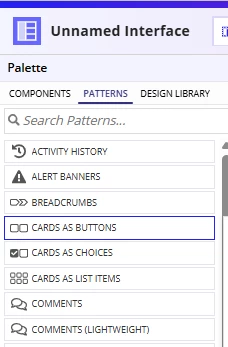
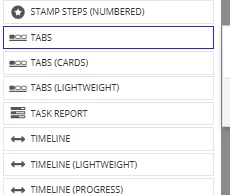
There is a pattern in Interface->Patterns. Have a look at it for inspirations around this design. 

You can try Cards as Buttons or Tabs patterns


13 replies

davidj137213
July 9, 2025

With dynamicLink you can use images as links por example

docs.appian.com/.../Dynamic_Link_Component.html

stefanhelzle0001
July 9, 2025

Any reason for not using a Site object and make these links the pages?

Card layouts also support links.

July 9, 2025

Well, this is a landing page for an organisation and in this organisation there are different types of users as you can see in the above pics namely Admin, Recruiter, Vendors, etc. And each of the users have a different site for them.

I have attached the link below to the landing page so you can get a better clarity of what i'm trying to say.

https://in.appian.community/suite/sites/the-it-mind-services

So as i said each user has their own site which i made the link field so that i can access it from a single page.

stefanhelzle0001
July 9, 2025

OK. Makes sense.

harshas2775
July 9, 2025

There is a pattern in Interface->Patterns. Have a look at it for inspirations around this design. 

You can try Cards as Buttons or Tabs patterns


July 10, 2025

Thankyou for your guidance.

shubhama926776
July 9, 2025

There are multiple ways you can achieve this type of landing page. I would recommend using a billboard layout with overlay.
See the example UI for your reference - you can modify it as per your needs, as multiple modifications are possible.

{
  a!billboardLayout(
    backgroundMedia: a!documentImage(document: a!EXAMPLE_BILLBOARD_IMAGE()),
    backgroundMediaPositionHorizontal: "CENTER",
    backgroundMediaPositionVertical: "MIDDLE",
    backgroundColor: "#000000",
    overlay: a!barOverlay(
      contents: {
        {
          a!localVariables(
            local!options: {
              a!map(icon: "home", name: "Admin"),
              a!map(icon: "building", name: "Recruiter"),
              a!map(icon: "building", name: "Vendor"),
              a!map(icon: "building", name: "Panel"),
              a!map(icon: "building", name: "Candidate")
            },
            a!columnsLayout(
              columns: {
                a!columnLayout(),
                a!forEach(
                  items: local!options,
                  expression: a!columnLayout(
                    contents: {
                      a!cardLayout(
                        contents: {
                          a!richTextDisplayField(
                            labelPosition: "COLLAPSED",
                            value: {
                              a!richTextIcon(
                                icon: fv!item.icon,
                                color: "#8CA1D0",
                                size: "SMALL"
                              ),
                              char(10),
                              a!richTextItem(
                                text: fv!item.name,
                                color: "ACCENT",
                                size: "SMALL",
                                style: "STRONG"
                              ),
                              
                            },
                            align: "CENTER"
                          )
                        },
                        link: a!dynamicLink(
                          saveInto: a!save(local!selectedCard, fv!item.name)
                        ),
                        height: "EXTRA_SHORT",
                        shape: "ROUNDED",
                        style: "INFO"
                      )
                    },
                    width: "MEDIUM"
                  )
                ),
                a!columnLayout()
              },
              marginBelow: "STANDARD"
            ),
            
          )
        }
      },
      style: "SEMI_DARK",
      
    ),
    
  )
}

July 10, 2025

Really appreciate it, thankyou.