
nicholaso0002
May 2, 2022
Question

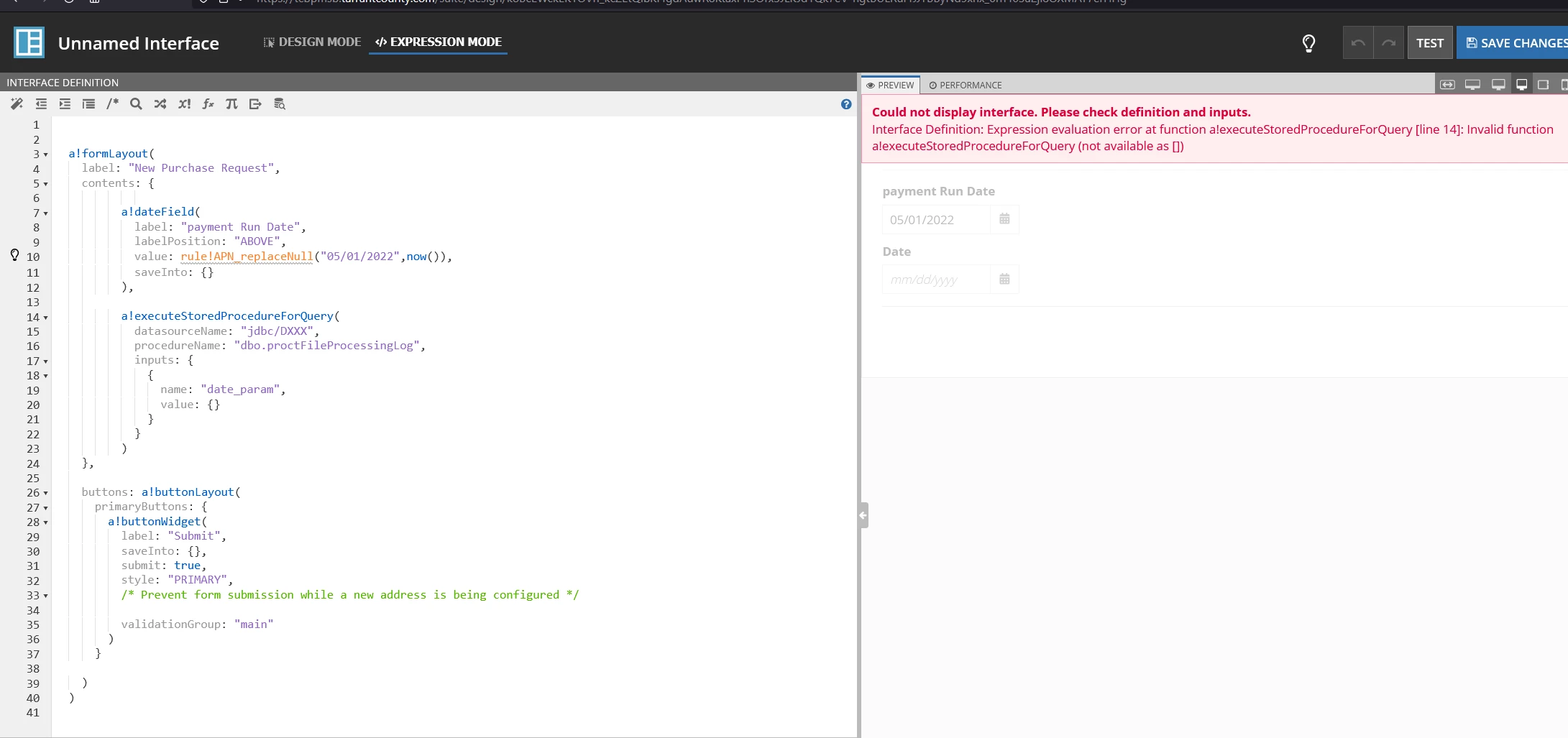
How to use executeStoredProcedureForQuery in an interface
  • May 2, 2022
  • 27 replies
  • 0 views

Any help will be appreciated. See error on the right.

Thanks

    27 replies

    mikes0011
    Brainy
    May 2, 2022

    Can you confirm which version of Appian you're running?  This function was just released with 22.1 for reference.

    The Expression Guru
    nicholaso0002
    May 2, 2022

    21.4.

    if this cannot be done with this version. Can it be done using the previous "executestoredprocedure"; I am trying to see how i can include it in a form.

    Thanks

    mikes0011
    Brainy
    May 2, 2022

    Yes - assuming you have the plug-in installed, it works in almost exaclty the same way, though the parameter names are slightly different.  The syntax is like this:

    executeStoredProcedure(
      dataSourceName: "jdbc/Appian",
      procedureName: "your procedure name here",
      inputs: {
        {
          name: "p_inputname1",
          value: ri!input1Value
        },
        ...
      }
    )

    The Expression Guru
    mikes0011
    Brainy
    May 2, 2022

    Additionally, you have it in the "contents" parameter of your a!formLayout - which isn't really valid since contents expects one or many interface components (including sections, column layouts, fields, etc), but even if your stored procedure call worked, it would be spitting out plain data which is not a valid form content.  If you're curious, you could always set it as the "value" parameter of a ParagraphField and see what happens then.  the more common way to handle this, though, would be to set it to the value of a local variable, then display that in the value parameter of text / paragraph / grid / rich text field(s), as appropriate.

    The Expression Guru
    nicholaso0002
    May 2, 2022

    I have removed it from the content., Please, see code. Still have issues


      a!formLayout(
        label: "New Purchase Request",
        contents: {
                 
              a!dateField(
                label: "payment Run Date",
                labelPosition: "ABOVE",
                value: rule!APN_replaceNull("05/01/2022",now()),
                saveInto: {}
              )
          
        },
        
        executestoredprocedure(
          datasourceName: "jdbc/DXXX",
          procedureName: "dbo.procFileProcessingLog",
          inputs: {
            {
              name: "date_param",
              value: {}
            }
          }
        )
        
        buttons: a!buttonLayout(
          primaryButtons: {
            a!buttonWidget(
              label: "Submit",
              saveInto: {},
              submit: true,
              style: "PRIMARY",
              /* Prevent form submission while a new address is being configured */
              
              validationGroup: "main"
            )
          }
     
        )
      )
    

    mikes0011
    Brainy
    May 2, 2022

    The problem here is you still have it as a member of your a!formLayout() call even though it's not a valid thing to put there.  Instead you should be setting the value to a local variable and then referencing that inside the contents.  As I mentioned before, the simplest way to do this is in the value of a paragraph field (just for preview/display purposes).

    a!localVariables(
    
      local!procedureOutput:  executestoredprocedure(
          datasourceName: "jdbc/DXXX",
          procedureName: "dbo.procFileProcessingLog",
          inputs: {
            {
              name: "date_param",
              value: {}
            }
          }
        ),
    
      a!formLayout(
        label: "New Purchase Request",
        contents: {
          a!paragraphField(
            label: "EXAMPLE procedure output:",
            value: local!procedureOutput,
            readOnly: true()
          ),
                 
              a!dateField(
                label: "payment Run Date",
                labelPosition: "ABOVE",
                value: rule!APN_replaceNull("05/01/2022",now()),
                saveInto: {}
              )
          
        },
        
        
        buttons: a!buttonLayout(
          primaryButtons: {
            a!buttonWidget(
              label: "Submit",
              saveInto: {},
              submit: true,
              style: "PRIMARY",
              /* Prevent form submission while a new address is being configured */
              
              validationGroup: "main"
            )
          }
        )
      )
    )

    The Expression Guru