September 22, 2022
Question

Interface

  • September 22, 2022
  • 5 replies
  • 0 views

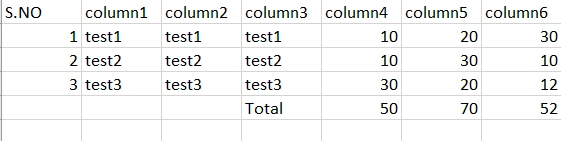
I am using a editable grid in that there are six columns (column1,2,3,4,5,6) after adding rows to that columns I want add a row at the end for column3,4,5,6 only for calculating the total value. Is that possible in editable grid

    5 replies

    Participating Frequently
    September 22, 2022

    Yes it is possible.

    harshitb6843
    September 22, 2022

    You can add an extra gridRowLayout() outside for a!forEach and use the sum() function on the respective column. 

    September 22, 2022

    Something like this you can build.

    a!localVariables(
      local!gridData: a!map(
        col1: "",
        col2: "",
        col3: "",
        col4: "",
        col5: "",
        col6: ""
      ),
      a!gridLayout(
        headerCells: {
          a!gridLayoutHeaderCell(label: "Col1"),
          a!gridLayoutHeaderCell(label: "Col2"),
          a!gridLayoutHeaderCell(label: "Col3"),
          a!gridLayoutHeaderCell(label: "Col4"),
          a!gridLayoutHeaderCell(label: "Col5"),
          a!gridLayoutHeaderCell(label: "Col6")
        },
        addRowLink: a!dynamicLink(
          label: "Add",
          saveInto: a!save(
            local!gridData,
            append(
              local!gridData,
              a!map(
                col1: "",
                col2: "",
                col3: "",
                col4: "",
                col5: "",
                col6: ""
              )
            )
          )
        ),
        rows: a!forEach(
          items: local!gridData,
          expression: if(
            fv!index = count(local!gridData),
            a!gridRowLayout(
              contents: {
                a!textField(readOnly: true()),
                a!textField(readOnly: true()),
                a!textField(readOnly: true(), value: "Total"),
                a!textField(
                  readOnly: true(),
                  value: sum(index(local!gridData, "col4", {}))
                ),
                a!textField(
                  readOnly: true(),
                  value: sum(index(local!gridData, "col5", {}))
                ),
                a!textField(
                  readOnly: true(),
                  value: sum(index(local!gridData, "col6", {}))
                )
              }
            ),
            a!gridRowLayout(
              contents: {
                a!textField(
                  value: fv!item.col1,
                  saveInto: fv!item.col1
                ),
                a!textField(
                  value: fv!item.col2,
                  saveInto: fv!item.col2
                ),
                a!textField(
                  value: fv!item.col3,
                  saveInto: fv!item.col3
                ),
                a!textField(
                  value: fv!item.col4,
                  saveInto: fv!item.col4
                ),
                a!textField(
                  value: fv!item.col5,
                  saveInto: fv!item.col5
                ),
                a!textField(
                  value: fv!item.col6,
                  saveInto: fv!item.col6
                )
              }
            )
          )
        )
      )
    )

    September 29, 2022

    thanks its worked

    harshitb6843
    September 29, 2022

    A suggestion, line 39: You can use fv!isLast instead of the condition. Also, adding a grid row layout outside should be less complex and easy to manage.