
February 2, 2024
Solved

Interface issue
  • February 2, 2024
  • 9 replies
  • 1 view


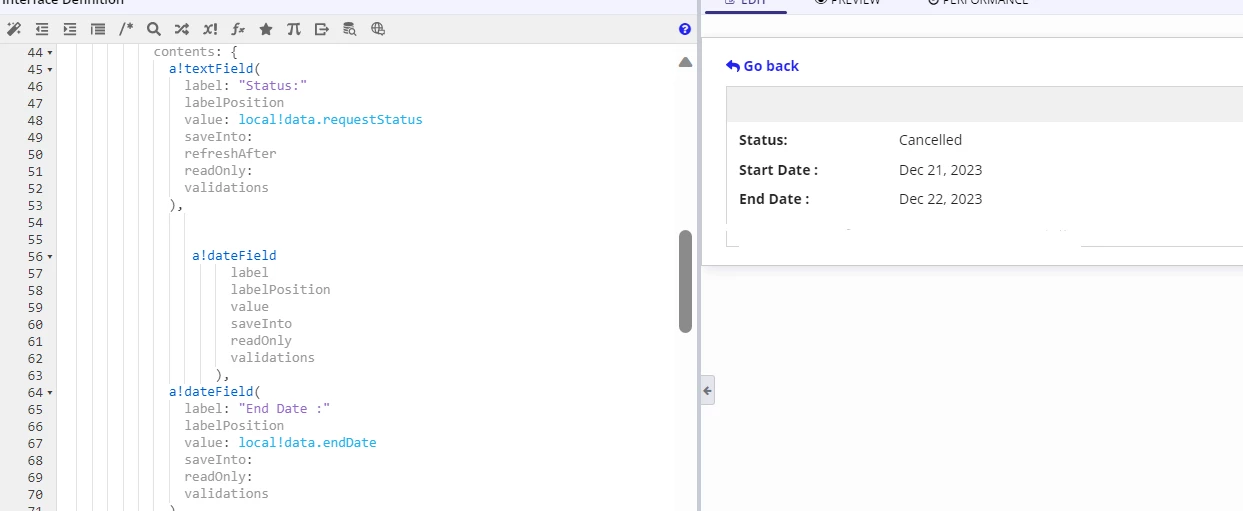
This is the strange behavior which I'm facing in my interface , the code is missing in expression now  but it is working as expected . Not sure how the code is missing .
In UI we can see start date but in code above the end date is missing (which is for start date)

can someone help me with this 

    Best answer by harshitb6843

    I too faced this issue. I don't know what is causing this. Most probably it is the Chrome Browser after the new update. 
    Try cutting the entire code (Ctrl+x) and pasting it again (Ctrl+v). It should be fine again. 

    9 replies

    harshitb6843
    February 2, 2024

    I too faced this issue. I don't know what is causing this. Most probably it is the Chrome Browser after the new update. 
    Try cutting the entire code (Ctrl+x) and pasting it again (Ctrl+v). It should be fine again. 

    sabat0002Author
    February 2, 2024

    Thank you [mention:b8ea18cfbb2e4f6d841cf3c1d4d7420b:e9ed411860ed4f2ba0265705b8793d05]  ,it worked

    harshitb6843
    February 2, 2024

    Awesome! Now when you have done it, please take a moment to verify the answers that worked for you to close the thread. 

    konduruc733182
    February 2, 2024

     [mention:85ca6a2722324ac4b08c9eda0b5e1851:e9ed411860ed4f2ba0265705b8793d05] 


    This might be an environment issue which I have faced yesterday. Reload the page or try closing and reopening your browser. If it still exists, Raise a support ticket.

    harshitb6843
    February 2, 2024

    No. It is actually the chrome browser. It is working fine for me in other browsers. 

    konduruc733182
    February 2, 2024

    I was just copying and repasting for confirming that my code is there. Now I don't see any issue. (Was using edge)