
Interface setting reminders
Hey all,
I have 2 user input tasks.
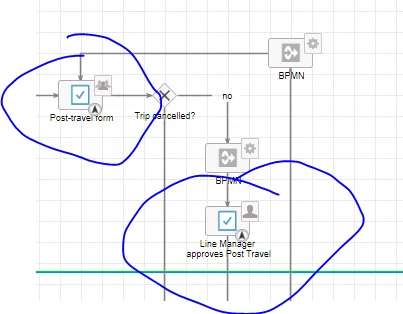
For both tasks, I need to implement/adjust alerts as follows. Number of days are calculated since the sending of the 'First task' task to the users (i.e. the deadline for both, the Primary Traveler and the Line Manager's tasks together must be 12 days).
| After x days | 1st TASK | 2nd TASK |
|---|---|---|
| 3 | Primary Traveller | 0 |
| 6 | Primary Traveller & Line Manager | Line Manager |
| 9 | Primary Traveller & Line Manager & Compliance employee who approved the travel request | Line Manager & Compliance employee who approved the travel request |
| 12 | Mail to Compliance with info that this Post Travel Form has still not been been completed/amended by the Primary Traveller and approved by the Line Manager | Mail to Compliance with info that this Post Travel Form has still not been approved by the Line Manager |
THE POINT IS THE DEADLINE FOR BOTH TOGETHER MUST BE 12 DAYS.
I first installed escalations for the primary travelers and the line managers task individually which results in having 12 days max on the complete as well as 12 days on the approval task which overall gives 24 days and two potential reports to compliance (given the primary traveler approves after 12 days, the task goes to the line manager and the count starts over again). The deadline should however together for both not exceed 12 days.
How can I for e.g. for after 9 days, check which of the tasks is active, primary travellers or line managers. depending on that, it will then send the reminder mail to either line manager and compliance (if the task is with the line manager) or to primary traveller, line manager and compliance (if the task is with the primary traveller).
Kind Regards,
Vic