November 10, 2021
Question

Issue with multipleDropdownField value

  • November 10, 2021
  • 5 replies
  • 0 views

Hi,

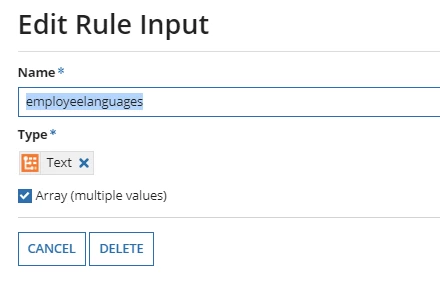
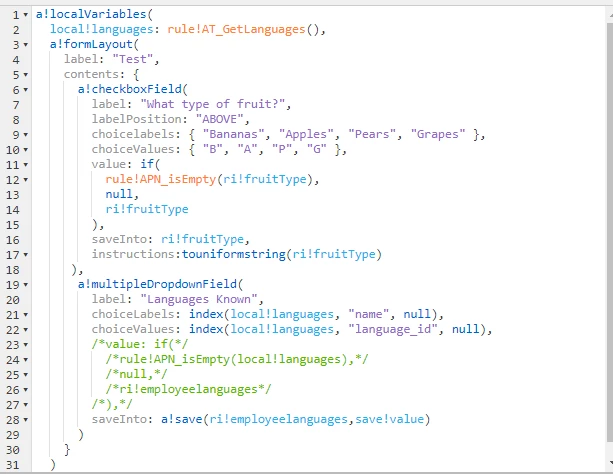
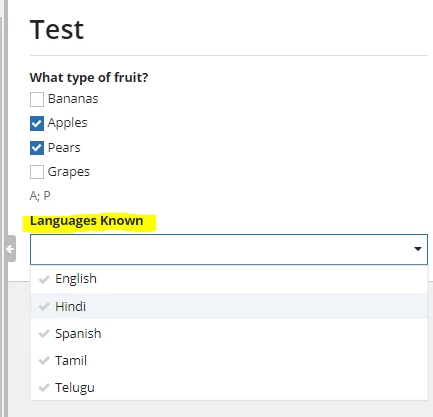
When I try to use multipleDropdownField to display multiple language selection and if I try to use "employeelanguages" rule input to save.

When I uncomment the below commented code, I am getting an error

Could not display interface. Please check definition and inputs. Interface Definition: Expression evaluation error at function a!multipleDropdownField [line 19]: A multiple dropdown component [label="Languages Known"] has an invalid value for "value". All selected values must be present in the choiceValues array, but value was 4 and choiceValues was 1; 4; 2; 5; 3.
5 replies

karumurua531442
November 10, 2021

One possible cause of this issue comes from casting. It's possible that the value selected is a different type than the choice values.

choice values and labels , must be same type, try to cast into same type and check .

hope it helps

gayathris111098
November 10, 2021

Try changing the ri!employeelanguages to number integer array. 

It seems like type casting issue

November 12, 2021

I can't do that, because, my CDT is having a structure similar to my table where I have to save the data.

Do I need to do any type of casting here?

November 12, 2021

Declare a new local variable and typecaste the ri!employeelanguage as the type of language_id , so you can use that new local variable as the Value:

The choice values and the Value should be the same type 

also the "value: " which is declared should be inside the values of "choiceValues: "