
September 10, 2023
Question

local variables

  • September 10, 2023
  • 2 replies
  • 0 views

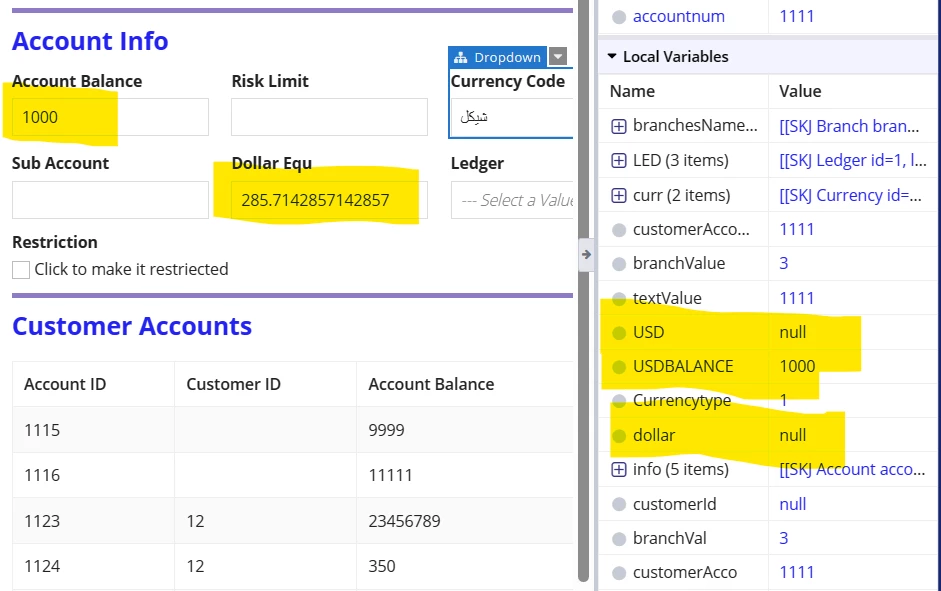
hi i am trying to save the value of "Account Balance" to calculate the dollar equivalent field. 

i wrote the code below and tried to save the value of "dollar equivalent" in a local variable but the value stays NULL, i also tried to replace with rule input but that did not work. 

any suggestions? 

     local!USD:ri!record['recordType!{e54cd4e6-9c62-49a2-82d6-965f3a86b2e7}SKJ Account.fields.{48c2c2cc-59fa-42cc-a496-c512f51c25bf}dollarEqu'],  
  local!USDBALANCE: ri!record['recordType!{e54cd4e6-9c62-49a2-82d6-965f3a86b2e7}SKJ Account.fields.{a26624aa-6c8b-4ad4-b696-f52169531873}accountBalance'],
    local!dollar:ri!record['recordType!{e54cd4e6-9c62-49a2-82d6-965f3a86b2e7}SKJ Account.fields.{48c2c2cc-59fa-42cc-a496-c512f51c25bf}dollarEqu'],  
     a!floatingPointField(
                      label: "Dollar Equ",
                      labelPosition: "ABOVE",
               
                      value: a!match(
                        value:local!Currencytype,

                        equals: 1,
                        then:{if(not(isnull(local!USDBALANCE)),(local!USDBALANCE/3.5),-1)},
                     
                        equals: 2,
                        then:{local!USDBALANCE},
                    
                        equals:null,
                        then:{false()},
                        default: then:{false()}

                      ),
                      
        saveInto:{local!dollar,a!save(local!USD,local!dollar)},
    2 replies

    stefanhelzle0001
    Brainy
    September 10, 2023

    That is because you fell into a typical trap like many others new to Appian. Input fields do only display a value, and the saveInto is only ever evaluated when the user types a different value. This means, that you need to make any calculations in the saveInto using one or more a!save().

    mathieud0001
    Brainy
    September 10, 2023

    Depends on what you want to do. If you are actually typing a value in the Account Balance field, this is what it would look like:

    a!localVariables(
      local!currencyType: 1,
      local!record: a!map(
        USD: 0,
        USDBALANCE: 0,
        dollar: 0,
      ),
      local!usd: local!record.USD,
      local!usdBalance: local!record.USDBALANCE,
      local!dollar: local!record.dollar,
      {
        a!floatingPointField(
          label: "Account Balance",
          value: local!usdBalance,
          saveInto: {
            local!usdBalance,
            a!save(
              local!dollar,
              a!match(
                value: local!currencyType,
                equals: 1,
                then: {
                  if(
                    a!isNotNullOrEmpty(local!usdBalance),
                    (local!usdBalance / 3.5),
                    - 1
                  )
                },
                equals: 2,
                then: { local!usdBalance },
                equals: null,
                then: { false() },
                default: then: { false() }
              )
            ),
            a!save(local!usd, local!dollar)
          }
        ),
        a!floatingPointField(
          label: "Dollar Equivalent",
          labelPosition: "ABOVE",
          value: local!dollar,
          saveInto: local!dollar
        )
      }
    )

    If you want to handle the case where you pre-populate these values and just save them back without you typing anything. It would be best to calculate them before sending them as rule inputs. Otherwise, you could also initialize them as local variables but you have to be sure to save them back into your rule input when you submit the form.

    A couple of extra links that might help: