

gautams4173
August 22, 2024
Question

Merge Cells In a column

  • August 22, 2024
  • 10 replies
  • 0 views

Hi 

I want to achieve such a grid, wherein there will be 1 value in the left row and can have multiple values in the right row denoting that values Mango -> Cherry belong to fruit type 
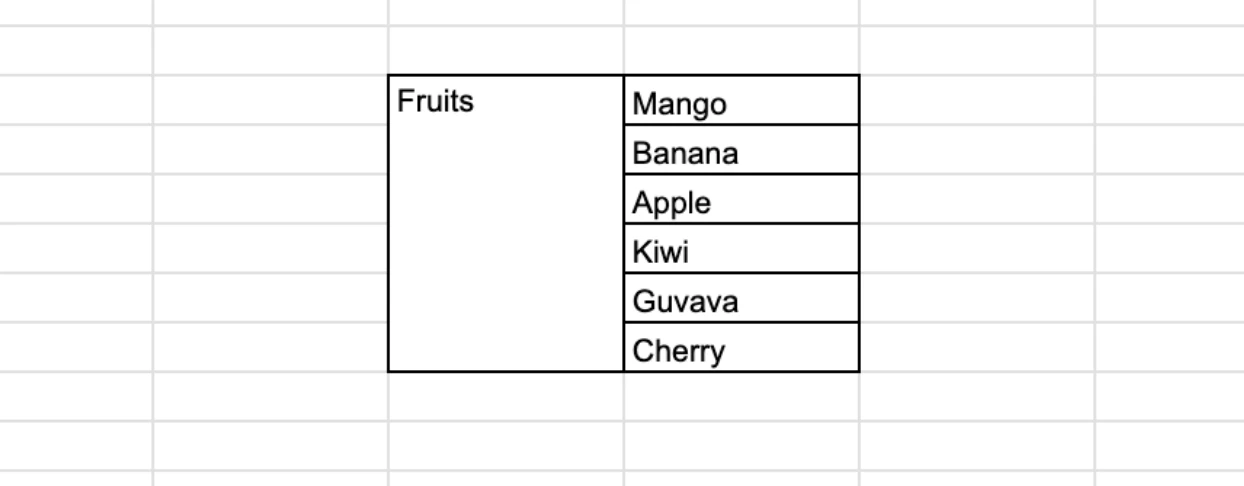
Can this be achieved using any of the grid components available ?

10 replies

stefanhelzle0001
Brainy
August 22, 2024

None of the grids does directly support cell fusion. But you can either build your own grid, using columns and cards, or you can tailor your data in a way it looks like fused cells. Rows with null values, and cell background color comes to my mind.

gautams4173
August 23, 2024

Hmm Ill give this a try [emoticon:5ce50ea3f9eb49809e861e8733750338]

Thanks

mikes0011
Brainy
August 22, 2024

Echoihng what Stefan said - my personal preference would be to utilize Rich Text to build all of this into one cell, with a "heading followed by bullet points" approach (one benefit here would be, you wouldn't necessarily be limited to a particular length of array here), like:

Fruits

  • Mango
  • Banana
  • Apple
  • Kiwi
  • Guava
  • Cherry

e.g.

gautams4173
August 23, 2024

Yeah, this would be a much simpler approach .. but the requirement was to put it in a grid

mikes0011
Brainy
August 23, 2024

the code i gave you can go in a grid cell.  the point is it would all go in a single grid cell (which is the closest thing you'll get to "merged rows" in an appian grid).  subsequent rows would be other items with different sub-items, or whatever the overall shape of your data is.

kumara0180
August 23, 2024

Adding on what Mike has shared, if you want to make it look bit more fancy use this

a!localVariables(
  local!fruits: { "Apple", "Banana", "Cherry" },
  {
    a!columnsLayout(
      columns: {
        a!columnLayout(
          contents: {
            a!richTextDisplayField(
              labelPosition: "COLLAPSED",
              value: {
                a!richTextItem(
                  text: { "Fruits" },
                  size: "MEDIUM",
                  style: { "STRONG" }
                )
              }
            ),
            a!forEach(
              items: local!fruits,
              expression: a!cardLayout(
                contents: a!richTextDisplayField(
                  labelPosition: "COLLAPSED",
                  value: a!richTextItem(text: fv!item)
                ),
                height: "AUTO",
                style: "TRANSPARENT",
                shape: "SEMI_ROUNDED",
                marginAbove: "NONE",
                marginBelow: "EVEN_LESS",
                showShadow: true
              )
            )
          },
          width: "NARROW_PLUS"
        ),
        a!columnLayout(contents: {}),
        a!columnLayout(contents: {})
      }
    )
  }
)

gautams4173
August 23, 2024

Thanks for this, but need to show like a grid [emoticon:7001ca6adc474a82b3fba88f98f15573]

kumara0180
August 23, 2024

a!localVariables(
  local!fruits: { "Apple", "Banana", "Cherry" },
  {
    a!cardLayout(
      contents: a!columnsLayout(
        columns: {
          a!columnLayout(
            contents: {
              a!richTextDisplayField(
                labelPosition: "COLLAPSED",
                value: {
                  a!richTextItem(
                    text: concat(char(10), { "Fruits" }),
                    size: "MEDIUM",
                    style: { "STRONG" }
                  )
                },
                align: "CENTER"
              )
            },
            width: "NARROW"
          ),
          a!columnLayout(
            contents: {
              a!forEach(
                items: local!fruits,
                expression: a!cardLayout(
                  contents: a!richTextDisplayField(
                    labelPosition: "COLLAPSED",
                    value: a!richTextItem(text: fv!item)
                  ),
                  height: "AUTO",
                  style: "TRANSPARENT",
                  shape: "SQUARED",
                  marginAbove: "NONE",
                  marginBelow: "NONE",
                  showShadow: false(),
                  showBorder: false(),
                  decorativeBarPosition: "BOTTOM",
                  decorativeBarColor: "#111111"
                )
              )
            },
            width: "NARROW"
          ),
          a!columnLayout(contents: {})
        },
        spacing: "NONE",
        showDividers: true()
      ),
      padding: "NONE"
    )
  }
)

konduruc733182
August 23, 2024

[mention:33794ebc39034be6a8166212f1b53ddb:e9ed411860ed4f2ba0265705b8793d05] 

What is your data structure? I guess that would help all of us to think of a work-around. You mentioned what you want but did not mention what you have.

mikes0011
Brainy
August 23, 2024

agreed, we need a "bigger picture" view of the whole data structure - i.e. what the entire grid would be expected to look like, not just one cell after a "merge".