

varunb579494
July 6, 2022
Question

Merged and nested Grids columns in paging grid

  • July 6, 2022
  • 6 replies
  • 0 views

Though it's an extension to below thread:

https://community.appian.com/discussions/f/user-interface/20858/merged-or-nested-column-headers-in-an-editable-grid

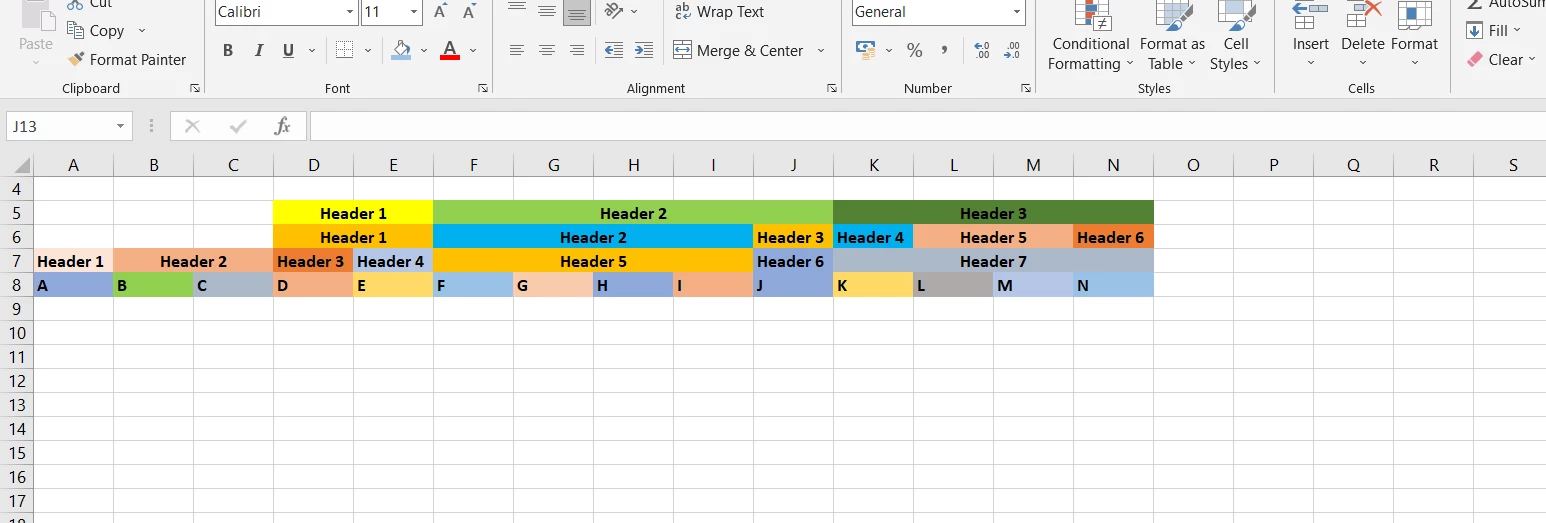
I was trying to follow the approach in above thread to achieve grid format I have attached as image in this thread post.

The above logic works good but there are lots of alignment issues when grid is viewed across different environment screen like wide desktop, mobile, etc.

The column widths in read only grid changes on different screens which most of the times cross the limits of above cards, for example - I have one main header "A" under this I have two headers "AA", "AB" and one more main header "B", have only one under it  "BA", when I change screen to wide the width changes and unaligns. Mostly, I see columns which should only be under "A", some part of those columns move under "B" header.

Also, with paging grid, it is getting difficult to align the width of grid columns/ headers as per card columns width.

I have something similar requirement. Can someone please help me how do I modify the code in above thread to achieve the requirement below with proper and auto alignment. If you can help me with some code that would great. Thanks

P.S. I need to use paging grid rather than Editable.
6 replies

csteward
July 6, 2022

AFAIK there isn't really any smooth way to create a setup guaranteed to be as detailed as you show there, due to the dynamic widths, different devices, etc.  Other than attempting to use something like the card/column combo from the referenced thread.  You cannot layer headers in a paging grid, so you would have to include that under the card layouts, which you cannot match column sizes to the cards above, unfortunately.

In theory you could get this as an output from Appian into Excel, but you would have to use the deprecated Export CDT to Excel service, for which we don't have an OOTB replacement that handles excel templates as smoothly.

I would be interested to know the use case, this is something where you may have to work with the users to adjust to something we can create more reliably and supportable, within Appian.

varunb579494
July 6, 2022

[mention:124cfac3ed754d2d8c4a043c0b4591cf:e9ed411860ed4f2ba0265705b8793d05]

 Above is the table I am trying to create in Appian. Can we do something similar with proper alignment at least for desktop screen wide/fit/narrow?

mikes0011
Brainy
July 6, 2022

This is a bit of a "square peg into a round hole" problem. 

I repeat this here often, but it's always worth reiterating:  Proper "requirements" don't dictate design.

However, here you're starting out with a design that (presumably) works somewhere else, and trying to hammer that design into Appian (even though it doesn't truly fit).  Instead, you need to consider the capabilities Appian already provides, and figure out a way to satisfy the actual requirements using the available functionality.

The Expression Guru