April 28, 2021
Solved

Merged or Nested column headers in an editable grid

  • April 28, 2021
  • 8 replies
  • 1 view

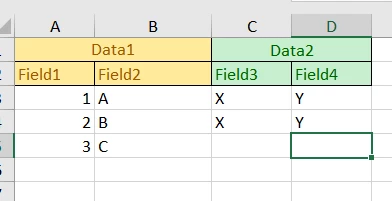
Has anyone figured out a good way to emulate nested/merged column headers in an editable grid?  I have attached an image to show what I mean.

As far as I know, there is no OOTB way to do this, but it must be a relatively common requirement.  Any suggestions would be greatly appreciated!

Best answer by csteward

You can try playing around with cards inside a!columnsLayout() above the grid, this will get you closest while still using the standard editable grid component:

a!localVariables(
  local!data: {
    {id: 1, text1: null, text2: null, text3: null, text4: null, text5: null, text6: null, text7: null, text8: null},
    {id: 2, text1: null, text2: null, text3: null, text4: null, text5: null, text6: null, text7: null, text8: null},
    {id: 3, text1: null, text2: null, text3: null, text4: null, text5: null, text6: null, text7: null, text8: null}
  },
  {
    a!columnsLayout(
      marginBelow: "NONE",
      spacing: "NONE",
      columns: {
        a!forEach(
          items: 1+enumerate(3),
          expression: 
          a!columnLayout(
            contents: {
              a!cardLayout(
                style: "INFO",
                contents: {
                  a!richTextDisplayField(
                    labelPosition: "COLLAPSED", 
                    align: "CENTER",
                    value: a!richTextItem(
                      text: concat("Header ",fv!item),
                      style: "STRONG"
                    )
                  )
                }
              )
            }
          )
        )
      }
    ),
    a!gridLayout(
      labelPosition: "COLLAPSED",
      headerCells: a!forEach(
        items: 1+enumerate(6),
        expression: a!gridLayoutHeaderCell(label: concat("Column ",fv!item), align: "CENTER")
      )
    )
  }
)

8 replies

csteward
April 28, 2021

You are correct there is no way to achieve this within the standard grid components OOTB.  However, you can create a custom grid by combining other components, such as below.

a!localVariables(
  local!data: {
    {id: 1, text1: null, text2: null, text3: null, text4: null, text5: null, text6: null, text7: null, text8: null},
    {id: 2, text1: null, text2: null, text3: null, text4: null, text5: null, text6: null, text7: null, text8: null},
    {id: 3, text1: null, text2: null, text3: null, text4: null, text5: null, text6: null, text7: null, text8: null}
  },
  {
    a!columnsLayout(
      marginBelow: "NONE",
      spacing: "NONE",
      columns: {
        a!columnLayout(
          contents: {
            a!cardLayout(
              style: "INFO",
              contents: {
                a!richTextDisplayField(
                  align: "CENTER",
                  labelPosition: "COLLAPSED",
                  value: a!richTextItem(
                    text: "Header 1",
                    style: "STRONG"
                  )
                )
              }
            )
          }
        ),
        a!columnLayout(
          contents: {
            a!cardLayout(
              style: "INFO",
              contents: {
                a!richTextDisplayField(
                  align: "CENTER",
                  labelPosition: "COLLAPSED",
                  value: a!richTextItem(
                    text: "Header 2",
                    style: "STRONG"
                  )
                )
              }
            )
          }
        )
      }
    ),
    a!columnsLayout(
      marginBelow: "NONE",
      spacing: "NONE",
      columns: {
        a!columnLayout(
          contents: {
            a!cardLayout(
              style: "WARN",
              contents: {
                a!richTextDisplayField(
                  align: "CENTER",
                  labelPosition: "COLLAPSED",
                  value: a!richTextItem(
                    text: "Sub Header A",
                    style: "STRONG"
                  )
                )
              }
            )
          }
        ),
        a!columnLayout(
          contents: {
            a!cardLayout(
              style: "WARN",
              contents: {
                a!richTextDisplayField(
                  align: "CENTER",
                  labelPosition: "COLLAPSED",
                  value: a!richTextItem(
                    text: "Sub Header B",
                    style: "STRONG"
                  )
                )
              }
            )
          }
        ),
        a!columnLayout(
          contents: {
            a!cardLayout(
              style: "WARN",
              contents: {
                a!richTextDisplayField(
                  align: "CENTER",
                  labelPosition: "COLLAPSED",
                  value: a!richTextItem(
                    text: "Sub Header C",
                    style: "STRONG"
                  )
                )
              }
            )
          }
        ),
        a!columnLayout(
          contents: {
            a!cardLayout(
              style: "WARN",
              contents: {
                a!richTextDisplayField(
                  align: "CENTER",
                  labelPosition: "COLLAPSED",
                  value: a!richTextItem(
                    text: "Sub Header D",
                    style: "STRONG"
                  )
                )
              }
            )
          }
        ),
      }
    ),    
    a!forEach(
      items: local!data,
      expression: 
      a!columnsLayout(
        marginBelow: "NONE",
        spacing: "NONE",
        columns: {
          a!columnLayout(
            contents: {
              a!textField(
                labelPosition: "COLLAPSED",
                value: fv!item.text1,
                saveInto: local!data[fv!index].text1
              )
            }
          ),
          a!columnLayout(
            contents: {
              a!textField(
                labelPosition: "COLLAPSED",
                value: fv!item.text2,
                saveInto: local!data[fv!index].text2
              )
            }
          ),
          a!columnLayout(
            contents: {
              a!textField(
                labelPosition: "COLLAPSED",
                value: fv!item.text3,
                saveInto: local!data[fv!index].text3
              )
            }
          ),
          a!columnLayout(
            contents: {
              a!textField(
                labelPosition: "COLLAPSED",
                value: fv!item.text4,
                saveInto: local!data[fv!index].text4
              )
            }
          ),
          a!columnLayout(
            contents: {
              a!textField(
                labelPosition: "COLLAPSED",
                value: fv!item.text5,
                saveInto: local!data[fv!index].text5
              )
            }
          ),
          a!columnLayout(
            contents: {
              a!textField(
                labelPosition: "COLLAPSED",
                value: fv!item.text6,
                saveInto: local!data[fv!index].text6
              )
            }
          ),
          a!columnLayout(
            contents: {
              a!textField(
                labelPosition: "COLLAPSED",
                value: fv!item.text7,
                saveInto: local!data[fv!index].text7
              )
            }
          ),
          a!columnLayout(
            contents: {
              a!textField(
                labelPosition: "COLLAPSED",
                value: fv!item.text8,
                saveInto: local!data[fv!index].text8
              )
            }
          )
        }
      )
    ),
    a!richTextDisplayField(
      labelPosition: "COLLAPSED",
      value: {
        a!richTextIcon(
          icon: "plus",
          color: "ACCENT"
        ),
        a!richTextItem(
          text: "Add a Row",
          link: a!dynamicLink(
            label: "Add a Row",
            value: {id: count(local!data)+1, text1: null, text2: null, text3: null, text4: null, text5: null, text6: null, text7: null, text8: null},
            saveInto: {
              a!save(
                local!data,
                append(
                  local!data,
                  save!value
                )
              )
            }
          )
        )
      }
    )
  }
),

May 13, 2021

Thank you for the suggestion!  I am a bit worried about performance because the grid will have many rows.  Do you know of any way that I could use a normal editable grid, but somehow line up a card above a specific number of the columns?  Or another elegant way to denote that columns are grouped?

csteward
cstewardAnswer
May 13, 2021

You can try playing around with cards inside a!columnsLayout() above the grid, this will get you closest while still using the standard editable grid component:

a!localVariables(
  local!data: {
    {id: 1, text1: null, text2: null, text3: null, text4: null, text5: null, text6: null, text7: null, text8: null},
    {id: 2, text1: null, text2: null, text3: null, text4: null, text5: null, text6: null, text7: null, text8: null},
    {id: 3, text1: null, text2: null, text3: null, text4: null, text5: null, text6: null, text7: null, text8: null}
  },
  {
    a!columnsLayout(
      marginBelow: "NONE",
      spacing: "NONE",
      columns: {
        a!forEach(
          items: 1+enumerate(3),
          expression: 
          a!columnLayout(
            contents: {
              a!cardLayout(
                style: "INFO",
                contents: {
                  a!richTextDisplayField(
                    labelPosition: "COLLAPSED", 
                    align: "CENTER",
                    value: a!richTextItem(
                      text: concat("Header ",fv!item),
                      style: "STRONG"
                    )
                  )
                }
              )
            }
          )
        )
      }
    ),
    a!gridLayout(
      labelPosition: "COLLAPSED",
      headerCells: a!forEach(
        items: 1+enumerate(6),
        expression: a!gridLayoutHeaderCell(label: concat("Column ",fv!item), align: "CENTER")
      )
    )
  }
)
