omj2851
June 13, 2024
Solved

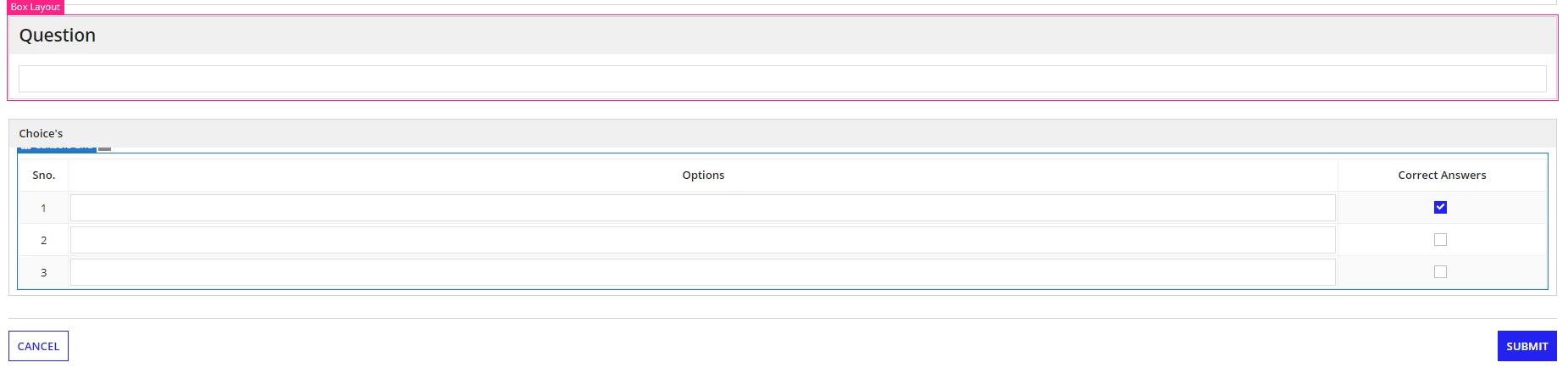
Multicheck checkbox

  • June 13, 2024
  • 4 replies
  • 0 views

How can we select the multiple choices in a check box field.

the current code that i am using right now is attached here with for your reference.

if(
ri!questions['recordType!{9f9ccdcb-c623-460d-b62e-11edf107c89f}MCS Questions.fields.{d24285e2-2025-4026-a79d-369fe6874d09}Style'] = cons!MCS_OPTIONSTYLE_POINTER[2],
a!checkboxField(
choiceLabels: { " " },
choiceValues: { true },
value: fv!item['recordType!{ed28cd83-aecc-434c-ac3c-48f88d5ab332}MCS_ANSWERS.fields.{d4e78775-ad64-4f7a-9881-ff6dac1ec243}isCorrect'],
saveInto: {
fv!item['recordType!{ed28cd83-aecc-434c-ac3c-48f88d5ab332}MCS_ANSWERS.fields.{d4e78775-ad64-4f7a-9881-ff6dac1ec243}isCorrect'],
a!save(
ri!answers,
a!forEach(
items: ri!answers,
expression: if(
fv!index <> local!presentindex,
a!update(
fv!item,
'recordType!{ed28cd83-aecc-434c-ac3c-48f88d5ab332}MCS_ANSWERS.fields.{d4e78775-ad64-4f7a-9881-ff6dac1ec243}isCorrect',
null
),
fv!item
)
)
)
},
align: "CENTER"
),

Best answer by shubhama926776

 [mention:67d3e8c7ee954087ae38b3a86b2789c3:e9ed411860ed4f2ba0265705b8793d05]  I have updated your code for your reference.


a!checkboxField(
  choiceLabels: { " " },
  choiceValues: { true },
  value: 
if(
fv!item['recordType!{ed28cd83-aecc-434c-ac3c-48f88d5ab332}.fields.{d4e78775-ad64-4f7a-9881-ff6dac1ec243}'],
true,
null
),
  saveInto: 
  a!save(
    fv!item['recordType!{ed28cd83-aecc-434c-ac3c-48f88d5ab332}.fields.{d4e78775-ad64-4f7a-9881-ff6dac1ec243}'],
    if(isnull(save!value), false, true)
    ),
  align: "CENTER"
), 

You can refer this below checkbox code for your reference.
Let me know if you still have any question

a!localVariables(
  local!items: {
    a!map(id: 1, summary: "Item 1", primary:true,qty: 1, unitPrice: 10, dept: "Sales",   due: today() + 10),
    a!map(id: 2, summary: "Item 2", primary:false, qty: 2, unitPrice: 20, dept: "Finance", due: today() + 20),
    a!map(id: 3, summary: "Item 3", primary:true, qty: 3, unitPrice: 30, dept: "Sales",   due: today() + 30)
  },
  a!formLayout(
    contents: {
      a!gridLayout(
        headerCells: {
          a!gridLayoutHeaderCell(label: "Summary"),
          a!gridLayoutHeaderCell(label: "Qty", align: "RIGHT"),
          a!gridLayoutHeaderCell(label: "Primary", align: "RIGHT"),
          a!gridLayoutHeaderCell(label: "U/P", align: "RIGHT"),
          a!gridLayoutHeaderCell(label: "Amount", align: "RIGHT"),
          a!gridLayoutHeaderCell(label: "Department"),
          a!gridLayoutHeaderCell(label: "Due", align: "RIGHT"),
          a!gridLayoutHeaderCell(label: "Decision"),
          a!gridLayoutHeaderCell(label: "Reason")
        },
        columnConfigs: {
          a!gridLayoutColumnConfig(width: "DISTRIBUTE", weight: 5),
          a!gridLayoutColumnConfig(width: "DISTRIBUTE"),
          a!gridLayoutColumnConfig(width: "DISTRIBUTE"),
          a!gridLayoutColumnConfig(width: "DISTRIBUTE"),
          a!gridLayoutColumnConfig(width: "DISTRIBUTE", weight: 2),
          a!gridLayoutColumnConfig(width: "DISTRIBUTE", weight: 3),
          a!gridLayoutColumnConfig(width: "DISTRIBUTE", weight: 3),
          a!gridLayoutColumnConfig(width: "DISTRIBUTE", weight: 3),
          a!gridLayoutColumnConfig(width: "DISTRIBUTE", weight: 3)
        },
        rows: a!forEach(
          items:local!items,
          expression:{
            a!gridRowLayout(
              id: fv!index,
              contents: {
                a!textField(
                  /* Labels are not visible in grid cells but are necessary to meet accessibility requirements */
                  label: "summary " & fv!index,
                  value: fv!item.summary,
                  readOnly: true
                ),
                a!integerField(
                  label: "qty " & fv!index,
                  value: fv!item.qty,
                  readOnly: true,
                  align: "RIGHT"
                ),
                a!checkboxField(
                  choiceLabels: {""},
                  choiceValues: {true},
                  /* If fv!item.primary is false, set the value to null so that the checkbox is unchecked        */
                  value: if(fv!item.primary, true, null),
                   /*We want to save a false value when the checkbox  is unchecked, so we need to check whether       
                   save!value is null and update the variable if so */
                  saveInto: a!save(
                    fv!item.primary,
                    if(isnull(save!value), false, true)
                  ),
                  required: true,
                  requiredMessage: "You must check this box!"
                ),
                a!floatingPointField(
                  label: "unitPrice " & fv!index,
                  value: fv!item.unitPrice,
                  readOnly: true,
                  align: "RIGHT"
                ),
                a!textField(
                  label: "amount " & fv!index,
                  value: if(
                    or(isnull(fv!item.qty), isnull(fv!item.unitPrice)),
                    null,
                    a!currency(
                      isoCode: "USD",
                      value: fv!item.qty * fv!item.unitPrice
                    )
                  ),
                  readOnly: true,
                  align: "RIGHT"
                ),
                a!dropdownField(
                  label: "dept " & fv!index,
                  choiceLabels: {"Finance", "Sales"},
                  placeholder: "--Select-- ",
                  choiceValues: {"Finance", "Sales"},
                  value: fv!item.dept,
                  disabled: true
                ),
                a!dateField(
                  label: "due " & fv!index,
                  value: fv!item.due,
                  readOnly: true,
                  align: "RIGHT"
                ),
                a!dropdownField(
                  label: "decision " & fv!index,
                  choiceLabels: {"Approve", "Reject", "Need More Info"},
                  placeholder: "--Select-- ",
                  choiceValues: {"Approve", "Reject", "Need More Info"},
                  value: fv!item.decision,
                  saveInto: fv!item.decision,
                  required: true
                ),
                a!textField(
                  label: "reason" & fv!index,
                  value: fv!item.reason,
                  saveInto: fv!item.reason,
                  required: and(
                    not(isnull(fv!item.decision)),
                    fv!item.decision <> "Approve"
                  ),
                  requiredMessage: "A reason is required for items that are not approved"
                )
              }
            )
          }
        )
      )
    }
  )
)


4 replies

shubhama926776
Brainy
June 13, 2024

I hope you are talking about multiple choice option to check in checkbox field.

Replace the single empty string in choiceLabels with an array of labels for your checkbox options.
Update choiceValues to be an array with corresponding values for each label. These values can be any data type, not just boolean.

choiceLabels: { "Option 1", "Option 2", "Option 3" },
choiceValues: { 1, 2, 3 },

शुभम्
omj2851
omj2851Author
June 13, 2024

Hi [mention:dea33493db6342c9a73dc108d45120c0:e9ed411860ed4f2ba0265705b8793d05] 

Actually i am trying to save the check box's for multiple row's in the given grid at the same point of time.

shubhama926776
Brainy
June 14, 2024

 [mention:67d3e8c7ee954087ae38b3a86b2789c3:e9ed411860ed4f2ba0265705b8793d05]  I have updated your code for your reference.


a!checkboxField(
  choiceLabels: { " " },
  choiceValues: { true },
  value: 
if(
fv!item['recordType!{ed28cd83-aecc-434c-ac3c-48f88d5ab332}.fields.{d4e78775-ad64-4f7a-9881-ff6dac1ec243}'],
true,
null
),
  saveInto: 
  a!save(
    fv!item['recordType!{ed28cd83-aecc-434c-ac3c-48f88d5ab332}.fields.{d4e78775-ad64-4f7a-9881-ff6dac1ec243}'],
    if(isnull(save!value), false, true)
    ),
  align: "CENTER"
), 

You can refer this below checkbox code for your reference.
Let me know if you still have any question

a!localVariables(
  local!items: {
    a!map(id: 1, summary: "Item 1", primary:true,qty: 1, unitPrice: 10, dept: "Sales",   due: today() + 10),
    a!map(id: 2, summary: "Item 2", primary:false, qty: 2, unitPrice: 20, dept: "Finance", due: today() + 20),
    a!map(id: 3, summary: "Item 3", primary:true, qty: 3, unitPrice: 30, dept: "Sales",   due: today() + 30)
  },
  a!formLayout(
    contents: {
      a!gridLayout(
        headerCells: {
          a!gridLayoutHeaderCell(label: "Summary"),
          a!gridLayoutHeaderCell(label: "Qty", align: "RIGHT"),
          a!gridLayoutHeaderCell(label: "Primary", align: "RIGHT"),
          a!gridLayoutHeaderCell(label: "U/P", align: "RIGHT"),
          a!gridLayoutHeaderCell(label: "Amount", align: "RIGHT"),
          a!gridLayoutHeaderCell(label: "Department"),
          a!gridLayoutHeaderCell(label: "Due", align: "RIGHT"),
          a!gridLayoutHeaderCell(label: "Decision"),
          a!gridLayoutHeaderCell(label: "Reason")
        },
        columnConfigs: {
          a!gridLayoutColumnConfig(width: "DISTRIBUTE", weight: 5),
          a!gridLayoutColumnConfig(width: "DISTRIBUTE"),
          a!gridLayoutColumnConfig(width: "DISTRIBUTE"),
          a!gridLayoutColumnConfig(width: "DISTRIBUTE"),
          a!gridLayoutColumnConfig(width: "DISTRIBUTE", weight: 2),
          a!gridLayoutColumnConfig(width: "DISTRIBUTE", weight: 3),
          a!gridLayoutColumnConfig(width: "DISTRIBUTE", weight: 3),
          a!gridLayoutColumnConfig(width: "DISTRIBUTE", weight: 3),
          a!gridLayoutColumnConfig(width: "DISTRIBUTE", weight: 3)
        },
        rows: a!forEach(
          items:local!items,
          expression:{
            a!gridRowLayout(
              id: fv!index,
              contents: {
                a!textField(
                  /* Labels are not visible in grid cells but are necessary to meet accessibility requirements */
                  label: "summary " & fv!index,
                  value: fv!item.summary,
                  readOnly: true
                ),
                a!integerField(
                  label: "qty " & fv!index,
                  value: fv!item.qty,
                  readOnly: true,
                  align: "RIGHT"
                ),
                a!checkboxField(
                  choiceLabels: {""},
                  choiceValues: {true},
                  /* If fv!item.primary is false, set the value to null so that the checkbox is unchecked        */
                  value: if(fv!item.primary, true, null),
                   /*We want to save a false value when the checkbox  is unchecked, so we need to check whether       
                   save!value is null and update the variable if so */
                  saveInto: a!save(
                    fv!item.primary,
                    if(isnull(save!value), false, true)
                  ),
                  required: true,
                  requiredMessage: "You must check this box!"
                ),
                a!floatingPointField(
                  label: "unitPrice " & fv!index,
                  value: fv!item.unitPrice,
                  readOnly: true,
                  align: "RIGHT"
                ),
                a!textField(
                  label: "amount " & fv!index,
                  value: if(
                    or(isnull(fv!item.qty), isnull(fv!item.unitPrice)),
                    null,
                    a!currency(
                      isoCode: "USD",
                      value: fv!item.qty * fv!item.unitPrice
                    )
                  ),
                  readOnly: true,
                  align: "RIGHT"
                ),
                a!dropdownField(
                  label: "dept " & fv!index,
                  choiceLabels: {"Finance", "Sales"},
                  placeholder: "--Select-- ",
                  choiceValues: {"Finance", "Sales"},
                  value: fv!item.dept,
                  disabled: true
                ),
                a!dateField(
                  label: "due " & fv!index,
                  value: fv!item.due,
                  readOnly: true,
                  align: "RIGHT"
                ),
                a!dropdownField(
                  label: "decision " & fv!index,
                  choiceLabels: {"Approve", "Reject", "Need More Info"},
                  placeholder: "--Select-- ",
                  choiceValues: {"Approve", "Reject", "Need More Info"},
                  value: fv!item.decision,
                  saveInto: fv!item.decision,
                  required: true
                ),
                a!textField(
                  label: "reason" & fv!index,
                  value: fv!item.reason,
                  saveInto: fv!item.reason,
                  required: and(
                    not(isnull(fv!item.decision)),
                    fv!item.decision <> "Approve"
                  ),
                  requiredMessage: "A reason is required for items that are not approved"
                )
              }
            )
          }
        )
      )
    }
  )
)
शुभम्
