
December 9, 2024
Question

Multiple Boolean Checkboxboxfield only one checkbox can be selected at a time

  • December 9, 2024
  • 5 replies
  • 0 views

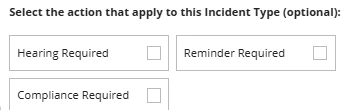
I need help with a concern. I have multiple record type fields that are boolean, and I need only one of them to have a value of true, while the rest should be null.

a!localVariables(
local!hearingSelected,
local!reminderSelected,
local!complianceSelected,


a!columnsLayout(
columns: {
a!columnLayout(
contents: {

a!checkboxField(
choiceLabels: {
"Hearing Required"
},
choiceValues: {
true
},
labelPosition: "COLLAPSED",
value: if(
ri!record['recordType!{8a8a403a-8fe2-4ed4-a3a3-9dd7b01f720d}SCA_IncidentTypev2.fields.{017a84f6-9869-4444-887a-3eddf23e1e97}hearingrequired'],
true,
null
),
saveInto: {
local!hearingSelected,
a!save(
ri!record['recordType!{8a8a403a-8fe2-4ed4-a3a3-9dd7b01f720d}SCA_IncidentTypev2.fields.{017a84f6-9869-4444-887a-3eddf23e1e97}hearingrequired'],
if(
isnull(
save!value
),
false,
true
)
)},
required: false,
choiceLayout: "COMPACT",
choiceStyle: "CARDS"
)
}
),
a!columnLayout(
contents: {
a!checkboxField(
choiceLabels: {
"Reminder Required"
},
choiceValues: {
true
},
labelPosition: "COLLAPSED",
value: if(
ri!record['recordType!{8a8a403a-8fe2-4ed4-a3a3-9dd7b01f720d}SCA_IncidentTypev2.fields.{edfd85a1-7524-4eeb-a1f3-a71da5e0f275}reminderrequired'],
true,
null
),
saveInto: {
local!reminderSelected,
a!save(
ri!record['recordType!{8a8a403a-8fe2-4ed4-a3a3-9dd7b01f720d}SCA_IncidentTypev2.fields.{edfd85a1-7524-4eeb-a1f3-a71da5e0f275}reminderrequired'],
if(
isnull(
save!value
),
false,
true
)
)},
required: false,
choiceLayout: "COMPACT",
choiceStyle: "CARDS"
)
}
),
a!columnLayout(
contents: {
a!checkboxField(
choiceLabels: {
"Compliance Required"
},
choiceValues: {
true
},
labelPosition: "COLLAPSED",
value: if(
ri!record['recordType!{8a8a403a-8fe2-4ed4-a3a3-9dd7b01f720d}SCA_IncidentTypev2.fields.{c058a7ed-fb86-46fd-9b9a-d8fe5de7f297}compliancerequired'],
true,
null
),
saveInto:
{
local!complianceSelected,
a!save(
ri!record['recordType!{8a8a403a-8fe2-4ed4-a3a3-9dd7b01f720d}SCA_IncidentTypev2.fields.{c058a7ed-fb86-46fd-9b9a-d8fe5de7f297}compliancerequired'],
if(
isnull(
save!value
),
false,
true
)
)},
required: false,
choiceLayout: "COMPACT",
choiceStyle: "CARDS"
)
}
)

}

)

)
5 replies

sandhyab4212
December 9, 2024

Hi [mention:203551a7d3bd4173b040fb5b4bd8a8b8:e9ed411860ed4f2ba0265705b8793d05] 

When you are selecting one checkbox set other checkboxes as null in the selected value saveinto.

When you are selecting Hearing Required set null as compliance and reminder, the same way you can implement for compliance and reminder as well.

If the selected value is hearing - set null as compliance and reminder in hearing checkbox saveinto.

If the selected value is reminder- set null as hearing and compliance in the reminder checkbox saveinto.

If the selected value is compliance- set null as hearing and reminder in the complaince checkbox saveinto

eg:

In hearing checkbox saveinto

{

a!save(

local!reminderSelected, null()

),

a!save(

local!complianceSelected, null()

)

}

sandhyab4212
December 9, 2024


a!localVariables(
  local!hearingSelected,
  local!reminderSelected,
  local!complianceSelected,
  a!columnsLayout(
    columns: {
      a!columnLayout(
        contents: {
          a!checkboxField(
            choiceLabels: { "Hearing Required" },
            choiceValues: { true },
            labelPosition: "COLLAPSED",
            value: local!hearingSelected,
            saveInto: {
              local!hearingSelected,
              a!save(
                {
                  local!complianceSelected,
                  local!reminderSelected
                },
                null()
              )
            },
            required: false,
            choiceLayout: "COMPACT",
            choiceStyle: "CARDS"
          )
        }
      ),
      a!columnLayout(
        contents: {
          a!checkboxField(
            choiceLabels: { "Reminder Required" },
            choiceValues: { true },
            labelPosition: "COLLAPSED",
            value: local!reminderSelected,
            saveInto: {
              local!reminderSelected,
              a!save(
                {
                  local!complianceSelected,
                  local!hearingSelected
                },
                null()
              )
            },
            required: false,
            choiceLayout: "COMPACT",
            choiceStyle: "CARDS"
          )
        }
      ),
      a!columnLayout(
        contents: {
          a!checkboxField(
            choiceLabels: { "Compliance Required" },
            choiceValues: { true },
            labelPosition: "COLLAPSED",
            value: local!complianceSelected,
            saveInto: {
              local!complianceSelected,
              a!save(
                {
                  local!hearingSelected,
                  local!reminderSelected
                },
                null()
              )
            },
            required: false,
            choiceLayout: "COMPACT",
            choiceStyle: "CARDS"
          )
        }
      )
    }
  )
)

Try this!

December 9, 2024

Thank you i got it now. 

stefanhelzle0001
December 9, 2024

Did you consider to use radio buttons? This is exactly what they are made for. From a UX perspective, building singular check boxes is misleading.

peter.lewis
Employee
December 9, 2024

Yeah completely agree with Stefan - it will be easier to configure as a radio button, and your users are more likely to understand it correctly when it uses that pattern.