

shaikg2747
May 11, 2023
Question

Need help on read only grid

  • May 11, 2023
  • 11 replies
  • 0 views

load(
  local!empStatus: {
    { name: "Ajay", status: "test1" },
    { name: "Ajay", status: "test2" },
    { name: "kumar", status: "test3" },
    { name: "phani", status: "test4" }
  },
  local!empDetail: {
    { name: "Ajay" },
    { name: "kumar" },
    { name: "phani" }
  },
  a!boxLayout(
    label: "Form",
    contents: {
      a!gridField(
        label: "grid",
        data: local!empDetail,
        pageSize: 5,
        pagingSaveInto: fv!pagingInfo,
        columns: {
          a!gridColumn(label: "Name", value: fv!row.name),
          a!gridColumn(
            label: "Status",
            value: a!forEach(
              items: local!empStatus,
              expression: fv!item.status
            )
          )
        }
      )
    }
  )
)
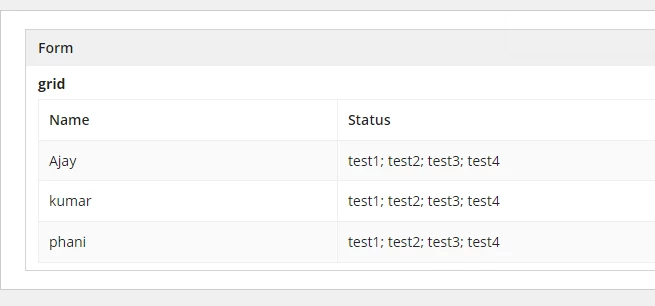
Hi All,

I have added the sample code and the output where I need to display the corresponding status for that particular name.

for example: Name: Ajay   Status should be Test1, Test2 and similarly

for                Name: Kumar Status should be Test3

and for         Name: Phani status should be Test4.

Thanks in advance,

Gousii.

11 replies

May 11, 2023

load(
  local!empStatus: {
    { name: "Ajay", status: "test1" },
    { name: "Ajay", status: "test2" },
    { name: "kumar", status: "test3" },
    { name: "phani", status: "test4" }
  },
  local!empDetail: {
    { name: "Ajay" },
    { name: "kumar" },
    { name: "phani" }
  },
  a!boxLayout(
    label: "Form",
    contents: {
      a!gridField(
        label: "grid",
        data: local!empDetail,
        pageSize: 5,
        pagingSaveInto: fv!pagingInfo,
        columns: {
          a!gridColumn(label: "Name", value: fv!row.name),
          a!gridColumn(
            label: "Status",
            value: joinarray(
              index(
                local!empStatus.status,
                wherecontains(
                  fv!row.name,
                  touniformstring(local!empStatus.name)
                ),
                {}
              ),
              ","
            )
          )
        }
      )
    }
  )
)

shaikg2747
May 11, 2023

Thank You!!!

tejpals0001
May 11, 2023

load(
  local!empStatus: {
    { name: "Ajay", status: "test1" },
    { name: "Ajay", status: "test2" },
    { name: "kumar", status: "test3" },
    { name: "phani", status: "test4" }
  },
  local!empDetail: {
    { name: "Ajay" },
    { name: "kumar" },
    { name: "phani" }
  },
  a!boxLayout(
    label: "Form",
    contents: {
      a!gridField(
        label: "grid",
        data: local!empDetail,
        pageSize: 5,
        pagingSaveInto: fv!pagingInfo,
        columns: {
          a!gridColumn(label: "Name", value: fv!row.name),
          a!gridColumn(
            label: "Status",
            value: a!forEach(
              items: local!empStatus,
              expression:   if(fv!row.name=fv!item.name,fv!item.status,{})
            )
          
          )
        }
      )
    }
  )
)


May 11, 2023

It is more readable in a code box[emoticon:c4563cd7d5574777a71c318021cbbcc8]

tejpals0001
May 11, 2023

okay thanks, next time I will.[emoticon:c4563cd7d5574777a71c318021cbbcc8]

harshitb6843
May 11, 2023

Why are you still using load instead of localVariables? 

harshitb6843
May 11, 2023

Also, a couple of observations

a!forEach(
              items: local!empStatus,
              expression: fv!item.status
            )

Here, forEach is not being used. It is useless. Rather you can just write local!empStatus.status. 

pagingSaveInto: fv!pagingInfo,

fv!pagingInfo gives you the current pagingInfo. You should use a variable instead that you are passing in your query as pagingInfo

shaikg2747
May 11, 2023

Sure Thank You!!

mikes0011
Brainy
May 11, 2023

Sanchit and Tejpals already gave you workable solutions above (and props to Harshit for pointing out that, really at this point everyone should be using a!localVariables for this...)

But I wanted to chime in with a recommendation towards a usual approach of mine, which is to abstract complicated processing behind additional local variables when necessary.  In this case the idea is to construct a whole new array-of-maps that will contain the "Name" property as well as a pre-evaluated copy of the Statuses looked up from the predefined Status List, formatted cleanly and separated by a comma (just for example).  Then we just use that new local variable as the source for the grid; any changes made to the original data will cause this to auto-update too, so we should be good there.

One of the main draws to this approach is we don't have to do potentially complex processing in the grid column itself (which isn't always bad to do, but often will make it easier to understand the code in the future, among other things):

The entire code body isn't much changed, other than the addition of the declaration for local!gridData:

a!localVariables(
  local!empStatus: {
    { name: "Ajay", status: "test1" },
    { name: "Ajay", status: "test2" },
    { name: "kumar", status: "test3" },
    { name: "phani", status: "test4" }
  },
  local!empDetail: {
    { name: "Ajay" },
    { name: "kumar" },
    { name: "phani" }
  },
  
  local!gridData: a!forEach(
    local!empDetail,
    a!map(
      name: fv!item.name,
      statusList: joinarray(
        index(
          local!empStatus.status,
          wherecontains(fv!item.name, local!empStatus.name),
          {}
        ),
        ", "
      )
    )
  ),
  
  a!boxLayout(
    label: "Form",
    contents: {
      a!gridField(
        label: "grid",
        data: local!gridData,
        pageSize: 5,
        columns: {
          a!gridColumn(
            label: "Name",
            sortField: "name",
            value: fv!row.name
          ),
          a!gridColumn(
            label: "Status",
            value: fv!row.statusList
          )
        }
      )
    }
  )
)

The Expression Guru