

vempatir680997
December 3, 2024
Question

Need help with this error

  • December 3, 2024
  • 8 replies
  • 0 views

Hi Everyone,

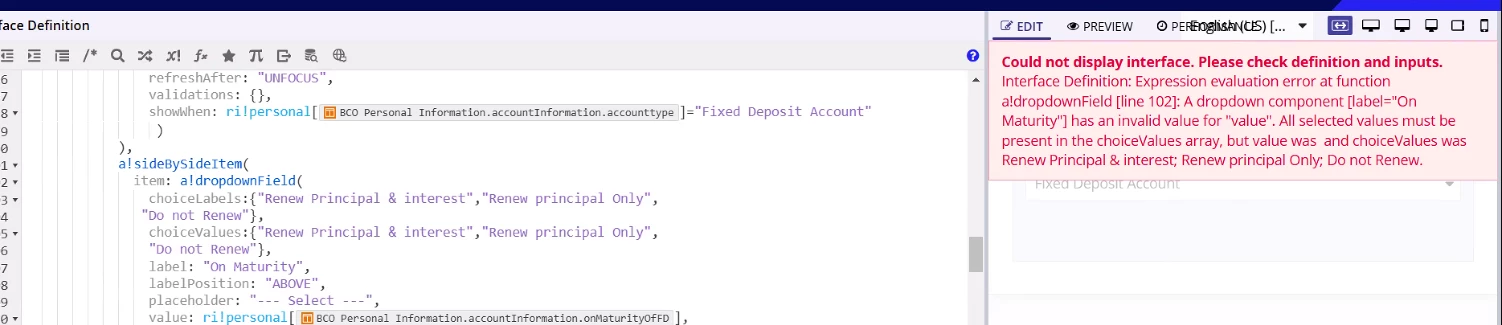
I am getting error in the dropdown field,
i have called 3 dropdown fields in interface level when i am selecting the value from 1st dropdown am getting error like this and this dropdown is 2nd and also i have passed the values and labels same only still i am getting error like this (the data is saving in the child records i have used parent records to pass the data to child )
8 replies

prateekv988933
December 3, 2024

Hi [mention:2d3c185fea1b4a2ba4053184eca60c71:e9ed411860ed4f2ba0265705b8793d05] ,

Here’s what I understand from the attached query and snippet:

Are you using dependent dropdowns? If the value of Dropdown 2 should depend on Dropdown 1 (i.e., the choice labels/values in Dropdown 2 change based on the selection in Dropdown 1), try setting the value of Dropdown 2 to null in the saveInto parameter of Dropdown 1. This will reset Dropdown 2 whenever the selection in Dropdown 1 changes.

Alternatively, if it's just a single dropdown, you can try using a toString type cast or an if(isNull(val),{},val) statement to handle null values.

Let me know if this helps! Or, if you're still facing issues, feel free to share the complete code snippet and provide a bit more context for a more detailed analysis.

vempatir680997
December 4, 2024

no i am not using dependent dropdown.

gayatria0439
December 4, 2024

Hi [mention:2d3c185fea1b4a2ba4053184eca60c71:e9ed411860ed4f2ba0265705b8793d05] , Could you please send the snippet of your code, as I need to check the 'saveinto' parameter and the rule input that you created

prasantap0900
December 4, 2024

You can use local variables in savento then you can map local variables with rue input. 

a!localVariables(
  local!save,
  {
  a!dropdownField(
    choiceLabels: {1, 2, 3, 4, 5, 6, 7, 8, 9, 10, 11, 12},
    choiceValues: {1, 2, 3, 4, 5, 6, 7, 8, 9, 10, 11, 12},
    label: "Dropdown",
    labelPosition: "ABOVE",
    placeholder: "--- Select a Value ---",
    value: local!save,
    saveInto:{
      local!save,
      a!save(
        ri!save,
        local!save
      )
    },
    searchDisplay: "AUTO",
    validations: {}
  )
}
)

vempatir680997
December 11, 2024

got it thanks...

December 11, 2024

you can also add the check if value of variable is null then proper null will be used else use the variable.

sandhyab4212
December 4, 2024

Hi [mention:2d3c185fea1b4a2ba4053184eca60c71:e9ed411860ed4f2ba0265705b8793d05] 

Did you get solution for this?

mikes0011
Brainy
December 4, 2024

Some appian components are picky between "true null" (where the value = NULL aka "null()"), versus merely "blank text", i.e. when the value = "".

To test this, temporarily replace your "value" parameter with "null()" instead of the value you're trying to reference.  Does the error go away, and you see your placeholder text as expected?  That means it doesn't like the value you're currently trying to pass in by default.