
naseemas732970
July 3, 2024
Question

Need Popup Screen when we click icon in Interface

  • July 3, 2024
  • 4 replies
  • 0 views

Hi Team, When I click the chevron up icon in the header, a grid should appear below the icon like a pop-up screen similar to the screen shot attached.

1) I have tried to create similar to the popup by using card layout. In card layout I'm showing the grid, when I click on the icon, the card height increases too much, causing the content move down.

2)I also tried using record action, but the pop-up screen appears in the middle of the screen.
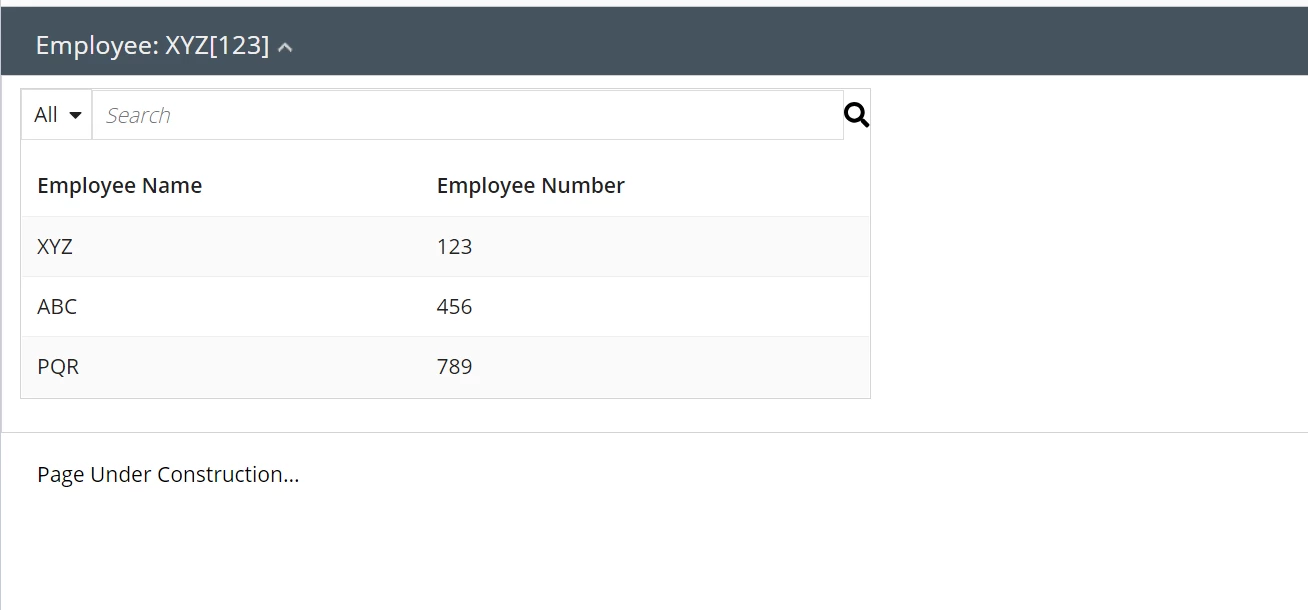
Could you please guide me how to achieve this

4 replies

konduruc733182
July 3, 2024

Hello [mention:a281a261dfa84f29857af6c5e0627927:e9ed411860ed4f2ba0265705b8793d05] 

Pop-up within the interface is not a possible option but you can recreate using Stefan's solution here

https://appian.rocks/2023/06/20/popup-windows-in-appian/

Have you tried using the collapsible options in Section Layout and Box Layout?

use the collapsible, isInitiallyCollapsed options. 

naseemas732970
July 3, 2024

Hi [mention:2df2892a4df7486f9775b4d2f0e405fd:e9ed411860ed4f2ba0265705b8793d05] ,


Thanks for your speedy reply.
I understand that above is for creating pop up.


But my clarification here is once pop-up box is created, the already existing screen below pop up is moving down.
Pop up screen has to be on top of existing screen. Can you please guide me on this?

konduruc733182
July 3, 2024

In Appian we can use record actions for pop-up screens but in your case I would recommend to go with box or section layout. A pop-up in midst of your interface without disturbing the alignment of other sections is not possible.