
February 11, 2026
Solved

Need to restrict upto 2 decimal places

  • February 11, 2026
  • 10 replies
  • 0 views

Hi All,

i have floatingpoint field in my UI, i want to restrict user from typing values upto 2 decimal point and Below is my expected results

  • If the user enters 12, it will be rounded off to 12.00
  • If the user enters 12.1, it will be rounded off to 12.10
  • If the user tries to enter 12.678, it will not be allowed. The entry will be cut off at 12.67

but what is the issue am facing is its allowing me to enter more values after decimal point and also if i give round values it's not taking .00 value.

below is my code

a!floatingPointField(
  label: "Dental Premium (Annual)",
  labelPosition: "ABOVE",
  value: ri!intakePreminumDetails['recordType!{4d82eb7f-ba46-46a2-a7dc-969f4ffcf344}GSE_SCL Intake Premium Details.fields.{cef89c65-a133-4766-bbb5-93cbcceddcab}dentalPremium'],
  saveInto: {
    a!save(ri!intakePreminumDetails['recordType!{4d82eb7f-ba46-46a2-a7dc-969f4ffcf344}GSE_SCL Intake Premium Details.fields.{cef89c65-a133-4766-bbb5-93cbcceddcab}dentalPremium'],
    if(a!isNotNullOrEmpty(save!value),fixed(save!value,2),null)),
   
  },
 

my rule input source is recordtype. and which of data type as decimal and also in db its decimal(10,2) .
note(am using external db (sql server management studio) using connected system)

Best answer by mikes0011

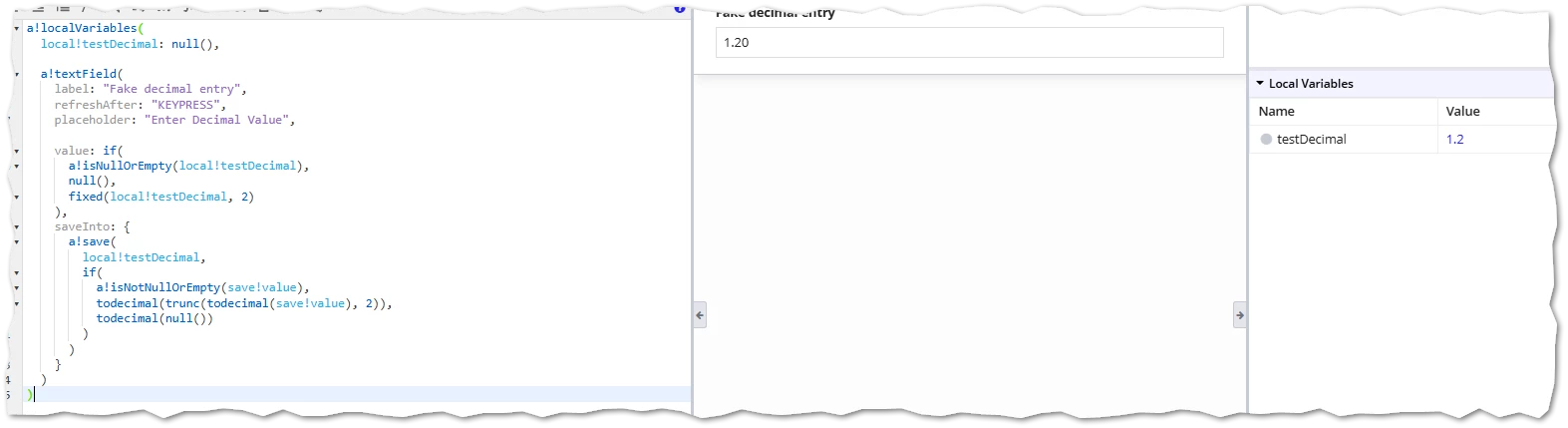
Example provided: we're using "fixed" for the display-time to make sure all decimal places are DISPLAYED even when they are zero.

(note: you do not need to STORE these extra places in the "decimal" data, as it is actually impossible to do so - if it should be SHOWN to the end user, it's up to you to do that on the user-facing side.) 

"Save into" is null-checked and truncated to 2 decimal places upon entry.  As I mentioned originally, of course, nothing can really keep the user from entering extra spam digits after the decimal place, but they are not saved.  I don't know of any good workaround for that unfortunately - if you were dedicated to it, you could look into using the "character count" feature, but I don't know if you'd be able to update it dynamically enough to account for different values ahead of the decimal point.

a!localVariables(
  local!testDecimal: null(),

  a!textField(
    label: "Fake decimal entry",
    refreshAfter: "KEYPRESS",
    placeholder: "Enter Decimal Value",

    value: if(
      a!isNullOrEmpty(local!testDecimal),
      null(),
      fixed(local!testDecimal, 2)
    ),
    saveInto: {
      a!save(
        local!testDecimal,
        if(
          a!isNotNullOrEmpty(save!value),
          todecimal(trunc(todecimal(save!value), 2)),
          todecimal(null())
        )
      )
    }
  )
)

10 replies

mikes0011
Brainy
February 11, 2026

Easiest to just use a Text Field and sanitize the input similarly to how you already are.  You won't be able to prevent the user from typing some gibberish into the field, but you can at least instantly justify it.

mikes0011
mikes0011Answer
Brainy
February 11, 2026

Example provided: we're using "fixed" for the display-time to make sure all decimal places are DISPLAYED even when they are zero.

(note: you do not need to STORE these extra places in the "decimal" data, as it is actually impossible to do so - if it should be SHOWN to the end user, it's up to you to do that on the user-facing side.) 

"Save into" is null-checked and truncated to 2 decimal places upon entry.  As I mentioned originally, of course, nothing can really keep the user from entering extra spam digits after the decimal place, but they are not saved.  I don't know of any good workaround for that unfortunately - if you were dedicated to it, you could look into using the "character count" feature, but I don't know if you'd be able to update it dynamically enough to account for different values ahead of the decimal point.

a!localVariables(
  local!testDecimal: null(),

  a!textField(
    label: "Fake decimal entry",
    refreshAfter: "KEYPRESS",
    placeholder: "Enter Decimal Value",

    value: if(
      a!isNullOrEmpty(local!testDecimal),
      null(),
      fixed(local!testDecimal, 2)
    ),
    saveInto: {
      a!save(
        local!testDecimal,
        if(
          a!isNotNullOrEmpty(save!value),
          todecimal(trunc(todecimal(save!value), 2)),
          todecimal(null())
        )
      )
    }
  )
)

shubhama926776
February 12, 2026

a!floatingPointField cannot restrict decimal input during typing because it lacks a decimalPlaces parameter and relies on native browser number input behavior.
Try this

a!localVariables(
  local!dentalPremium: null,
  a!textField(
    label: "Dental Premium (Annual)",
    labelPosition: "ABOVE",
    refreshAfter: "UNFOCUS",
    value: if(
      a!isNullOrEmpty(local!dentalPremium),
      null,
      text(local!dentalPremium, "0.00")
    ),
    saveInto: a!save(
      local!dentalPremium,
      if(
        a!isNullOrEmpty(save!value),
        null,
        floor(todecimal(save!value) * 100) / 100
      )
    )
  )
)

February 12, 2026

Thanks [mention:9861aef97eb2483a8b76175d9eda1e37:e9ed411860ed4f2ba0265705b8793d05]  and [mention:b45a4f6a20b14a008e4e0ec732a8bf98:e9ed411860ed4f2ba0265705b8793d05]  .. using this i was able to achieve 80% but if i gave alphabets its throws error and it breaks the screen. Instead of that how can we show validation message .

mikes0011
Brainy
February 12, 2026

Oops - my null check in the saveInto should have done the null test against the "todecimal" version of the save!value just to make sure it contained anything valid after invalid characters are stripped out.  Here's mine again but with that one function added back in, and it works even when junk, text-only, or mixed (number and text) info is entered.

a!localVariables(
  local!testDecimal: null(),

  a!textField(
    label: "Fake decimal entry",
    refreshAfter: "KEYPRESS",
    placeholder: "Enter Decimal Value",

    value: if(
      a!isNullOrEmpty(local!testDecimal),
      null(),
      fixed(local!testDecimal, 2)
    ),
    saveInto: {
      a!save(
        local!testDecimal,
        if(
          a!isNotNullOrEmpty(todecimal(save!value)),
          todecimal(trunc(todecimal(save!value), 2)),
          todecimal(null())
        )
      )
    }
  )
)