
July 13, 2023
Question

Not able to filter a dropdown list of text values

  • July 13, 2023
  • 5 replies
  • 0 views

Hi! I´m trying to make a simple record filter of a dropdown list, which contains a list of text. To make the dropdown, I point to a constant which contains a text array with the name of the suppliers:
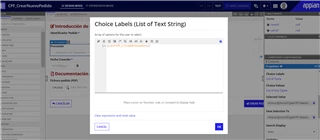
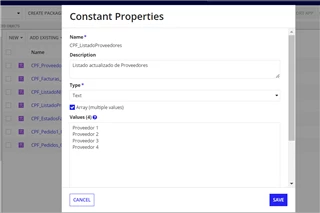
But the fact is that, when I try to make a simple filter, it doesn´t work. If I put a text value, nothing appears. If I try with an expression ("Proveedor 1") I have the following error:
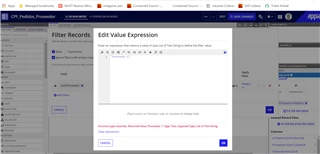
I think it´s because of the list, because the filters work properly in individual text fields.

What can I do to fix it?

    5 replies

    stefanhelzle0001
    Brainy
    July 13, 2023

    Can you provide the images in a higher resolution.

    Did you check all the tutorials and examples in the documentation?

    July 13, 2023

    Hi Stefan, I searched in lots of examples and tutorials in the documentation, also in related questions of the forums, but my doubt was not solved. 

    1) The constant is a Text Array with the Supplier Names

    2) I put the dropdown list os labels and values pointing the constant (works OK)

    3) When I try to make a filter of the record in another interface, the filter is not working properly. Its like if the fact that the dropdown has a list avoided me to make a text filter

    In this example I tried the filter with an expression: nomProveedor in "Proveedor 1" (error in the image)

    Also, I tried the filter directly with text (nomProveedor = Proveedor 1), but returns null value

    July 13, 2023

    Hi [mention:f1950f4100b949739ed29e1582abf1f2:e9ed411860ed4f2ba0265705b8793d05],

    Did you try, instead of giving as string "Proveedor 1", with {"Proveedor 1"} as list of Text String which is the expected output of the Edit Value Expression dialog box (refer your 3rd image)?

    Thanks,

    Bharathwaj RK