

venkataharishd0002
January 29, 2021
Solved

Null check is not working as expected

  • January 29, 2021
  • 6 replies
  • 0 views

Hi Team,

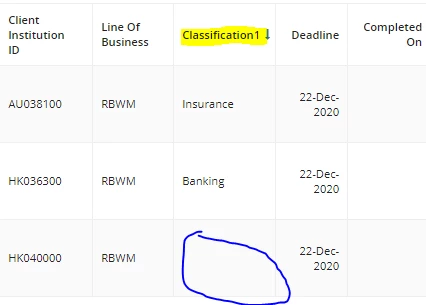
I'm having an old grid layout. I'm having a field "Classification", Currently if the data is null its showing as emply(rounded below).

Now i want to put a condition, if any of the value is null/emply i should display as "None'" otherwise as it is value

existing data 


      Classification

         Insurance

         Banking

       Null/Empty

Expected:

       Classification

         Insurance

         Banking

         None
Using the following code

a!gridTextColumn(
                            label: "Classification",
                            field:local!gridDatasubset.columnConfigs[31].field,
                            data: if(
                              rule!APN_isEmpty(local!gridDatasubset.data.c61),
                              "None",
                              if(
                                local!gridDatasubset.totalCount = 0,
                                {},
                                local!gridDatasubset.data.c61
                              )
                            )
                            ),

    Best answer by mikes0011

    Dang - the only other thought I have is maybe the field is getting returned with some non-null character like a space or a non-breaking space?  -- actually scratch that, i realized the real issue and spoke to it below:

    So... i'm not sure you're configuring your data: property quite correctly for the (now deprecated) a!gridTextColumn() rule.  If you are able to use the 19.2+ gridField, you should consider switching.  If you are unable to do this, i'm thinking your data: parameter should probably do something more like this:

    data: a!forEach(
      local!gridDatasubset.data,
      if( rule!isBlank(fv!item.c61), "(None)", fv!item.c61 )
    )

    The problem with the null check you're attempting to do above is that you're passing in the entire array of "c61" fields to "isBlank", instead of the data for the current row.  In my version we've fixed that issue.  Also there's no reason to do your if() statement checking for a totalcount of zero, because a!forEach cleanly executes zero times when local!gridDatasubset.data is empty.

    6 replies

    mikes0011
    Brainy
    January 29, 2021

    If you're using the standard Appian Common Objects rules that I assume, then you should be using rule!APN_isBlank() instead of isEmpty.  isEmpty checks whether an array is empty, but if you pass a single null element to it, the result will probably evaluate to a "false" value because that rule will see the input as an array containing a single null, and thus it is not an "empty array" as it was expecting.

    The Expression Guru
    venkataharishd0002
    January 29, 2021

    Still no luck [emoticon:ca08b2c27c2f40e993e89508acf29e0b]

    a!gridTextColumn(
                                label: "Classification", 
                                field:local!gridDatasubset.columnConfigs[31].field,
                                data: if(
                                  rule!APN_isBlank(tostring(index(local!gridDatasubset,"data","c61",null))),
                                  "None",
                                  if(
                                    local!gridDatasubset.totalCount = 0,
                                    {},
                                    local!gridDatasubset.data.c61
                                  )
                                )
                                ),

    mikes0011
    mikes0011Answer
    Brainy
    January 29, 2021

    Dang - the only other thought I have is maybe the field is getting returned with some non-null character like a space or a non-breaking space?  -- actually scratch that, i realized the real issue and spoke to it below:

    So... i'm not sure you're configuring your data: property quite correctly for the (now deprecated) a!gridTextColumn() rule.  If you are able to use the 19.2+ gridField, you should consider switching.  If you are unable to do this, i'm thinking your data: parameter should probably do something more like this:

    data: a!forEach(
      local!gridDatasubset.data,
      if( rule!isBlank(fv!item.c61), "(None)", fv!item.c61 )
    )

    The problem with the null check you're attempting to do above is that you're passing in the entire array of "c61" fields to "isBlank", instead of the data for the current row.  In my version we've fixed that issue.  Also there's no reason to do your if() statement checking for a totalcount of zero, because a!forEach cleanly executes zero times when local!gridDatasubset.data is empty.

    The Expression Guru