March 25, 2025
Solved

Null Pointer Exception while filling out a text field

  • March 25, 2025
  • 6 replies
  • 0 views

Hello! 

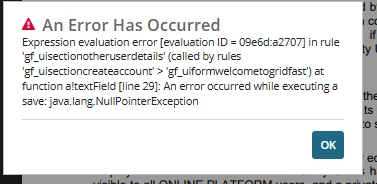
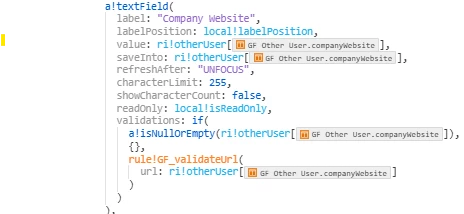
Does anyone know why a Null Exception Error is happening at this page? (see video) This is a form that's using a very simple logic for the text field. I checked the logs and didn't get anything there, so I tried remapping the record fields. That didn't work. The logic for this text field is very simple so I'm confused why it would give an error like this, see below. Thanks for any help in advance!

Also, let me know if you need any details on this, I'll be happy to provide them!

Code:
Best answer by tamaras6727

Checked the logs and found nothing there. I did fix it though! I'll include the fix on this reply since I'm unable to update my post

FIX:

I created two local variables on the parent interface, which then got sent down to the children interfaces, all the way down to the interface where the textfield is erroring out.

Instead of saving directly to the record as in the original post, I saved to the local variable getting passed down from the parent interface as rule inputs.

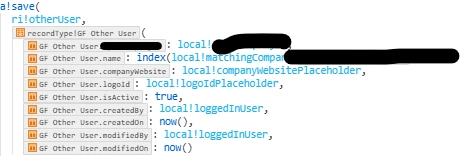
In the parent interface's save expression, I basically used a save() where the local variables were mapped to the fields there. Below is a screenshot of what I'm talking about

crossed out some values for client confidentiality purposes

Thank you [mention:a11f77a729fb4db2af76b09948583328:e9ed411860ed4f2ba0265705b8793d05]  for your help!

6 replies

varuntejg243705
March 25, 2025

HI [mention:eb9dd92d7e2c4aa3ad000681313e337e:e9ed411860ed4f2ba0265705b8793d05] ,

The value property of a!textField might be null, and some operations are being performed on it without handling null cases.
Since this rule is called by others, check if data is being passed correctly between them.

I don't see any mistake made in code, maybe due to null data being passed into value/saveInto  parameter.

Ensure ri!otherUser is not null before accessing .companyWebsite

write value : a!defaultValue(ri!otherUser.companyWebsite, ""),   to avoid null values, try using "" in validations instead of {}.

Hope this helps you!!!

March 25, 2025

Hi,

thanks for looking into this! You're right, it is getting passed from two other interfaces. The record is being passed from the parent interface, and then all the way down to this interface. I tried doing the default value and it was giving me the same error :/ I came up with a fix where I save the value in a local variable which is getting passed down from the parent, and then on the parent level, I save that local variable on the record, which removed the error from text field, but then when you click the action button to create the account, it errors out again, which makes me think the record itself is compromised? Not sure.

Anyway, TLDR: working on it still and will update this discussion if I come up with fix.

Thank you so much for your help again!

stefanhelzle0001
March 25, 2025

Any details in the tomcat stdout log file?

tamaras6727AuthorAnswer
March 26, 2025

Checked the logs and found nothing there. I did fix it though! I'll include the fix on this reply since I'm unable to update my post

FIX:

I created two local variables on the parent interface, which then got sent down to the children interfaces, all the way down to the interface where the textfield is erroring out.

Instead of saving directly to the record as in the original post, I saved to the local variable getting passed down from the parent interface as rule inputs.

In the parent interface's save expression, I basically used a save() where the local variables were mapped to the fields there. Below is a screenshot of what I'm talking about

crossed out some values for client confidentiality purposes

Thank you [mention:a11f77a729fb4db2af76b09948583328:e9ed411860ed4f2ba0265705b8793d05]  for your help!

March 25, 2025

Is this text field inside gf_uisectionotherdetails interface ?

March 26, 2025

It was happening in that interface. Got it fixed and outlined in the reply above. Thank you!