
Question
One field value of rule input is not updated with the local variable value
Hi,
For my requirement, I have multiple rows with radio button field in the grid. The selected radio button values are saved in local variable and that local variable value is stored in the rule input variable {CDT Type] on click of save button.
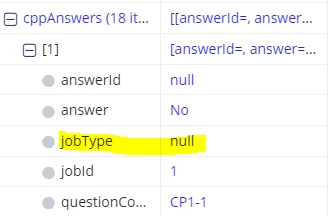
The rule input contains 5 fields, where 4 fields are copied from the local variable and one field is not copied.
Could anyone help me on this,
Local Variable:

Rule Input:
a!localVariable(

    local!listQuestionAnswer: a!forEach(
       items: (Fetch Data from DB),
       expression: { id: null, question: fv!item, answer: "No" }
     ),
      local!questionResponse: {

    a!forEach(
      items: local!listQuestionAnswer,
      expression: {
            answerId: null,
            answer: fv!item.answer,
            questionCode: fv!item.question.questionCode,
            jobTYpe: ri!jobType,
            jobId: ri!jobId
          }
        )
      },

    {
        a!gridLayout(
          headerCells: {
            a!gridLayoutHeaderCell(label: "#"),
            a!gridLayoutHeaderCell(label: "Question"),
            a!gridLayoutHeaderCell(label: "Answer")
          },
          columnConfigs: {
            a!gridLayoutColumnConfig(width: "NARROW"),
            a!gridLayoutColumnConfig(width: "DISTRIBUTE", weight: 6),
            a!gridLayoutColumnConfig(width: "DISTRIBUTE", weight: 3)
          },
          rows: {
            a!forEach(
              items: local!listQuestionAnswer,
              expression: a!gridRowLayout(
                contents: {
                  a!richTextDisplayField(value: fv!index),
                  a!richTextDisplayField(value: fv!item.question.question),
                  a!radioButtonField(
                    choiceLabels: cons!TST_YES_NO_VALUES,
                    choiceValues: cons!TST_YES_NO_VALUES,
                    label: "",
                    value: fv!item.answer,
                    saveInto: fv!item.answer,
                    choiceLayout: "COMPACT",
                    disabled: if(ri!readOnly, true(), false())
                  )
                }
              )
            )
          },
          selectionSaveInto: {},
          height: "AUTO",
          validations: {},
          shadeAlternateRows: true
        )
    }

    a!buttonArrayLayout(
      buttons: {
        a!buttonWidget(
          label: "CANCEL",
          icon: "backspace",
          value: cons!TST_ACTIONS[2],
          saveInto: a!save(ri!action, cons!TST_ACTIONS[2]),
          submit: true,
          style: "OUTLINE"
        ),
        a!buttonWidget(
          label: "SAVE & CONTINUE",
          icon: "fast-forward",
          iconPosition: "END",
          value: cons!TST_ACTIONS[1],
          saveInto: {
            a!save(ri!action, cons!TST_ACTIONS[1]),
            a!save(ri!cppAnswers, local!questionResponse)
          },
          submit: true,
          loadingIndicator: true(),
          style: "SOLID",
          color: "#cc0000"
        )
      },
      align: "END",
      marginAbove: "LESS",
      marginBelow: "LESS",
      showWhen: if(ri!readOnly, false(), true())
    )
  }
 )