Solved
Order and Order detail in one interface
Hi all,
I am new to Appian and i am trying to create a simple interface for recording orders, with their order detail. My current code for CreateOrder ls below:
a!localVariables(
  local!orderID: ri!record['recordType!{eef9daa6-821f-458d-a4bc-bd83dc5891a3}BC Order.fields.{5339c6c7-2ebe-42bd-a56c-6f282a60f27f}OrderID'],
  local!orderItems: ri!record['recordType!{eef9daa6-821f-458d-a4bc-bd83dc5891a3}BC Order.relationships.{777eb5a1-e4db-42d7-a15d-a0b26f1b65fe}bcOrderitem'],
  local!data,
  a!formLayout(
    label: "Create New Order",
    contents: {
      a!sectionLayout(
        label: "Order Summary",
        contents: {
          a!sideBySideLayout(
            items: {
              a!sideBySideItem(
                item: a!textField(
                  label: "Order Number",
                  labelPosition: "ABOVE",
                  value: local!orderID,
                  refreshAfter: "",
                  readOnly: true
                )
              ),
              a!sideBySideItem(
                item: a!pickerFieldRecords(
                  label: "Customer",
                  labelPosition: "ABOVE",
                  placeholder: "---Select a Customer---",
                  maxSelections: 1,
                  recordType: 'recordType!{7ac4eded-2bb1-4af8-90e2-738d79b5be04}BC Customer',
                  value: ri!record['recordType!{eef9daa6-821f-458d-a4bc-bd83dc5891a3}BC Order.fields.{38d01908-529b-4203-bd75-ff444f92484d}CustomerID'],
                  saveInto: ri!record['recordType!{eef9daa6-821f-458d-a4bc-bd83dc5891a3}BC Order.fields.{38d01908-529b-4203-bd75-ff444f92484d}CustomerID']
                )
              ),
              a!sideBySideItem(
                item: a!textField(
                  label: "Order Total",
                  value: 5,
                  readOnly: true
                )
              )

            }
          )
        }
      ),

      a!sectionLayout(
        label: "Enter Order Details"

        ),
      a!gridLayout(
        label: "",
        labelPosition: "ABOVE",
        headerCells: {
          a!gridLayoutHeaderCell(label: "Line Item"),
          a!gridLayoutHeaderCell(label: "Product"),
          a!gridLayoutHeaderCell(label: "Quantity"),
          a!gridLayoutHeaderCell(label: "Sub Total"),
          a!gridLayoutHeaderCell(label: ""),
          a!gridLayoutHeaderCell(label: "")
        },
        columnConfigs: {
          a!gridLayoutColumnConfig(
            width: "NARROW"
          ),
          a!gridLayoutColumnConfig(
            width: "WIDE"
          ),
          a!gridLayoutColumnConfig(
            width: "NARROW"
          ),
          a!gridLayoutColumnConfig(
            width: "NARROW"
          ),
          a!gridLayoutColumnConfig(
            width: "ICON"
          ),
          a!gridLayoutColumnConfig(
            width: "ICON"
          )
        },
        rows: {
          a!forEach(
            items: local!data,
            expression: a!gridRowLayout(
              contents: {
                a!textField(
                  value: fv!index
                ),
                a!textField(
                  value: fv!item.Product,
                  saveInto: fv!item.Product
                ),
                a!textField(
                  value: fv!item.Quantity,
                  saveInto: fv!item.Quantity
                ),
                a!textField(
                  value: fv!item.Subtotal,
                  saveInto: fv!item.Subtotal
                ),
                a!richTextDisplayField(
                  value:  {
                    a!richTextIcon(
                    icon: "close",
                    link: a!dynamicLink(
                      value: remove(local!data, fv!index),
                      saveInto: local!data
                    ),
                    linkStyle: "STANDALONE",
                    color: "NEGATIVE"
                  ),
                    a!richTextIcon(
                      icon: "trash",
                      link: a!dynamicLink(
                        saveInto: a!deleteRecords(
                          records: local!item,
                          onSuccess: a!save(local!data, remove(local!data, fv!index)) /*-- change to a!deleteRecord(record fv!item  */
                        )

                      ),
                      linkStyle: "STANDALONE",
                      showWhen: a!isNotNullOrEmpty(
                        fv!index
                      ),
                      color: "NEGATIVE"
                    )
                  }
                ),
                a!richTextDisplayField(
                  value: a!richTextIcon(
                    icon: "floppy-o",
                    showWhen: a!isNotNullOrEmpty(
                      fv!index
                    ),
                    color: "POSITIVE"
                )
               )
              }
            )
          )
        },
        selectionSaveInto: local!data,
        addRowlink: a!dynamicLink(
          label: "Add Items",
          value: append(local!data, a!map()),
          saveInto: local!data
        ),
        validations: {},
        shadeAlternateRows: true
      )
    },
    buttons: a!buttonLayout(
      primaryButtons: {
        a!buttonWidget(
          label: "Create Order",
          submit: true,
          style: "SOLID",
          loadingIndicator: true
        )
      },
      secondaryButtons: {
        a!buttonWidget(
          label: "Cancel",
          value: true,
          saveInto: {},
          submit: true,
          style: "OUTLINE",
          validate: false
        )
      }
    )
  )
)
and part of my data model is below:
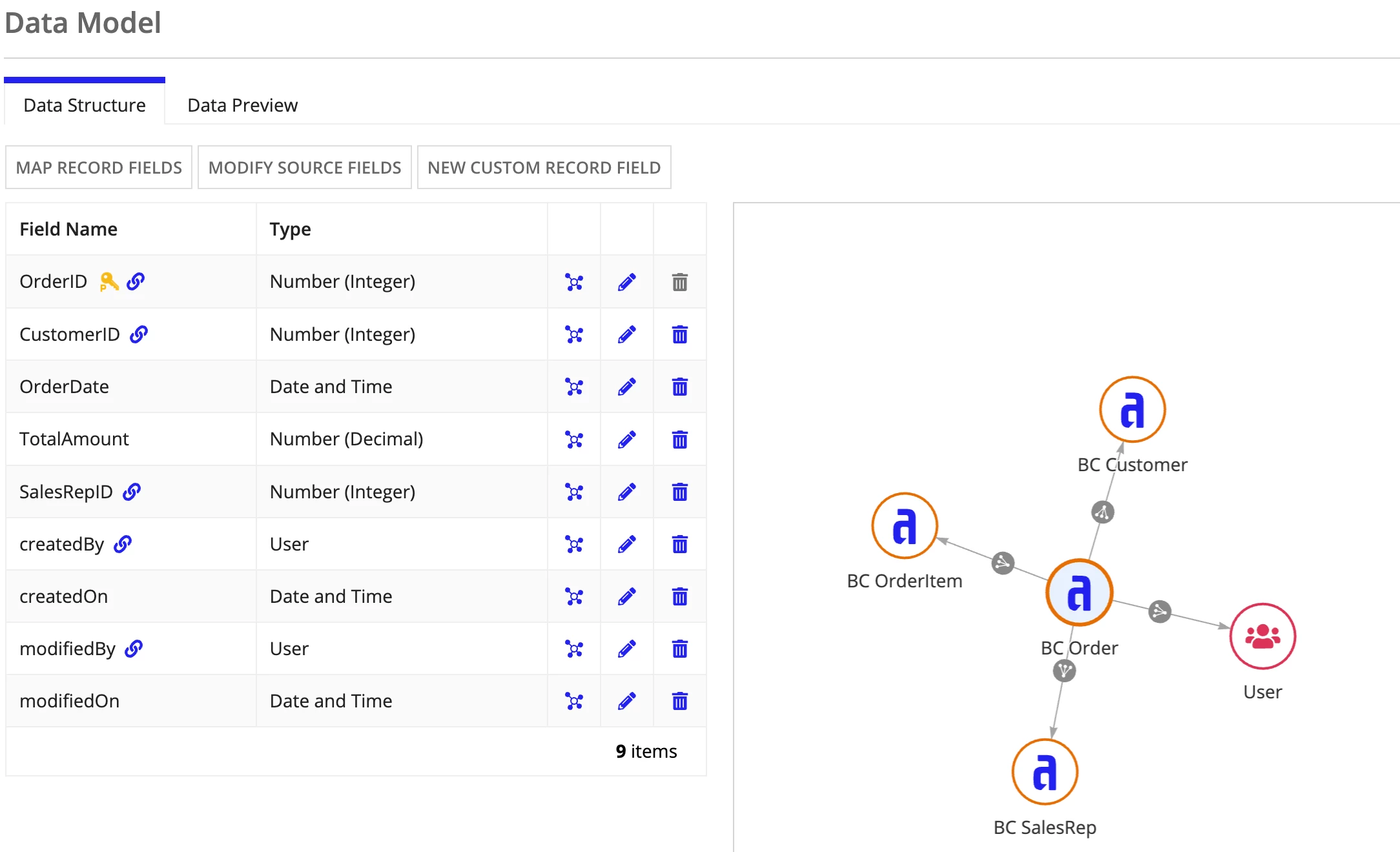
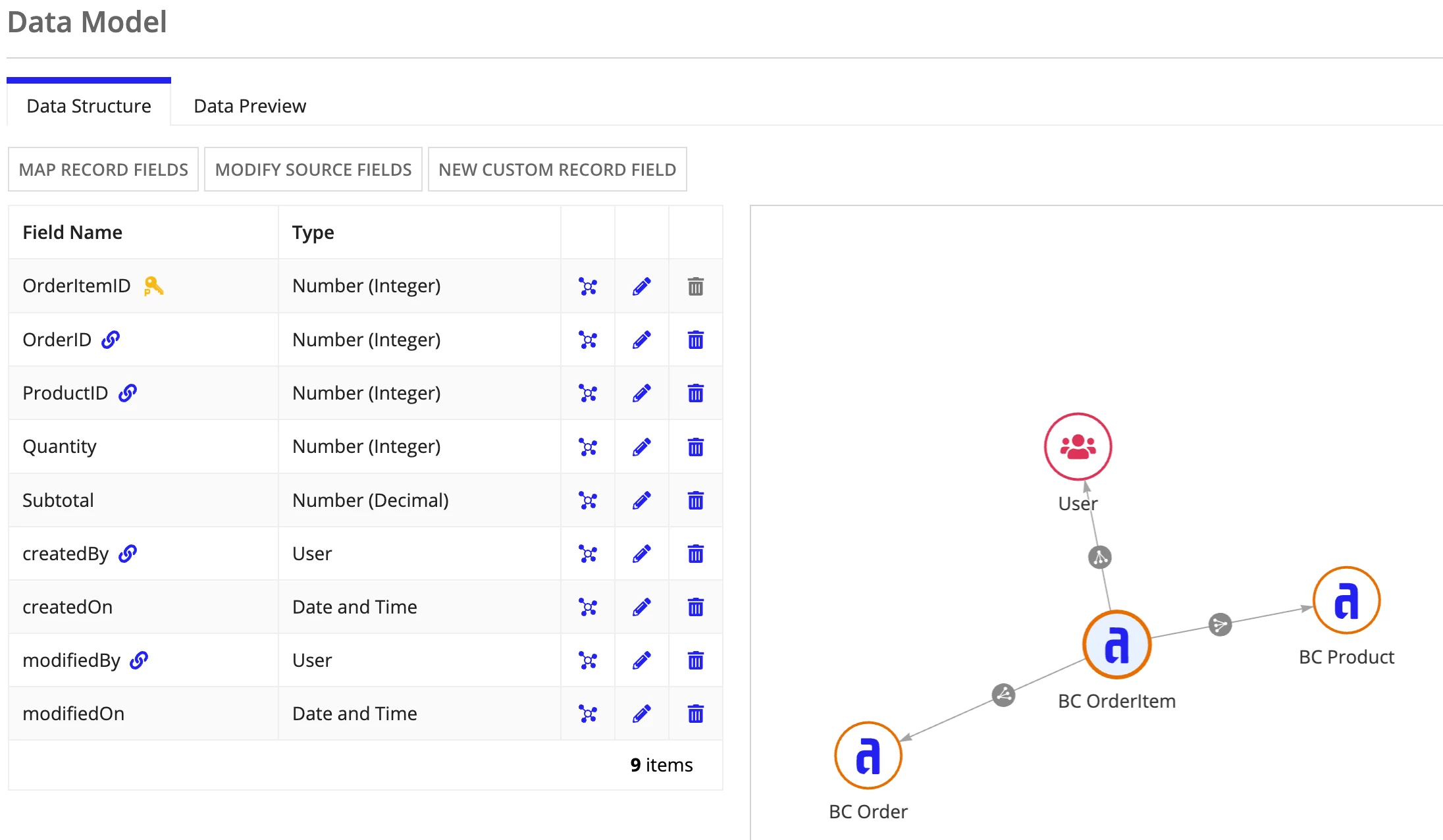
At the moment i am failing to add Order item lines. I would like to pick products for each line and write to the 2 recordTypes on save.
Your assistance is greatly appreciated.