
Solved
pickerFieldCustom display value
a!localVariables(
  local!customerName,

  a!pickerFieldCustom(

    label: "Enter Customer Name,
    placeholder: "Type to select the employee's state of residence",
    maxSelections: 1,
    suggestFunction: rule!CP_AAACUSTOMER(
      filter :_ ,

    ),

    selectedLabels: local!customerName,

    value: local!customerName,

    saveInto: {local!customerName}

  )
)
a!localVariables(
  local!matches: (
    a!queryEntity(
      entity: cons!CP_AAA_CUSTOMER,
      query: a!query(
        logicalExpression: a!queryLogicalExpression(
          operator: "AND",
          filters: {
            a!queryFilter(
              field: "name",
              operator: "includes",
              value: ri!filter
            )
          },
          ignoreFiltersWithEmptyValues: true
        ),
        pagingInfo: a!pagingInfo(
          startIndex: 1,
          batchSize: 50
        )
      ),
      fetchTotalCount: false
    )
  ),


  a!dataSubset(
    data: local!matches.data,
    identifiers: index( local!matches, "identifiers",{})
  )

)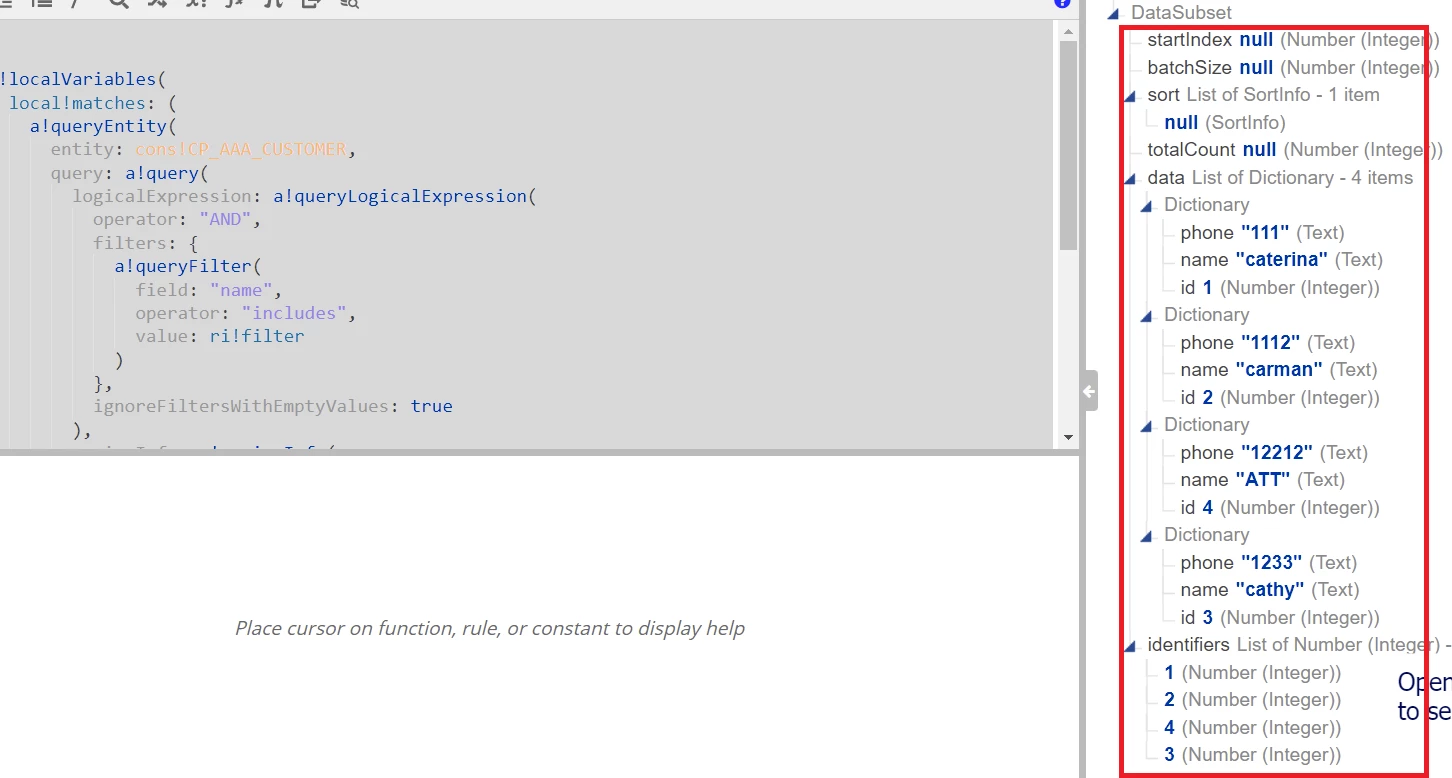
Please find above screenshots (Expression Rule and output + SAIL code and Interface . I'm using pickerfieldCustom here. Please help me to display "name' only and how to display and save selected name . Currently it displays and save ' id ' . Please let me know if i need to make any changes in Interface or/and Exp Rule ?
