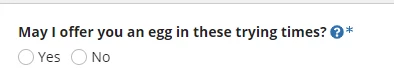
I'm 99% certain this isn't possible.
What you could do though is make your own component that replaces the relevant label, helpToolTip and required aspects displayed above with a side by side component that can be manipulated.
Depending on your use case this may not work though. For a standard interface though it should be fine.
EDIT: Adding code
a!localVariables(
  local!label: "May I offer you an egg in these trying times?",
  /*Note that label size also impacts the help tooltip and required indicators/icons*/
  local!labelSize: "STANDARD",
  local!required: true,
  local!helpTooltipText: "This is a helpful tooltip",
  local!helpTooltipIcon: "question-circle",
  local!helpTooltipIconColor: "ACCENT",
  a!sectionLayout(
    divider: "BELOW",
    contents: {
      a!sideBySideLayout(
        items: {
          a!sideBySideItem(
            item: a!richTextDisplayField(
              label: "Bespoke label, required indicator and help tooltip",
              labelPosition: "COLLAPSED",
              value: {
                a!richTextItem(
                  text: local!label,
                  style: "STRONG",
                  size: local!labelSize
                ),
                a!richTextItem(
                  text: " ",
                  style: "STRONG",
                  showWhen: not(a!isNullOrEmpty(local!helpTooltipText))
                ),
                a!richTextIcon(
                  icon: local!helpTooltipIcon,
                  altText: local!helpTooltipText,
                  caption: local!helpTooltipText,
                  color: local!helpTooltipIconColor,
                  size: local!labelSize,
                  showWhen: not(a!isNullOrEmpty(local!helpTooltipText))
                ),
                a!richTextItem(
                  text: "*",
                  style: "STRONG",
                  color: "ACCENT",
                  size: local!labelSize,
                  showWhen: local!required
                )
              }
            )
          )
        }
      ),
      a!radioButtonField(
        label: local!label,
        labelPosition: "COLLAPSED",
        required: local!required,
        helpTooltip: local!helpTooltipText,
        choiceLabels: {
          "Yes",
          "No"
        },
        choiceValues: {
          1,
          0
        },
        choiceLayout: "COMPACT"
      )
    }
  )
)
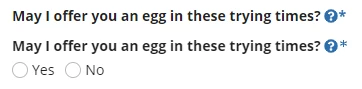
For comparison I left the actual label, help tooltip and required indicator on the radio button field and the only difference is in the required indicator although I haven't played around with the CHAR() function and unicode.
Play around with the values and add your own in like changing the color of the label (or whatever you want)