
July 21, 2025
Question

Redirect to interface

  • July 21, 2025
  • 50 replies
  • 0 views

Hi All,

My requirement is if any error comesup then it has to redirect to the same interface to modify the form and then resubmit the form again . IN the 2nd interface (which is same as 1st) I'm getting the below error .can someone please help.

An error occurred while evaluating expression: Error.message:AC!error.body (Invalid index: Cannot index property 'body' of type Text into type IntegrationError) (Data Outputs)
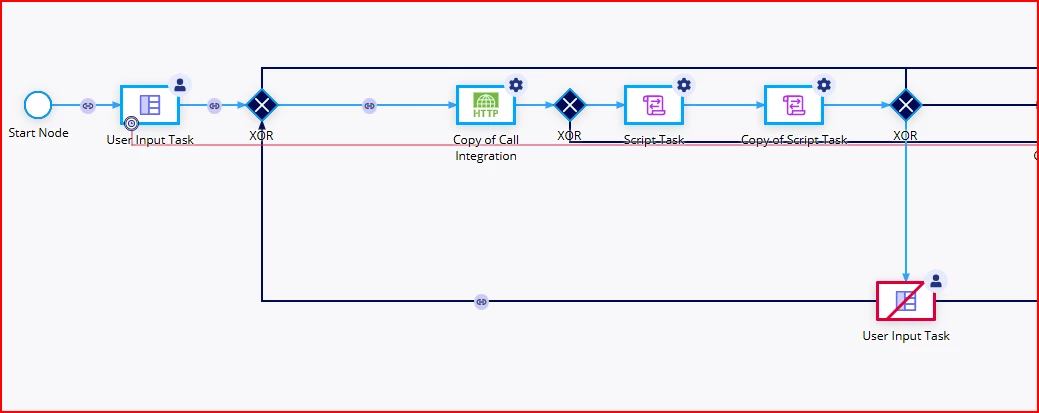
    50 replies

    July 21, 2025

    Hi ,

    could you please  let me know how is the your response which you got from integration ? and if your integration response has setup with return raw response body then you have to use a!fromJson(pv!body).value to extract the values from the body...

    sabat0002Author
    July 21, 2025

    Already values are extracted and stored in PV . I have a flag like iserror then it is redirecting to the below form . When clicking on submit for the form it gives the error

    July 21, 2025

    can you share the response of integration?

    shantanub
    July 21, 2025

    Hi,

    Can you share screenshot where ac!error.body field is used inside User input task?

    sabat0002Author
    July 21, 2025

    shantanub
    July 21, 2025

    Ok, inside Interface where you have used this field. Can you share screenshot

    harshas2775
    July 21, 2025
    AC!error.body

    Fist locate where in your process model you have this expression. Then replace that with property(ac!error,"body,{})

    sabat0002Author
    July 21, 2025

    harshas2775
    July 21, 2025

    If not in process model then check in underlying interface. You can do Ctrl+F and search for error.body also 

    shubhama926776
    July 21, 2025

    The error is happening because you're trying to use ac!error.body in the Data Outputs tab of your User Input Task, but Activity Class parameters (ac!) aren't available in User Input Tasks - they only exist in Script Tasks and other system nodes. In User Input Tasks, you can only map rule inputs (ri!) from your interface to process variables (pv!).
    To fix this, remove the ac!error.body reference from your Data Outputs tab. Instead, capture the error in a Script Task or Integration node before the User Input Task, save it to a process variable there, then pass that process variable to your interface as a rule input. This way, you're only mapping ri! values to pv! values in the Data Outputs, which is the correct approach.

    sabat0002Author
    July 21, 2025

    Issue is I don't see ac!error.body in data output tab itself .Attached above screenshots of the same

    shubhama926776
    July 21, 2025

    Could you share the same(Node I/O) for integration smart service and following script tasks for better understanding.