

niciv
February 11, 2023
Question

Refine A Search Function

  • February 11, 2023
  • 5 replies
  • 0 views

Good day,

I'd like to implement a search function in an interface, but I'm struggling to make it work. Once the user types in a search term and presses the search button, the appropriate results should return.

The code : 

a!localVariables(
local!search: false,
local!searchTerm,
local!searchTitles: {
"Amadori",
"Telpark",
"Microsystem",
"Kone"
},
local!searchData: a!dataSubset(
data: rule!JT_CONS_CASE_STUDIES(),
batchSize: - 1,
startIndex: 2,
sort: a!sortInfo(field: "title", ascending: true)
),
local!searchField: index(
local!searchTerm,
wherecontains(local!searchTitles, local!searchData)
),
{
a!sectionLayout(
label: "",
contents: {
rule!JT_uiCaseStudyDashboard(numberOfColumns: 3)
},
showWhen: local!search,
isCollapsible: true
),
a!sideBySideLayout(
items: {
a!sideBySideItem(
item: a!textField(
labelPosition: "COLLAPSED",
placeholder: "Search Use Cases",
value: local!searchTerm,
saveInto: local!searchTerm,
)
),
a!sideBySideItem(
item: a!buttonArrayLayout(
buttons: {
a!buttonWidget(
icon: "search",
value: rule!APP_safeIndex(
dictionary: rule!JT_CONS_CASE_STUDIES(),
path: "dictionary.title"
),
/* The save here would use local!searchTerm to perform the search */
saveInto: { a!save(local!search, not(local!search)) },
size: "SMALL",
style: "NORMAL",
accessibilityText: "Search"
)
},
marginBelow: "NONE"
),
width: "MINIMIZE"
)
},
alignVertical: "MIDDLE",
spacing: "DENSE"
)
}
)

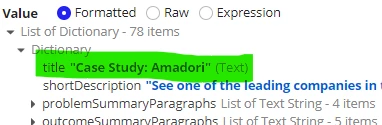
The user needs to search according to title of this list of dictionary :
5 replies

stefanhelzle0001
Brainy
February 11, 2023

Some interesting code you have here ?!? Super hard to understand. Can you post some simplified example?

When I am stuck with such an issue, I try to simplify my code and validate each part of it, before reassembling it.

Next time, please use this.

niciv
nicivAuthor
February 12, 2023

a!localVariables(
  local!search: false,
  local!searchTerm,  
  local!searchData: rule!JT_CONS_CASE_STUDIES(),  
  {
    a!sectionLayout(
      label: "",
      contents: {
        rule!JT_uiCaseStudyDashboard(numberOfColumns: 3)
      },
      showWhen: local!search,
      isCollapsible: true
    ),
    a!sideBySideLayout(
      items: {
        a!sideBySideItem(
          item: a!textField(
            labelPosition: "COLLAPSED",
            placeholder: "Search Use Cases",
            value: local!searchTerm,
            saveInto: local!searchTerm,
          )
        ),
        a!sideBySideItem(
          item: a!buttonArrayLayout(
            buttons: {
              a!buttonWidget(
                icon: "search",
                /* The save here would use local!searchTerm to perform the search */
                saveInto: a!save(local!search, local!searchData.reportingCompany.name),
                size: "SMALL",
                style: "NORMAL",
                accessibilityText: "Search"
              )
            },
            marginBelow: "NONE"
          ),
          width: "MINIMIZE"
        )
      },
      alignVertical: "MIDDLE",
      spacing: "DENSE"
    )
  }
)

stefanhelzle0001
Brainy
February 12, 2023

I do not understand how this code does any search.

I found the following recipe which you might want to use for inspiration: docs.appian.com/.../recipe-searching-on-multiple-fields.html