August 8, 2021
Question

Remove space between Label and field

  • August 8, 2021
  • 6 replies
  • 0 views

Hello All, 

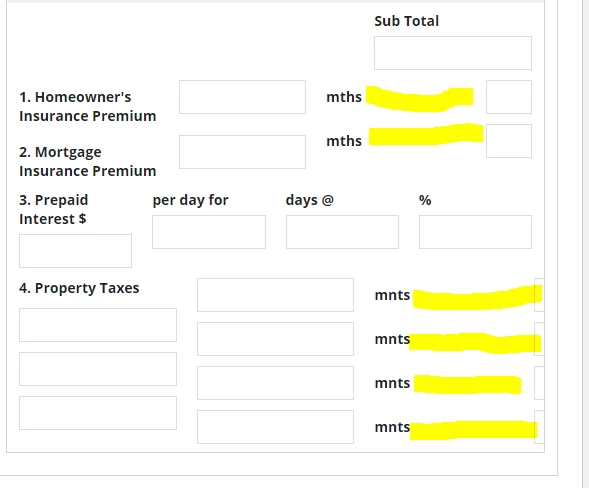
I want to remove the space between the Label and field values (Screenshot below). Is there any way I can achieve that?

Please let me know if anyone knows how to do that. 

Thanks in advance.

6 replies

acaciob0002
August 8, 2021

Hi there,

The solution to remove the space highlighted depends of how the Sail was implemented is it possible for you to share that piece of the code?

Just looking to the screenshot I don't see how you could insert that gap using a normal text field, perhaps you have an side by side layout, but whatever I say would be only a guess without the code.

If you share more context, I can try to provide a better advise [emoticon:c4563cd7d5574777a71c318021cbbcc8]

Regards,

Acacio B.

August 9, 2021

Hi Acacio, Thanks for the response. Please see the code below.

I am using a column layout. I would like to remove the space between the Field label and value. Please let me know if you need more information. 

a!columnLayout(
contents: {
a!integerField(
label: "mnts",
labelPosition: "JUSTIFIED",
saveInto: {},
refreshAfter: "UNFOCUS",
validations: {}
)

}
)

acaciob0002
August 9, 2021

Could you please try ADJACENT:

        a!integerField(
          label: "mnts",
          labelPosition: "ADJACENT",
          align: "LEFT",
          saveInto: {},
          refreshAfter: "UNFOCUS",
          validations: {}
        ),

aparajitas0001
August 9, 2021

If the label positions are unable to provide the correct alignment you can try using side by side layout, with one one item as rich text field containing the label and other item as the field without any label. Keep label position as "Collapsed"