

saifalik8679
Known Participant
January 18, 2022
Question

Rich Text Item link property to use two services simultaneously

  • January 18, 2022
  • 12 replies
  • 0 views

Hi Devs,
I want to use to services in my rich text part, in this on the click of the link and the csv document will be downloaded in the system as an export file,
Simultaneoulsy I want to start the process on that click only to delete that csv document that is created internally by appian, so that my app does not pile up with time in the future
Attaching the snip for your reference:


12 replies

harshitb6843
January 18, 2022

Hi there,

You cannot start two processes/services with a single click. 
The closest solution to your problem can be a scheduler that runs overnight to clean the documents from the folder. And then you can keep using the link to just download the document and leave the cleaning on the scheduler process. 

saifalik8679
Known Participant
January 18, 2022

How to run the scheduler if i dont have the document ids?
Can I run the scheduler pointing to the folder constant?
This is the folder that i want not to pile up:
 

mikes0011
Brainy
January 18, 2022

Where/when/how is your Export CSV generated?  One trick I've used in my implementations, particularly for on-demand generated documents, is to have a timer node after the generation node, lasting several hours, and after it expires the generated file is deleted.  The users are warned in the UI that they have a relatively limited amount of time to download the exported file.

If the ones you're dealing with are generated automatically (i.e. overnight) then you could potentially implement a 2-click solution.  I.E. at first the download link could be grayed out and the user sees a separate link next to it saying "Click to mark as seen and enable download"; that click would start a process that can delete the document after a (long) timer has expired, and after that click has been completed, the download link can be enabled for the user.

The Expression Guru
saifalik8679
Known Participant
January 18, 2022

Let me explain you through the interface,

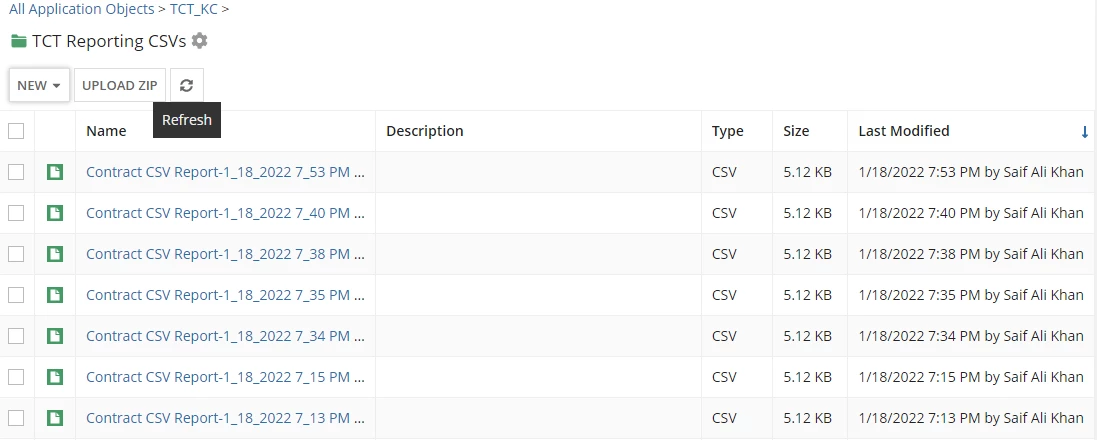
As you can see above, in the backend, the folder in which i am pointing to, contains all the csv files, which will pile up one day and slow down the system.
So, I want a solution to delete the contents of this folder after 1 day of the creation of the file.
I am creating this csv from a database view as a source.

mikes0011
Brainy
January 18, 2022

Are the CSVs generated by a process model?  If so, you could put a timer node at the end of the process which, after it expires, deletes all documents generated in that model.  Alternatively you could build a whole separate process model which runs nightly, gets all documents in the folder, and deletes documents older than X days for example.  The choices are relatively limitless here depending on your needs.

The Expression Guru