
select multiple checkbox in grid and map it to CDT
Hi guys,
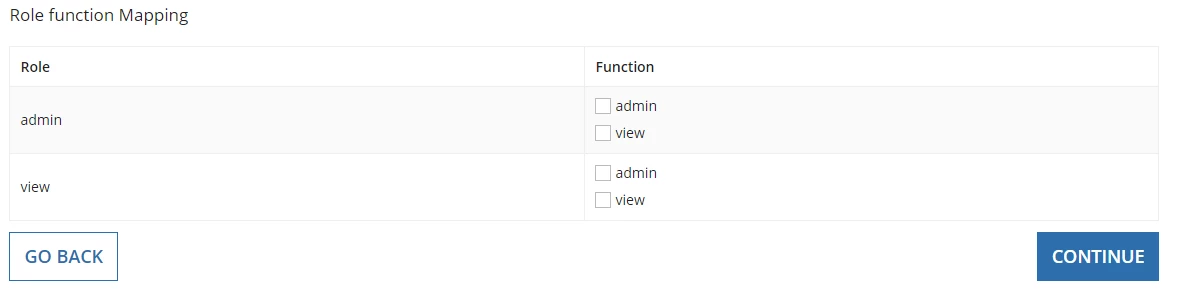
I am working on a requirement like editable grid which contains 2 columns, In first column we are having textfield, In second checkbox.
I need to procide row based on Roles for grid field which includes textfield and checkbox.In checkbox in need to select multiple function
I have 3 nested CDT and
getting the value from role and function cdt,
Need to display these to in Grid and map it to role Function CDT
Here is my input to the ruleInput
{
function:{{functionName:"admin"},{functionName:"view"}},
role:{{roleName:"admin"},{roleName:"view"}},
}
Code:
a!localVariables(
local!getfunctionNames:
a!forEach(items: ri!AppDetails.function, expression: fv!item.functionName),
local!getRoleName:a!forEach(items: ri!AppDetails.role, expression: fv!item.roleName),
local!role,
local!funtion,
local!delete,
{
a!sectionLayout(
contents: {
a!richTextDisplayField(
labelPosition: "COLLAPSED",
value: {
a!richTextItem(
text: "Role function Mapping",
size: "MEDIUM"
)
}
),
},
),
a!gridLayout(
label: "",
headerCells: {
a!gridLayoutHeaderCell(label: "Role", align: "LEFT"),
a!gridLayoutHeaderCell(label: "Function", align: "LEFT"),
},
columnConfigs: {
a!gridLayoutColumnConfig(width: "DISTRIBUTE", weight: 3),
a!gridLayoutColumnConfig(width: "DISTRIBUTE", weight: 3),
},
rows: a!forEach(
items: local!getRoleName,
expression: a!gridRowLayout(
contents: {
a!textField(
readOnly: true(),
value: local!getRoleName[fv!index],
saveInto:{
ri!roleFunction.role
}
),
a!checkboxField(
choiceLabels: local!getfunctionNames,
choiceValues: local!getfunctionNames,
value:local!funtion,
saveinto:{
ri!roleFunction.function
}
),
}
/*showWhen: local!displayActive=toboolean(fv!item.active)*/
)
)
),
if(ri!readOnly,{},
a!columnsLayout(
columns: {
a!columnLayout(
contents: {
a!buttonArrayLayout(
buttons: {
a!buttonWidget(
label: "Go Back",
size: "LARGE",
value: 3,
saveInto: ri!currentStep
)
},
align: "START",
marginBelow: "NONE"
)
}
),
a!columnLayout(
contents: {
a!buttonArrayLayout(
buttons: {
a!buttonWidget(
label: "Continue",
size: "LARGE",
style: "PRIMARY",
value:5,
saveInto: {
ri!currentStep,
},
)
},
align: "END",
marginBelow: "NONE"
)
}
)
}
))})
Please help me .Thanks in advance