Solved
Selectable Editable Grid is Selecting Everything
Hi all,
I am trying to build a selectable editable grid, but everytime I select a row it keeps selecting the entire grid. I saw previous comments that each row needed to have an identifier, and my data does have one, but its identifier status must be getting lost somewhere if a selection on my grid keeps selecting everything. Here is my test code:
a!localVariables(
  local!data: rule!query_case_summary(show5YrAvg: false),
  local!header: {"age",	"gender",	"smoker",	"amount",	"fiveyravg1",	"fiveyravg2",	"fiveyravg3",	"fiveyravg4",
                "sum5yrChange",	"annual5YrChange",	"currYrChange",	"priorVal",	"currVal",	"recVal",	"reviewStatus",
                "lastReviewedBy",	"userRecVal",	"comment"},
  local!selectable,
  {
    a!gridLayout(
      headerCells:{
          a!forEach(local!header, a!gridLayoutHeaderCell(label:fv!item))
      },
      rows: a!forEach(
        items: local!data.data,
        expression: {
          a!gridRowLayout(
            contents:{
              /*a!textField(value: fv!item.id),*/
              a!textField(value: fv!item.age),
              a!textField(value: fv!item.gender),
              a!textField(value: fv!item.smoker),
              a!textField(value: fv!item.amount),
              a!textField(value: fv!item.fiveyravg1),
              a!textField(value: fv!item.fiveyravg2),
              a!textField(value: fv!item.fiveyravg3),
              a!textField(value: fv!item.fiveyravg4),
              a!textField(value: fv!item.sum5yrChange),
              a!textField(value: fv!item.annual5yrChange),
              a!textField(value: fv!item.currYrChange),
              a!textField(value: fv!item.priorVal),
              a!textField(value: fv!item.currVal),
              a!textField(value: fv!item.recVal),
              a!textField(value: fv!item.reviewStatus),
              a!textField(value: fv!item.lastReviewedBy),
              a!textField(value: fv!item.userRecVal),
              a!textField(value: fv!item.comment),

            }
          )
        }
      ),
      selectable: true,
      selectionStyle: "ROW_HIGHLIGHT",
      selectionValue: local!selectable,
      selectionSaveInto: local!selectable
    )
  }
)
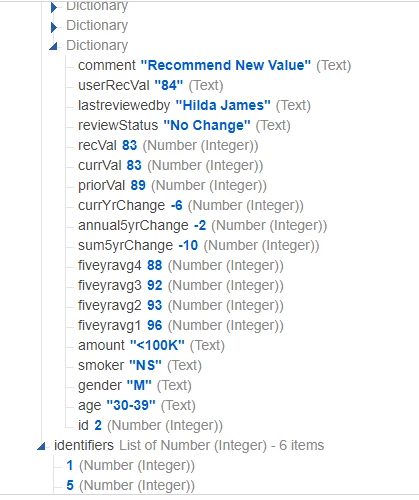
And here is a sample of the data I'm reading in:
Thank you